Dell EMC Unity: Is it possible to change Unity LUNs from thin to thick and vice versa
Summary: Dell EMC Unity: Is it possible to change Unity LUNs from thin to thick and vice versa
This article applies to
This article does not apply to
This article is not tied to any specific product.
Not all product versions are identified in this article.
Instructions
Existing Thick LUNs can be converted to Thin LUNs, and Thin LUNs can be converted to Thick LUNs, by using the 'LUN Move' operation.
The steps to do this on Unisphere are as follows:
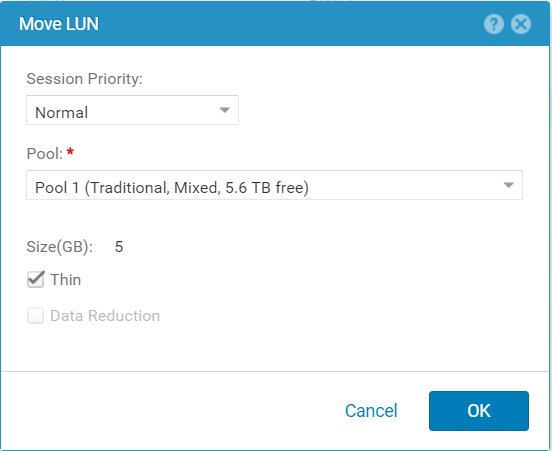
The steps to do this on Unisphere are as follows:
- Under Storage, select Block > LUNs.
- Select checkbox next to the LUN you want to move, then More Actions > Move.
- On the Move LUN window, check the 'Thin' checkbox to move from a Thick to a Thin LUN, or un-check the 'Thin checkbox to move from a Thin to a Thick LUN.
Adjust any other desired settings on this window.
- Click OK.
- The LUN Move task progress can be monitored, by double-clicking the LUN, and monitoring the General > Status section.
Affected Products
Dell EMC Unity FamilyProducts
Dell Unity 300, Dell EMC Unity 350F, Dell EMC Unity 400, Dell EMC Unity 500, Dell EMC Unity 600, Dell EMC Unity Family, Dell EMC Unity HybridArticle Properties
Article Number: 000021267
Article Type: How To
Last Modified: 22 Oct 2025
Version: 7
Find answers to your questions from other Dell users
Support Services
Check if your device is covered by Support Services.