VNX:如何刪除複製私人 LUN
Summary: VNX:如何刪除複製私人 LUN。
This article applies to
This article does not apply to
This article is not tied to any specific product.
Not all product versions are identified in this article.
Instructions
-
登入 Unisphere。使用「Dashboard」左側的下拉式列 或在畫面左上角的「Systems by Severity」方塊中選取 選取受影響的陣列
-
前往標示為資料保護的標籤。
-
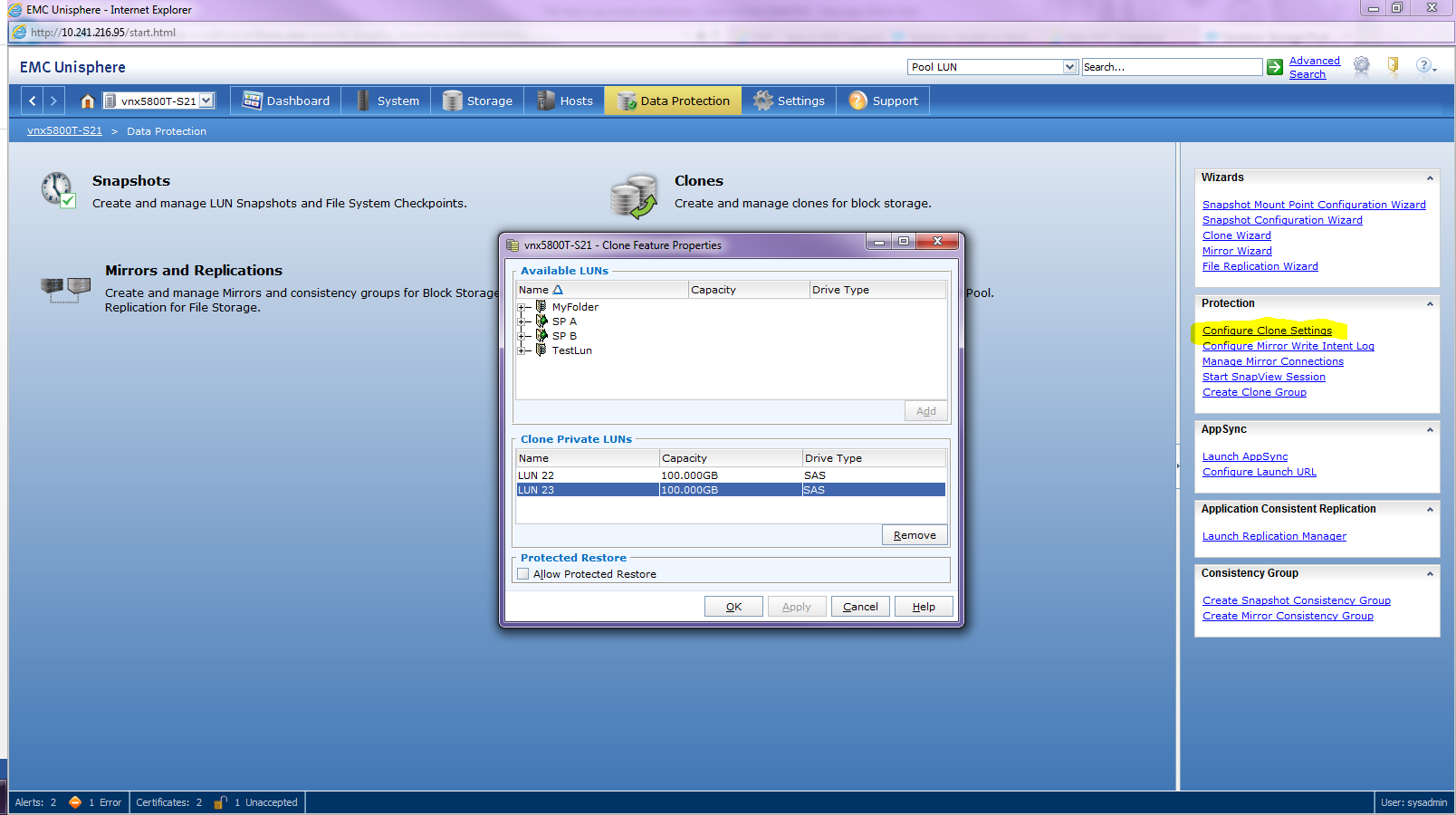
點擊右側的 設定克隆設定
-
從複製私人 LUN 清單中,按一下想要的複製私人 LUN
-
按 一下移除
注意:在刪除克隆專用 LUN 之前,必須斷開並刪除所有關聯的克隆和克隆組。
Affected Products
VNX1 SeriesProducts
VNX1 Series, VNX2 Series, VNX/VNXeArticle Properties
Article Number: 000022409
Article Type: How To
Last Modified: 22 Oct 2025
Version: 5
Find answers to your questions from other Dell users
Support Services
Check if your device is covered by Support Services.