Dell EMC Unity: Read/Write access on destination resource (DR) LUN (User Correctable)
Summary: In a scenario where there is a source LUN replicated to a destination LUN, the destination resource is marked as a destination image. This restriction blocks Read/Write access on the destination storage resource. ...
This article applies to
This article does not apply to
This article is not tied to any specific product.
Not all product versions are identified in this article.
Instructions
- In a scenario where there is a source LUN is replicated to a destination LUN, the destination resource is marked as a destination image. This restriction blocks Read/Write access on the destination storage resource.
In this case (the replication session is active)
1. Modify the host access to destination resource/LUN to be (LUN and Snapshot)
2. Take a snapshot of the destination resource (LUN)
3. Now you can access and edit the snapshot taken from the destination resource.
1. Modify the host access to destination resource/LUN to be (LUN and Snapshot)
2. Take a snapshot of the destination resource (LUN)
3. Now you can access and edit the snapshot taken from the destination resource.
- If a replication session is deleted, the destination storage resource will still be labeled as a replication destination image. And you will face the below error.
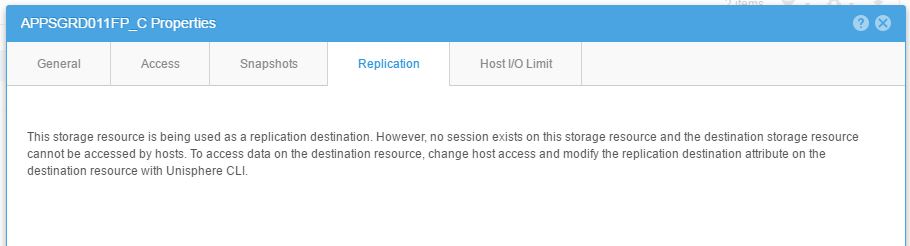
1. You will need to disable the destination LUN from being an image manually by the below command:
>> uemcli -u username -p Password /stor/prov/luns/lun -id ID set -replDest no
to get the LUN ID:
>> uemcli /stor/prov/luns/lun show
Additional Information
Source: Unity Replication Technology White Paper
"When a replication session is created in Unisphere, the destination storage resource is automatically created with the session. In Unisphere you may not choose a previously provisioned storage resource as a replication destination when configuring a session. Upon creation, the destination resource is marked as a destination image. This restriction blocks Read/Write access on the destination storage resource.
To view the data contained in the destination storage resource, you may take a Snapshot of the resource and provide host access to it. In Unisphere, you can easily determine which storage resources are replicated and which are destination images from any of the storage resource pages, such as the LUNs tab on the Block page. While in this tab, select the gear icon, and hover Columns to view the available columns that can be viewed. Select the check boxes for Replication Type and Restricted Replication Access . Replication Type displays what type of replication the LUN is participating in, whether it is None, Remote, or Local. The Restricted Replication Access column will display Yes if the storage resource is labeled as a replication destination resource, or No if it is not. If a replication session is deleted, the destination storage resource will still be labeled as a replication destination image. The replication destination label must be edited manually via Unisphere CLI before the resource is allowed to receive I/O. For example, to remove the replication destination setting from a LUN, use the uemcli /stor/prov/luns/lun -id set -replDest no command.
White Paper
"When a replication session is created in Unisphere, the destination storage resource is automatically created with the session. In Unisphere you may not choose a previously provisioned storage resource as a replication destination when configuring a session. Upon creation, the destination resource is marked as a destination image. This restriction blocks Read/Write access on the destination storage resource.
To view the data contained in the destination storage resource, you may take a Snapshot of the resource and provide host access to it. In Unisphere, you can easily determine which storage resources are replicated and which are destination images from any of the storage resource pages, such as the LUNs tab on the Block page. While in this tab, select the gear icon, and hover Columns to view the available columns that can be viewed. Select the check boxes for Replication Type and Restricted Replication Access . Replication Type displays what type of replication the LUN is participating in, whether it is None, Remote, or Local. The Restricted Replication Access column will display Yes if the storage resource is labeled as a replication destination resource, or No if it is not. If a replication session is deleted, the destination storage resource will still be labeled as a replication destination image. The replication destination label must be edited manually via Unisphere CLI before the resource is allowed to receive I/O. For example, to remove the replication destination setting from a LUN, use the uemcli /stor/prov/luns/lun -id set -replDest no command.
White Paper
Affected Products
Dell Unity 300Products
Dell Unity 300, Dell EMC Unity 300F, Dell EMC Unity 400, Dell EMC Unity 400F, Dell EMC Unity 500, Dell EMC Unity 500F, Dell EMC Unity 600, Dell EMC Unity 600F, Dell EMC Unity Family |Dell EMC Unity All Flash, Dell EMC Unity Family
, Dell EMC Unity Hybrid
...
Article Properties
Article Number: 000022443
Article Type: How To
Last Modified: 17 Sept 2025
Version: 5
Find answers to your questions from other Dell users
Support Services
Check if your device is covered by Support Services.