Dell EMC Unity: ESRS를 비활성화 또는 활성화하는 방법 (사용자 수정 가능)
Summary: 고객은 Unisphere 또는 Uemcli를 통해 Unity에서 통합 eSRS 서비스를 직접 비활성화할 수 있습니다.
This article applies to
This article does not apply to
This article is not tied to any specific product.
Not all product versions are identified in this article.
Instructions
ESRS
를 비활성화 및 활성화하는 방법uemcli 또는 Unisphere 인터페이스를 사용하여 서비스를 재시작하십시오.
A) UEMCLI :
통합 ESRS를 사용하는 경우:
1. uemcli를 설치한 호스트에서 uemcli 명령을 실행하고 아래 명령을 사용하여 ESRS를 비활성화합니다.
uemcli -u local/admin -p [password] /or -securepassword /sys/support/esrsi set -enable no
2. 그런 다음 unisphere를 새로 고치고 아래 명령을 통해 활성화 한 다음 unishpere를 다시 새로 고칩니다.
uemcli -u local/admin -p [password] /or -securepassword /sys/support/esrsi set -enable yes
중앙 집중식 ESRS를 사용하는 경우:
1. UEMCLI는 호스트가 설치된 클라이언트 또는 SHS 콘솔 인터페이스에서 실행할 수 있습니다.
uemcli [-d unity-ip] -u local/admin -p [password] /or -securepassword /sys/support/esrsc set -enable no
2. 10초 정도 기다린 후 ESRSI를 다시 활성화하십시오.
uemcli [-d unity-ip] -u local/admin -p [password] /or -securepassword /sys/support/esrsc set -enable yes
Unisphere 크랙:
1. ESRS를 비활성화하려면 Unisphere에서시스템>서비스>개요>EMC Secure Remote Services >비활성화>됨마침
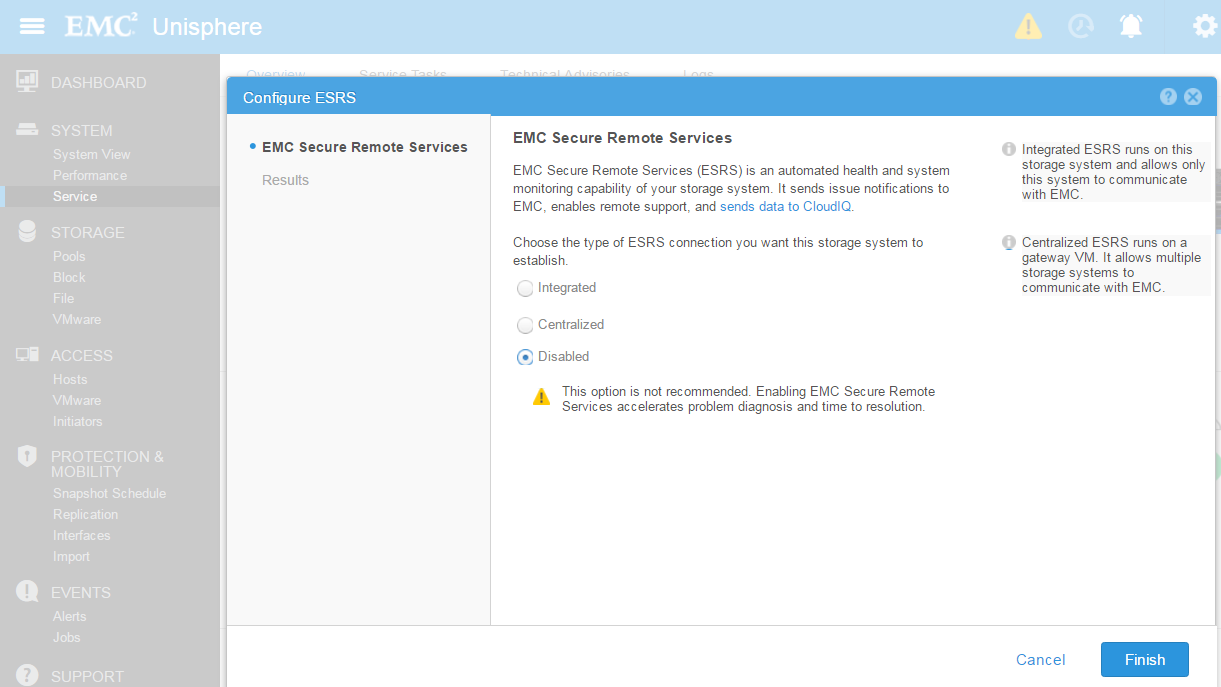 2로 이동합니다
.
ESRS를 활성화하려면 Unisphere에서시스템>서비스>개요>EMC Secure Remote Services > 로
이동합니다. 그런 다음 통합 또는 중앙 집중식을 선택하고 다음을 클릭합니다.

를 비활성화 및 활성화하는 방법uemcli 또는 Unisphere 인터페이스를 사용하여 서비스를 재시작하십시오.
A) UEMCLI :
통합 ESRS를 사용하는 경우:
1. uemcli를 설치한 호스트에서 uemcli 명령을 실행하고 아래 명령을 사용하여 ESRS를 비활성화합니다.
uemcli -u local/admin -p [password] /or -securepassword /sys/support/esrsi set -enable no
2. 그런 다음 unisphere를 새로 고치고 아래 명령을 통해 활성화 한 다음 unishpere를 다시 새로 고칩니다.
uemcli -u local/admin -p [password] /or -securepassword /sys/support/esrsi set -enable yes
중앙 집중식 ESRS를 사용하는 경우:
1. UEMCLI는 호스트가 설치된 클라이언트 또는 SHS 콘솔 인터페이스에서 실행할 수 있습니다.
uemcli [-d unity-ip] -u local/admin -p [password] /or -securepassword /sys/support/esrsc set -enable no
2. 10초 정도 기다린 후 ESRSI를 다시 활성화하십시오.
uemcli [-d unity-ip] -u local/admin -p [password] /or -securepassword /sys/support/esrsc set -enable yes
Unisphere 크랙:
1. ESRS를 비활성화하려면 Unisphere에서시스템>서비스>개요>EMC Secure Remote Services >비활성화>됨마침
2로 이동합니다.
ESRS를 활성화하려면 Unisphere에서시스템>서비스>개요>EMC Secure Remote Services > 로
이동합니다. 그런 다음 통합 또는 중앙 집중식을 선택하고 다음을 클릭합니다.
Additional Information
Unity 버전 4.1 이상에서는 서비스 콘솔을 통해 서비스를 재시작할 수 있습니다(ssh를 통해 서비스로 로그인하고 수행).
사용법: svc_esrs_ve [옵션]
ESRS 서비스, 구성 및 연결을 유지 관리합니다. 이 명령은 주 SP(Storage Processor)에서 실행해야 합니다.
통합 ESRS 전용 명령은 UnitySA에서 지원되지 않습니다.
옵션:
-s, --status 현재 ESRS 구성 및 상태를 표시합니다.
-r, --restart 통합 ESRS 서비스를 재시작합니다.
--reenable 현재 활성화된 ESRS가 정상적으로 작동하지 않는 경우 통합 또는 중앙 집중식 ESRS를 다시 활성화합니다.
--forcedisable 중앙 집중식 ESRS를 강제로 비활성화합니다.
--syncmgmt 관리 IP 주소가 변경된 경우 관리 IP 주소를 ESRS 서버에 동기화합니다.
--networkcheck 통합 ESRS의 네트워크 연결성을 확인합니다.
--mtu [value] 통합 ESRS 및 관리 인터페이스에 대한 MTU를 수정합니다.
지정하지 않을 경우 최대값은 1500이고 기본값은 1300입니다.
--cleanup 통합 ESRS 구성을 정리합니다.
-h, --help 도움말을 표시하고 종료합니다.
사용법: svc_esrs_ve [옵션]
ESRS 서비스, 구성 및 연결을 유지 관리합니다. 이 명령은 주 SP(Storage Processor)에서 실행해야 합니다.
통합 ESRS 전용 명령은 UnitySA에서 지원되지 않습니다.
옵션:
-s, --status 현재 ESRS 구성 및 상태를 표시합니다.
-r, --restart 통합 ESRS 서비스를 재시작합니다.
--reenable 현재 활성화된 ESRS가 정상적으로 작동하지 않는 경우 통합 또는 중앙 집중식 ESRS를 다시 활성화합니다.
--forcedisable 중앙 집중식 ESRS를 강제로 비활성화합니다.
--syncmgmt 관리 IP 주소가 변경된 경우 관리 IP 주소를 ESRS 서버에 동기화합니다.
--networkcheck 통합 ESRS의 네트워크 연결성을 확인합니다.
--mtu [value] 통합 ESRS 및 관리 인터페이스에 대한 MTU를 수정합니다.
지정하지 않을 경우 최대값은 1500이고 기본값은 1300입니다.
--cleanup 통합 ESRS 구성을 정리합니다.
-h, --help 도움말을 표시하고 종료합니다.
Affected Products
Dell EMC Unity FamilyProducts
Dell EMC Unity FamilyArticle Properties
Article Number: 000022632
Article Type: How To
Last Modified: 17 Oct 2025
Version: 3
Find answers to your questions from other Dell users
Support Services
Check if your device is covered by Support Services.