Dell EMC Unity:如何停用或啟用 ESRS?(使用者可修正)
Summary: 客戶可自行停用透過 Unisphere 或 Uemcli 在 Unity 中啟用整合式 eSRS 服務。
This article applies to
This article does not apply to
This article is not tied to any specific product.
Not all product versions are identified in this article.
Instructions
如何停用和啟用 ESRS?
可使用 uemcli 或 Unisphere 介面來執行服務重新開機。
A) UEMCLI
:如果您使用內建 ESRS:
1.從已安裝 uemcli 的主機執行 uemcli 命令,使用以下命令停用 esrs:
uemcli -u local/admin -p [password] /or -securepassword /sys/support/esrsi set -enable no
2. 然後透過以下命令重新整理 Unisphere 並啟用,然後再次重新整理 unishpere。
uemcli -u local/admin -p [password] /or -securepassword /sys/support/esrsi set -enable yes
如果您使用集中式 ESRS:
1. UEMCLI 可從主機安裝的用戶端或 SHS 主控台介面執行:
uemcli [-d unity-ip] -u local/admin -p [password] /or -securepassword /sys/support/esrsc set -enable no
2.請稍候 10 秒,然後重新啟用 ESRSI 。
uemcli [-d unity-ip] -u local/admin -p [password] /or -securepassword /sys/support/esrsc set -enable yes
Unisphere:
1. 若要停用 ESRS,請在 Unisphere 中,前往
系統>服務>概觀 >EMC 安全遠端服務 >已停用>完成
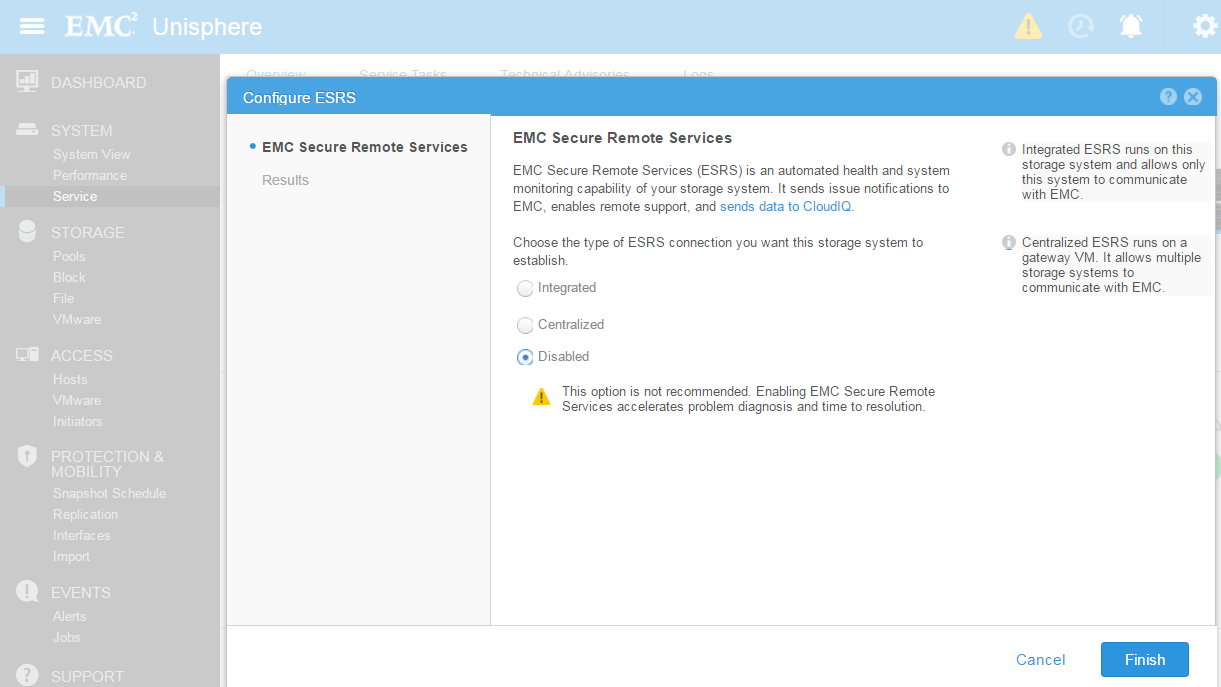
2.若要啟用 ESRS,請在 Unisphere 中,前往
系統>服務>概觀 >EMC 安全遠端服務 >然後選擇整合式或集中式,然後按一下下一步

可使用 uemcli 或 Unisphere 介面來執行服務重新開機。
A) UEMCLI
:如果您使用內建 ESRS:
1.從已安裝 uemcli 的主機執行 uemcli 命令,使用以下命令停用 esrs:
uemcli -u local/admin -p [password] /or -securepassword /sys/support/esrsi set -enable no
2. 然後透過以下命令重新整理 Unisphere 並啟用,然後再次重新整理 unishpere。
uemcli -u local/admin -p [password] /or -securepassword /sys/support/esrsi set -enable yes
如果您使用集中式 ESRS:
1. UEMCLI 可從主機安裝的用戶端或 SHS 主控台介面執行:
uemcli [-d unity-ip] -u local/admin -p [password] /or -securepassword /sys/support/esrsc set -enable no
2.請稍候 10 秒,然後重新啟用 ESRSI 。
uemcli [-d unity-ip] -u local/admin -p [password] /or -securepassword /sys/support/esrsc set -enable yes
Unisphere:
1. 若要停用 ESRS,請在 Unisphere 中,前往
系統>服務>概觀 >EMC 安全遠端服務 >已停用>完成
2.若要啟用 ESRS,請在 Unisphere 中,前往
系統>服務>概觀 >EMC 安全遠端服務 >然後選擇整合式或集中式,然後按一下下一步
Additional Information
Unity 版本 4.1 及以上版本可讓您透過服務性主控台重新啟動服務 (透過 ssh 以服務登入並執行):
使用方式: svc_esrs_ve [選項]
維護 ESRS 服務、組態和連線。此命令應在主要儲存處理器 (SP) 上執行。
請注意,UnitySA 不支援僅整合式 ESRS 命令。
Options:
-s, --status 顯示目前的 ESRS 組態和狀態。
-r, --restart 重新啟動整合式 ESRS 服務。
--重新啟用:如果目前啟用的 ESRS 無法正常運作,請重新啟用整合式或集中式 ESRS。
--forcedisable 強制停用集中式 ESRS。
--syncmgmt 在管理 IP 位址變更的情況下,將管理 IP 位址同步至 ESRS 伺服器。
--networkcheck 檢查網路是否具備整合式 ESRS 的網路執行能力
--mtu [值] 修改整合式 ESRS 和管理介面的 MTU。
最大值為 1500,如果未指定,預設值為 1300。
--cleanup 清理整合式 ESRS 組態。
-h, --help 顯示說明並結束。
使用方式: svc_esrs_ve [選項]
維護 ESRS 服務、組態和連線。此命令應在主要儲存處理器 (SP) 上執行。
請注意,UnitySA 不支援僅整合式 ESRS 命令。
Options:
-s, --status 顯示目前的 ESRS 組態和狀態。
-r, --restart 重新啟動整合式 ESRS 服務。
--重新啟用:如果目前啟用的 ESRS 無法正常運作,請重新啟用整合式或集中式 ESRS。
--forcedisable 強制停用集中式 ESRS。
--syncmgmt 在管理 IP 位址變更的情況下,將管理 IP 位址同步至 ESRS 伺服器。
--networkcheck 檢查網路是否具備整合式 ESRS 的網路執行能力
--mtu [值] 修改整合式 ESRS 和管理介面的 MTU。
最大值為 1500,如果未指定,預設值為 1300。
--cleanup 清理整合式 ESRS 組態。
-h, --help 顯示說明並結束。
Affected Products
Dell EMC Unity FamilyProducts
Dell EMC Unity FamilyArticle Properties
Article Number: 000022632
Article Type: How To
Last Modified: 17 Oct 2025
Version: 3
Find answers to your questions from other Dell users
Support Services
Check if your device is covered by Support Services.