Dell EMC Unity:如何禁用或启用 ESRS?(用户可纠正)
Summary: 客户可以通过 Unisphere 或 Uemcli 在 Unity 中自行禁用启用集成式 eSRS 服务。
This article applies to
This article does not apply to
This article is not tied to any specific product.
Not all product versions are identified in this article.
Instructions
如何禁用和启用 ESRS?
使用 uemcli 或 Unisphere 界面执行服务重新启动。
A) UEMCLI :
如果使用集成式 ESRS:
1.从已安装 uemcli 的主机运行 uemcli 命令,使用以下命令禁用 esrs:
uemcli -u local/admin -p [password]/or -securepassword /sys/support/esrsi set -enable no
2. 然后刷新 unisphere 并通过以下命令启用它,然后再次刷新 unishpere。
uemcli -u local/admin -p [password] /or -securepassword /sys/support/esrsi set -enable yes
如果您使用集中式 ESRS:
1. 可以从主机安装的客户端执行 UEMCLI 或从 SHS 控制台界面执行:
uemcli [-d unity-ip] -u local/admin -p [password] /or -securepassword /sys/support/esrsc set -enable no
2.请等待 10 秒钟,然后重新启用 ESRSI。
uemcli [-d unity-ip] -u local/admin -p [password] /or -securepassword /sys/support/esrsc set -enable yes
Unisphere:
1. 要禁用 esrs,请在 Unisphere 中,转至SystemServiceOverviewEMCSeclean>>
>Remote Services >disabledFinish2
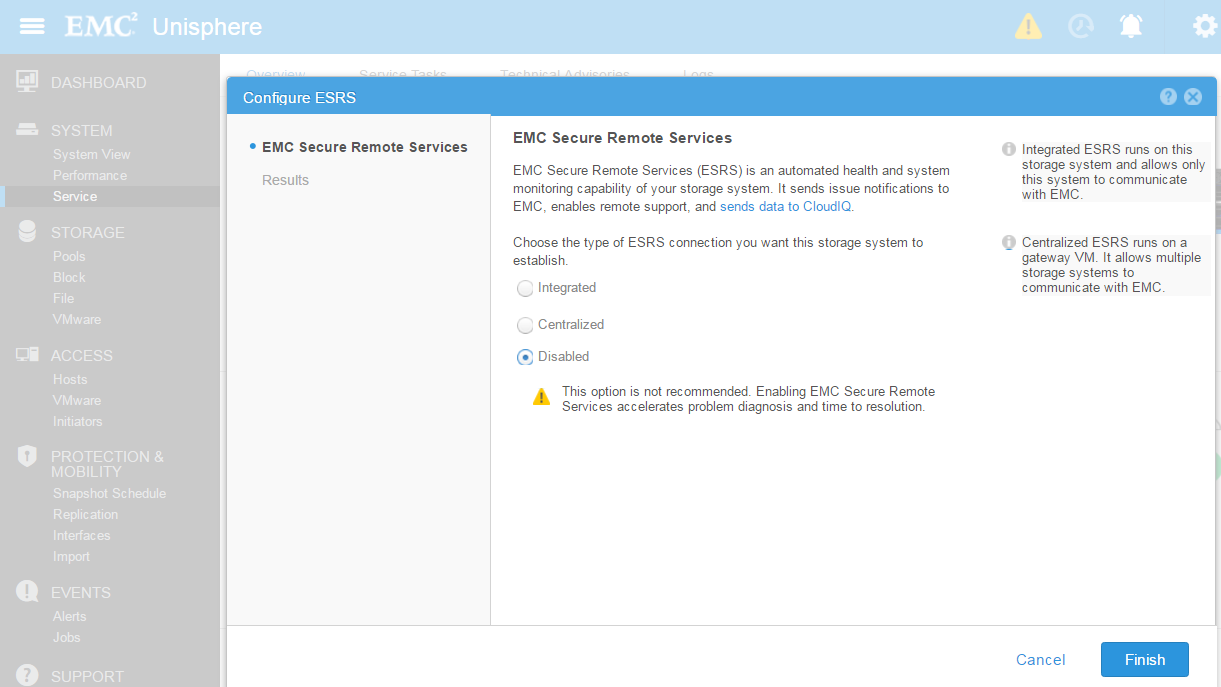 >
>
。 要启用 esrs,请在 Unisphere 中转至
系统>服务>概述>EMC Secure Remote Services >,然后选择 integrated 或 centralized,然后单击 Next
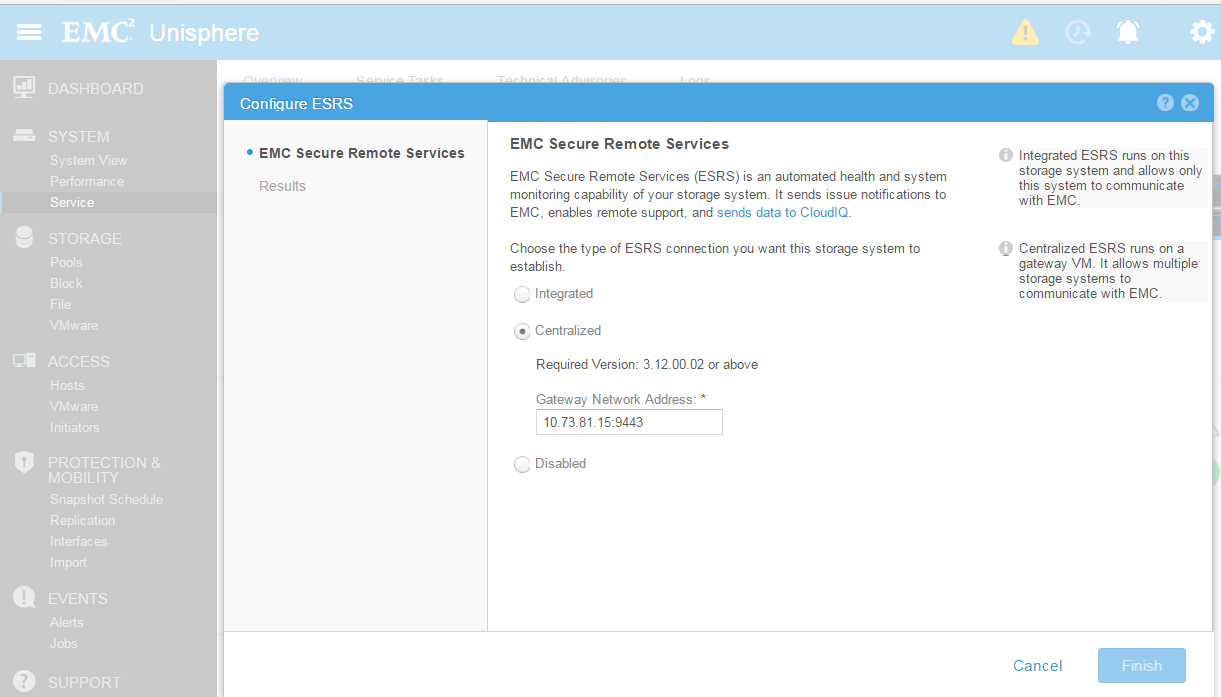
使用 uemcli 或 Unisphere 界面执行服务重新启动。
A) UEMCLI :
如果使用集成式 ESRS:
1.从已安装 uemcli 的主机运行 uemcli 命令,使用以下命令禁用 esrs:
uemcli -u local/admin -p [password]/or -securepassword /sys/support/esrsi set -enable no
2. 然后刷新 unisphere 并通过以下命令启用它,然后再次刷新 unishpere。
uemcli -u local/admin -p [password] /or -securepassword /sys/support/esrsi set -enable yes
如果您使用集中式 ESRS:
1. 可以从主机安装的客户端执行 UEMCLI 或从 SHS 控制台界面执行:
uemcli [-d unity-ip] -u local/admin -p [password] /or -securepassword /sys/support/esrsc set -enable no
2.请等待 10 秒钟,然后重新启用 ESRSI。
uemcli [-d unity-ip] -u local/admin -p [password] /or -securepassword /sys/support/esrsc set -enable yes
Unisphere:
1. 要禁用 esrs,请在 Unisphere 中,转至SystemServiceOverviewEMCSeclean>>
>Remote Services >disabledFinish2
>
。 要启用 esrs,请在 Unisphere 中转至
系统>服务>概述>EMC Secure Remote Services >,然后选择 integrated 或 centralized,然后单击 Next
Additional Information
Unity 版本 4.1 及更高版本允许通过可服务性控制台重新启动服务(通过 ssh 作为服务登录并执行):
Usage: svc_esrs_ve [选项]
维护 ESRS 服务、配置和连接。此命令应在主存储处理器 (SP) 上运行。
请注意,UnitySA 不支持仅集成式 ESRS 命令。
选项包括:
-s, --status 显示当前 ESRS 配置和状态。
-r, --restart 重新启动集成式 ESRS 服务。
--reenable 如果当前启用的 ESRS 无法正常工作,则重新启用集成式或集中式 ESRS。
--forcedisable 强制禁用集中式 ESRS。
--syncmgmt 在管理 IP 地址发生更改时,将管理 IP 地址同步到 ESRS 服务器。
--networkcheck 检查集成式 ESRS 的网络连接性。
--mtu [value] 修改集成 ESRS 和管理界面的 MTU。
最大值为 1500,如果未指定,默认值为 1300。
--cleanup 清理集成式 ESRS 配置。
-h、--help 显示 help 和 exit。
Usage: svc_esrs_ve [选项]
维护 ESRS 服务、配置和连接。此命令应在主存储处理器 (SP) 上运行。
请注意,UnitySA 不支持仅集成式 ESRS 命令。
选项包括:
-s, --status 显示当前 ESRS 配置和状态。
-r, --restart 重新启动集成式 ESRS 服务。
--reenable 如果当前启用的 ESRS 无法正常工作,则重新启用集成式或集中式 ESRS。
--forcedisable 强制禁用集中式 ESRS。
--syncmgmt 在管理 IP 地址发生更改时,将管理 IP 地址同步到 ESRS 服务器。
--networkcheck 检查集成式 ESRS 的网络连接性。
--mtu [value] 修改集成 ESRS 和管理界面的 MTU。
最大值为 1500,如果未指定,默认值为 1300。
--cleanup 清理集成式 ESRS 配置。
-h、--help 显示 help 和 exit。
Affected Products
Dell EMC Unity FamilyProducts
Dell EMC Unity FamilyArticle Properties
Article Number: 000022632
Article Type: How To
Last Modified: 17 Oct 2025
Version: 3
Find answers to your questions from other Dell users
Support Services
Check if your device is covered by Support Services.