Dell Unity: vVol Capability Profiles (User Correctable)
Summary: Details and limitations for vVol Capability Profiles along with where to look for issues with vVol Capability Profiles.
This article applies to
This article does not apply to
This article is not tied to any specific product.
Not all product versions are identified in this article.
Instructions
Capability Profile
A vVol datastore is associated with one or more capability profiles. A capability profile is a set of storage capabilities for a vVol datastore. These capabilities are derived based on the underlying pools for the vVol datastore. The vVol datastore will show as compatible storage in vCenter or the vSphere Web Client if the associated capability profiles meet VMware storage policy requirements. Capability profiles must be created before creating a vVol datastore. Capability profiles can be created at the time of pool creation (recommended), or can be added to an existing pool later.
Define a capability profile in the following ways:
Storage capabilities
Service level-based provisioning (physical deployments)
Expected service level for the pool:
- Platinum
- Single-tiered Flash pool
- Gold
- Multitiered pool with a mix of Flash and SAS drives
- Single-tiered pools with SAS RAID 10
- Silver
- Single-tiered pools with SAS RAID 5 or RAID 6
- Multitiered pools with a mix of SAS and NL-SAS
- Bronze
- Single-tiered pools with NL-SAS
- Multitiered pools with a mix of Flash and NL-SAS
Service level-based provisioning (virtual deployments)
Expected service level for a virtual pool:
- Gold
- Multitiered pool with a mix of Extreme Performance and Performance tiers
- Single-tiered Extreme Performance pool
- Silver
- Multitiered pool with a mix of Extreme Performance, Performance, and Capacity tiers
- Multitiered pool with a mix of Performance and Capacity tiers
- Single-tiered Performance pool
- Bronze
- Multitiered pool with a mix of Extreme Performance and Capacity tiers
- Single-tiered Capacity pool
Usage tags
Usage tags can be applied to capability profiles to designate them and their associated vVol datastores for a particular use. For example, a vVol datastore may be tagged for vVols and VMs that support a particular application. The virtualization administrator and storage administrator should collaborate to define these usage tags.
Storage properties
Supported storage properties include:
- Drive type:
- Extreme Performance [Flash]
- Performance [SAS]
- Capacity [NL-SAS]
- Multitier [mixed]
- Extreme Multitier [mixed with Flash]
- RAID type (physical deployments only):
- RAID5
- RAID6
- RAID10
- Mixed
- FAST Cache (physical deployments only):
- Enabled
- Disabled
- FAST VP tiering policy:
- Highest Available Tier
- Start High then Auto-Tier
- Auto-Tier
- Lowest Available Tier
- Space Efficiency
NOTE:
The Max size for Capability Profiles is 16 TB per Capability Profile.
To create a Capability profile for Vmware that is more than 16 TB, create another Capability profile and add it to the vVol (file or block), however the hard disk of the VM will still have a limit of 16 TB. So vVols can be expanded beyond the 16 TB even though the VM hard disk will still be limited with this size (at least until OE 5.5.0.0.5.259). Alternatively, VMFS6 does not have this limitation.
Additional Information
For Troubleshooting on a live array use the command below to get more info on vVol in general.
Each capability profile and vVol has an rfc identifier for Vmware. To find the rfc, go into the details of both the vVol and the Capability Profile.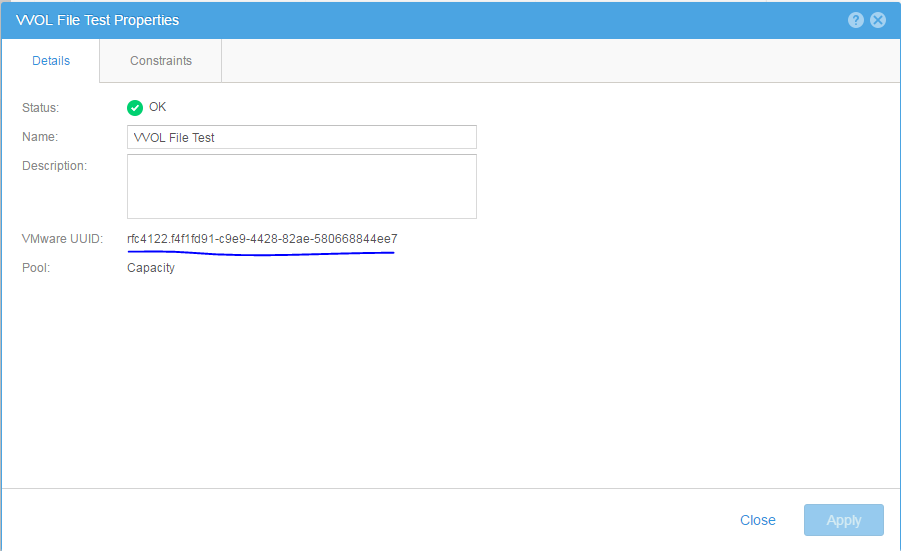
svc_storagecheck -l | less
Search or grep to find the state and what profile belongs to what vVol. This will be under the UNKNOWN TYPE List or vVol List when searching by topics by using the command above.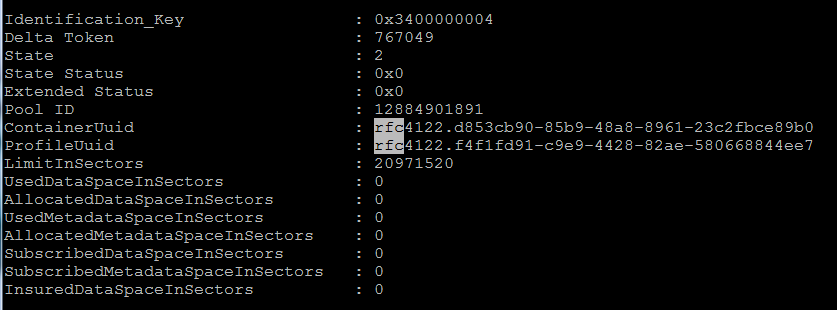
ContainerUuid is the vVol rfc.
ProfileUuid is the Capability Profile rfc.
More details for the capability profile can be found in the /EMC/CEM/log/cemtracer.log or /EMC/CEM/log/cemtracer_application_provisioning.log
Affected Products
Dell EMC Unity FamilyProducts
Dell EMC Unity FamilyArticle Properties
Article Number: 000022664
Article Type: How To
Last Modified: 10 Jun 2025
Version: 5
Find answers to your questions from other Dell users
Support Services
Check if your device is covered by Support Services.