Data Domain: Filesystem Failure Due to Incorrect DS60 Power Cabling
Summary: A Data Domain system experienced a filesystem outage after one power distribution unit (PDU) was powered down during a scheduled redundant power interruption. The issue occurred because DS60 storage shelves were incorrectly cabled to PDUs, breaking fault tolerance. ...
This article applies to
This article does not apply to
This article is not tied to any specific product.
Not all product versions are identified in this article.
Symptoms
- Filesystem became unavailable due to missing external storage enclosures/disks (caused by power outage)..
- Disks reported as absent.
- Alerts logged:
-
Event ID: EVT-STORAGE-00002 Message: Unable to access a disk and the disk state is absent -
Event ID: EVT-FILESYS-00002
Message: Problem is preventing filesystem from running.
-
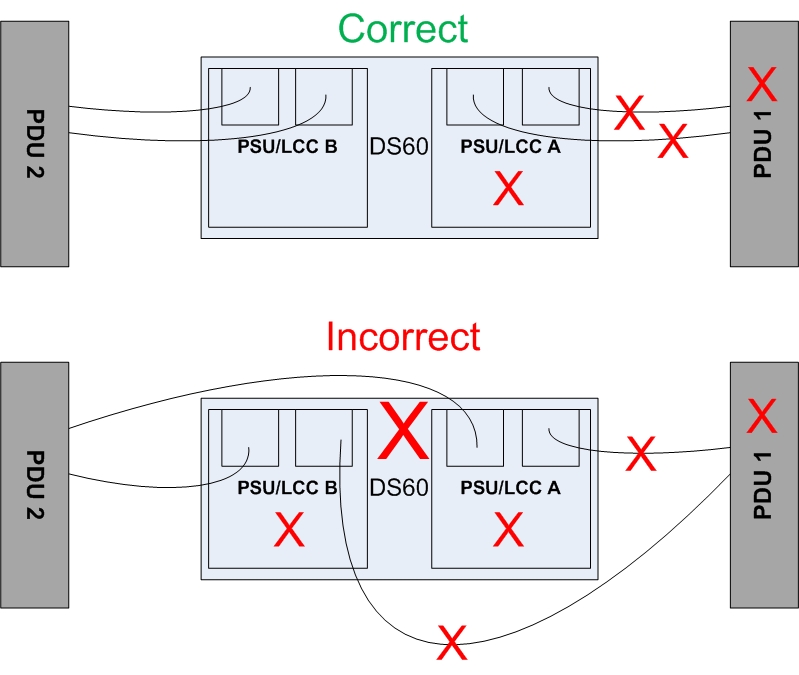
- The DS60 power has been incorrectly cabled inside the customer rack.
Cause
Data Domain systems are designed for fault tolerance with two independent AC power feeds (N+1). If one PDU fails, the system should remain operational.
However, DS60 shelves have:
- Two PSUs per shelf, each with two AC inlets (total: Four AC connections per shelf)
- Proper cabling requires:
- Each PSU connected to a separate PDU
- PDUs connected to independent UPS sources
If both AC inlets of a PSU are connected to the same PDU, losing that PDU leaves only one feed per PSU, causing the DS60 shelf to shut down and the filesystem to fail.
Note: Dell EMC factory-racked systems are correctly cabled and do not exhibit this issue.
Example of Correct Cabling:
Resolution
To correct cabling without downtime:
- Refer to the diagram for proper cabling layout.
- Obtain a spare power cable to swap incorrect connections without removing both cables from a PSU.
- Engage a Dell EMC engineer to perform the correction safely.
Affected Products
Data DomainProducts
Data DomainArticle Properties
Article Number: 000028356
Article Type: Solution
Last Modified: 23 Oct 2025
Version: 3
Find answers to your questions from other Dell users
Support Services
Check if your device is covered by Support Services.