Avamar: Hyper-V 백업이 실패하고 "모든 타겟에 대해 vss 백업 파일을 가져오지 못했습니다."
Summary: 이 KB(Knowledgebase) 문서에서는 VSS(Volume Shadow Copy Services) 기록기로 인한 Hyper-V 백업 실패에 대한 솔루션을 제공합니다.
This article applies to
This article does not apply to
This article is not tied to any specific product.
Not all product versions are identified in this article.
Symptoms
Avamar Hyper-V 백업이 실패하고 다음과 유사한 오류가 발생할 수 있습니다.
avhypervvss Error <41606>: Failed to fetch vss backup files for all the targets. Internal error.
avhypervvss Error <41586>: Failed to backup targets. Unable to assign vss reported backup files for all targets
avhypervvss Error <41662>: Failed to validate and expand the targets.
avhypervvss Error <41659>: Backup did not complete successfully
Cause
Hyper-V VSS writer가 실패 상태일 수 있습니다. Windows 명령 또는 PowerShell 프롬프트를 열고 다음을 실행하여 이를 확인할 수 있습니다. vssadmin list writers (따옴표 없음) :
Writer name: 'Microsoft Hyper-V VSS Writer'
   Writer Id: {66841cd4-6ded-4f4b-8f17-fd23f8ddc3de}
   Writer Instance Id: {5713fd6b-5154-4a3b-a6ef-4973bfea66c9}
   State: [1] Failed
   Last error: No error
Resolution
열기 services.msc 콘솔을 열고 Hyper-V 호스트 시스템에서 Hyper-V 가상 머신 관리 서비스를 다시 시작합니다.
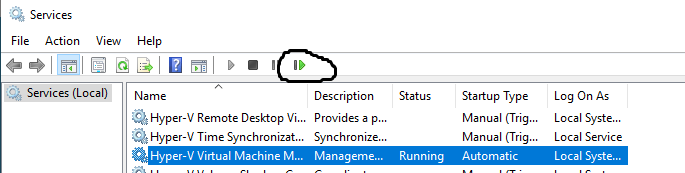
Windows 명령 또는 PowerShell 프롬프트에서 다음 명령을 실행하여 Hyper-V VSS Writer가 양호하거나 안정적인 상태인지 확인합니다.
vssadmin list writers
Affected Products
Avamar, Avamar Plug-in for Hyper-V VSS, Integrated Data Protection Appliance FamilyArticle Properties
Article Number: 000039786
Article Type: Solution
Last Modified: 11 Dec 2025
Version: 5
Find answers to your questions from other Dell users
Support Services
Check if your device is covered by Support Services.