Avamar:Hyper-V 备份失败,并显示“无法获取所有目标的 vss 备份文件”。
Summary: 此知识库 (KB) 文章提供了有关由于卷影拷贝服务 (VSS) 编写器而导致 Hyper-V 备份失败的解决方案。
This article applies to
This article does not apply to
This article is not tied to any specific product.
Not all product versions are identified in this article.
Symptoms
Avamar Hyper-V 备份可能会失败,并显示类似于以下内容的错误:
avhypervvss Error <41606>: Failed to fetch vss backup files for all the targets. Internal error.
avhypervvss Error <41586>: Failed to backup targets. Unable to assign vss reported backup files for all targets
avhypervvss Error <41662>: Failed to validate and expand the targets.
avhypervvss Error <41659>: Backup did not complete successfully
Cause
Hyper-V VSS 编写器可能处于失败状态。可以通过打开 Windows 命令或 PowerShell 提示符并运行 vssadmin list writers (无引号):
Writer name: 'Microsoft Hyper-V VSS Writer'
   Writer Id: {66841cd4-6ded-4f4b-8f17-fd23f8ddc3de}
   Writer Instance Id: {5713fd6b-5154-4a3b-a6ef-4973bfea66c9}
   State: [1] Failed
   Last error: No error
Resolution
打开 services.msc 控制台并重新启动 Hyper-V 主机上的 Hyper-V 虚拟机管理服务。
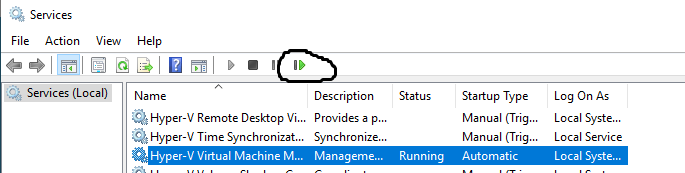
通过从 Windows 命令或 PowerShell 提示符处运行以下命令,确认 Hyper-V VSS 编写器处于良好或稳定状态:
vssadmin list writers
Affected Products
Avamar, Avamar Plug-in for Hyper-V VSS, Integrated Data Protection Appliance FamilyArticle Properties
Article Number: 000039786
Article Type: Solution
Last Modified: 11 Dec 2025
Version: 5
Find answers to your questions from other Dell users
Support Services
Check if your device is covered by Support Services.