PowerScale OneFS: 從 <Client IP> 掛接 <Path> 的要求失敗
Summary: 解決重複出現的「掛載來源」警示。
This article applies to
This article does not apply to
This article is not tied to any specific product.
Not all product versions are identified in this article.
Symptoms
任何過度重複的警示都可能導致 CELOG 負載,進而導致任何數量的警示/事件相關問題。
最大的錯誤之一是以下警報:
最大的錯誤之一是以下警報:
Recurring: Mount request from <Client IP Address> on <Node IP Address> for <Share> failed with errno: <2 or 13>
透過正確處理此警示,我們可以減少 CELOG 上的負載,並改善警示/事件操作和報告。
Cause
用戶端通過嘗試訪問不存在的共用或它們沒有訪問許可權來觸發這些警報。
安全性掃描器、InsightIQ 或 Windows 用戶端可能已啟用網路檔案系統服務 (NFS),通常會觸發這些警示。
Resolution
為了正確解決這些警示,我們必須判斷誰在從違規的用戶端 IP 位址存取指定的共用:
# isi event events list | grep "Mount.*fail" | awk '{print $10}' | sort | uniq -c | sort -rn

 110 xxx.xxx.xxx.57
  63 xxx.xxx.xxx.63
  61 xxx.xxx.xxx.54
  39 xxx.xxx.xxx.55
  37 xxx.xxx.xxx.250
  37 xxx.xxx.xxx.240
  24 xxx.xxx.xxx.61
  23 xxx.xxx.xxx.65
  22 xxx.xxx.xxx.44
  20 xxx.xxx.xxx.45
  19 xxx.xxx.xxx.56
  16 xxx.xxx.xxx.62
以及他們正在經歷的失敗:
# isi event events list | grep "Mount.*fail" |awk '{print $NF}' | sort | uniq -c|sort -rn

 876 STATUS_NOT_FOUND
  63 STATUS_ACCESS_DENIED
透過上述資訊,您可以判斷誰在嘗試存取匯出,以及其失敗的原因,從而產生事件。
如果無法處理違規的用戶端,則警示可從 OneFS 9.3 及更新版本開始隱藏。
在 WebUI 中,這可以在 事件與警示 ->警示管理 ->在事件類型 ID 中搜尋掛接底下完成。
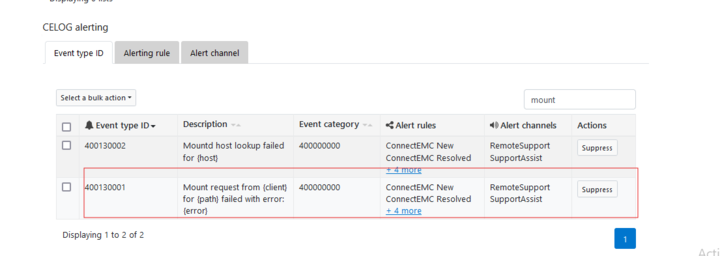
在 CLI 中,可以使用下列命令:
# isi event suppress modify --suppress=true --id=400130001
事件 ID 可在以下第 54 頁的文件中看到。
Affected Products
PowerScale OneFSProducts
PowerScale OneFSArticle Properties
Article Number: 000040449
Article Type: Solution
Last Modified: 17 Oct 2025
Version: 6
Find answers to your questions from other Dell users
Support Services
Check if your device is covered by Support Services.