PowerFlex:開機後,Scini 裝置上的邏輯磁碟區未自動啟動
Summary: 在 scini 裝置上建置的 LV (邏輯磁碟區) 作為實體磁碟區 (PV) 在 SDC 開機後不會啟動。
This article applies to
This article does not apply to
This article is not tied to any specific product.
Not all product versions are identified in this article.
Symptoms
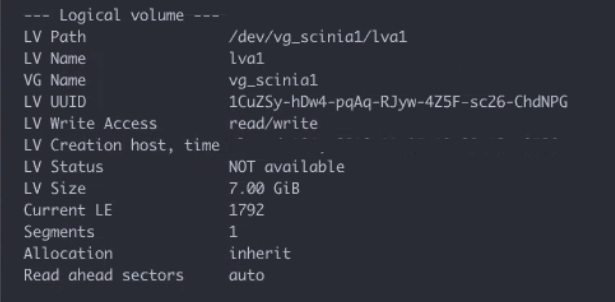
在開機程序期間,啟用 VG 和 LV 後,會載入 SDC 驅動程式並建立 scini* 裝置。磁碟區會在開機期間自動掛載。
lvdisplay 命令顯示 LV 狀態為「不可用」:
影響
LV 不會自動啟動。
Cause
默認情況下, lvmetad 使用基於事件的 LV 啟動,依賴於 udev 將 LVM 元數據掃描到緩存中的規則,並在配置作為 PV 的新設備時啟動 VG 和 LV。但是 lvmetad 不適用於 scini 裝置。
如果停用 lvmetad, 系統將 使用 lvm-activation-generator 以產生系統單元以在引導序列中的不同點啟動 LV。這並不排除在設定 scini 裝置之前嘗試啟動的可能性。
Resolution
在以下位置新增以下行 /etc/udev/rules.d/20-scini.rules 檔案 (舊版 SDC 版本中為 60-scini.rules):
ACTION=="add", DEVPATH=="*scini*", RUN+="/sbin/lvm pvscan --cache --activate ay /dev/$name"
如果使用 RHEL7,還必須在以下位置啟用 lvmetad /etc/lvm/lvm.conf 要使此 udev 規則正常工作:
use_lvmetad = 1
如果使用 RHEL8,lvmetad 已被淘汰。僅 udev 規則就足夠了。
受影響的版本
ScaleIO 2.x
VxFlex 3.0.x.x
PowerFlex 3.5.x
PowerFlex 3.6.x
Affected Products
PowerFlex appliance Intelligent Catalog Software, PowerFlex rack RCM Software, PowerFlex SoftwareArticle Properties
Article Number: 000047739
Article Type: Solution
Last Modified: 27 Oct 2025
Version: 7
Find answers to your questions from other Dell users
Support Services
Check if your device is covered by Support Services.