SourceOne Email Management: Centera test pool failing, record failed volumes.
Summary: Volumes are not closing and are in Record failed state, Centera test in the Archive Folder Storage properties fails. Error: no primary cluster found
This article applies to
This article does not apply to
This article is not tied to any specific product.
Not all product versions are identified in this article.
Symptoms
User is reporting that volumes are not closing and are set to Record Failed state.
Centera Pool test shows an error indicating that there is no connection to the Centera pool.
The following errors is shown in the ExMMCAdmin.dll.log file:
CoExCenteraAccess::OpenConnection|ERROR|FPPool Open Failed: FP_NO_POOL_ERR - no primary cluster found (0x86043F00)|CoExCenteraAccess.cpp(570)|
82421|4316|T4328|2019/11/07 12:55:01:361|CExCenteraSupport::OpenConnection|ERROR|CExCenteraSupport::OpenConnection - Error: 0x86043f00|ExCenteraSupport.cpp(214)|
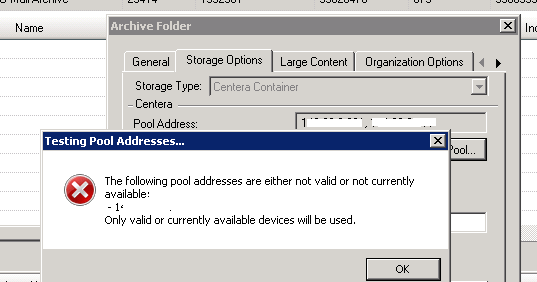
The following pool addresses are either not valid or not currently available
Only valid or currently available devices will be used.
Cause
The node specified in the Archive Folder configuration is not available.
Resolution
Engage Centera support team to confirm the health of the Centera cluster.
If the cluster is available but the node specified in the configuration is not available for any reason, another node of the Centera cluster can be used in the SourceOne Archive Folder configuration.
Engage SME engineer to change the configuration of the Centera connection in the Folderplan table for the affected Archive Folders.
If the cluster is available but the node specified in the configuration is not available for any reason, another node of the Centera cluster can be used in the SourceOne Archive Folder configuration.
Engage SME engineer to change the configuration of the Centera connection in the Folderplan table for the affected Archive Folders.
Affected Products
SourceOneProducts
SourceOne, SourceOne Email ManagementArticle Properties
Article Number: 000055770
Article Type: Solution
Last Modified: 13 Jun 2025
Version: 5
Find answers to your questions from other Dell users
Support Services
Check if your device is covered by Support Services.