Dell Unity:執行狀況檢查失敗,錯誤:check_peer_management_port_link_2 (使用者可修正)
Summary: 在執行狀況檢查期間,對等儲存處理器 (SP) 失去與管理網路的通訊。
This article applies to
This article does not apply to
This article is not tied to any specific product.
Not all product versions are identified in this article.
Symptoms
執行狀況檢查失敗,並顯示訊息:
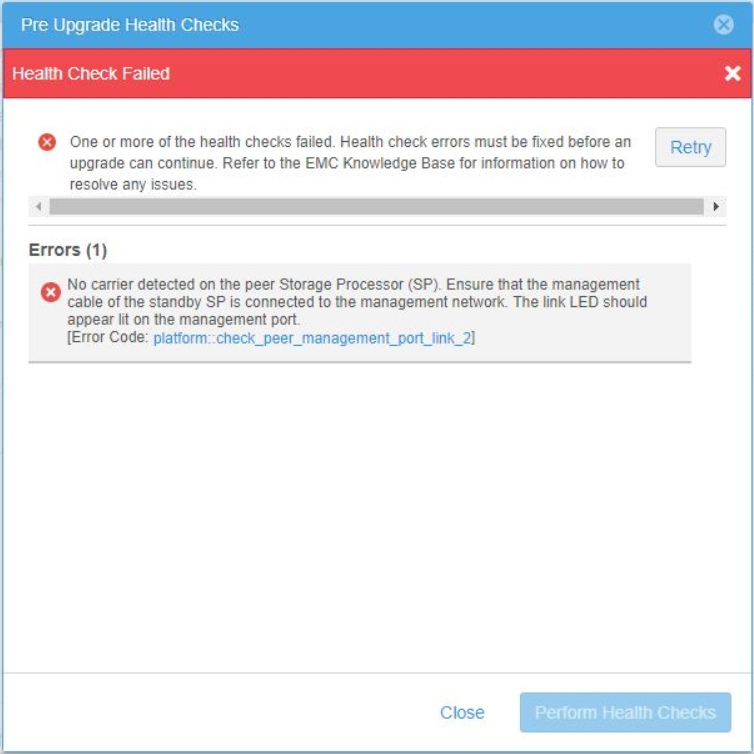
No carrier was detected on the peer Storage Processor (SP). Ensure that the management cable of the standby SP is connected to the management network.
The link LED should appear lit on the management port.
[Error code: platform::check_peer_management_port_link_2]
Cause
對等 (非主要) SP 失去與管理網路的連線。當管理服務故障移轉至同儕 SP 時,將無法存取 Unity 管理存取 (UI 和 CLI)。
在系統檢視 >機櫃 (後視圖) >同儕 (非主要) 的 Unisphere 中,SP 會針對管理連接埠回報「連接埠連結中斷」。
Unisphere 中的範例:

在系統檢視 >機櫃 (後視圖) >同儕 (非主要) 的 Unisphere 中,SP 會針對管理連接埠回報「連接埠連結中斷」。
Unisphere 中的範例:
Resolution
使用以下檢查來確定問題所在位置。每次檢查後,請在 Unisphere 中確認連結是否出現。
- 檢查管理網路纜線。
- 確定有纜線連接至同儕 (非主要) SP 至網路交換器。
- 確認纜線兩側是否都穩固在連接埠中。
- 如果纜線有瑕疵或受損,請更換纜線。
- 檢查交換器以判斷連接埠是否已關閉,或交換器端是否有問題。
- 如果纜線沒有問題,且在 Unity 和交換器連接埠中是固定的,請執行下列步驟。
- 從對等 (非主要) SP 上的管理連接埠拔下纜線。
- 使用壓縮空氣罐清除纜線連接埠和末端的任何碎屑或灰塵。
- 將纜線插回對等 (非主要) SP 上的管理連接埠。
- 追蹤纜線到網路交換器。
- 從交換器連接埠拔下纜線。
- 使用壓縮空氣罐清除纜線連接埠和末端的任何碎屑或灰塵。
- 將纜線插回交換器連接埠。
- 在 Unisphere 中確認連結已啟動後,請執行新的執行狀況檢查,以確認不再回報此錯誤。
Affected Products
Dell EMC Unity FamilyProducts
Dell EMC Unity Family |Dell EMC Unity All Flash, Dell EMC Unity Family, Dell EMC Unity HybridArticle Properties
Article Number: 000061985
Article Type: Solution
Last Modified: 27 Jun 2024
Version: 6
Find answers to your questions from other Dell users
Support Services
Check if your device is covered by Support Services.