PowerVault ME4: Unable to add a new host to an existing host group.
Summary: Prior to GT280R006-01, Using the GUI wizard a user would be able to add a new host to an existing host group but the new host would not acquire volume mappings of the group. This is a GUI bug and is fixed in GT280R006-01. The fix would not allow a host to be added to the host group prior to performing mappings that are consistent with the group. GT280R006-01 if a user is unable to add a new host to a host group then it is because the new host is not mapped to the same "volume, lun number and port numbers" as the host group. ...
This article applies to
This article does not apply to
This article is not tied to any specific product.
Not all product versions are identified in this article.
Symptoms
Simulation steps for reference (prior to GT280R006-01):
* Created a host group with one host in it and map volume/s (LUNs) to the host group.
* Created a host group with one host in it and map volume/s (LUNs) to the host group.

* Add 2nd host to the host group using host setup wizard.

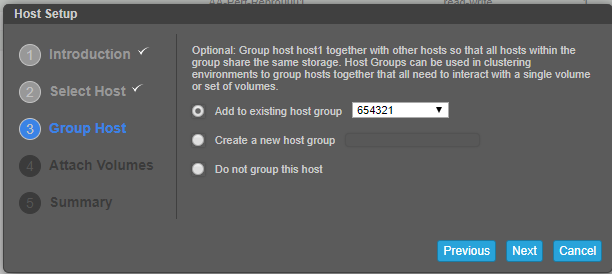

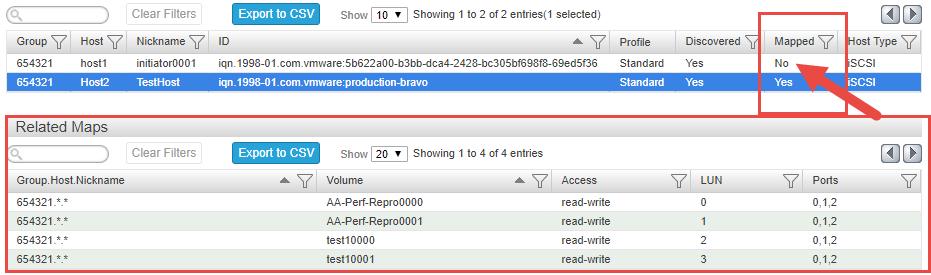
*Multiple disk rescans on the newly added host will not show the mapped LUN’s. Found the following in the WBI.
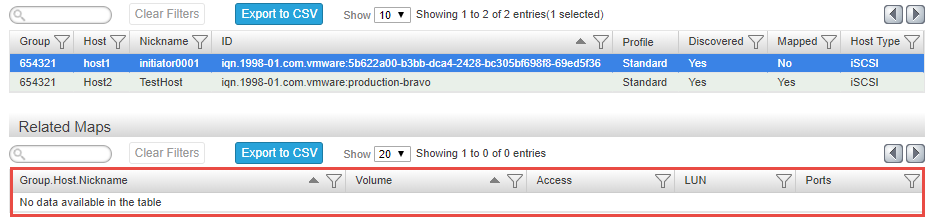
*Removing ‘host1’ from the host group and adding via right click > add to host group, receive the following error. Same in CLI.

Suspect a problem with the wizard not validating the host add to an existing group with mappings.
A few other things we ran into:
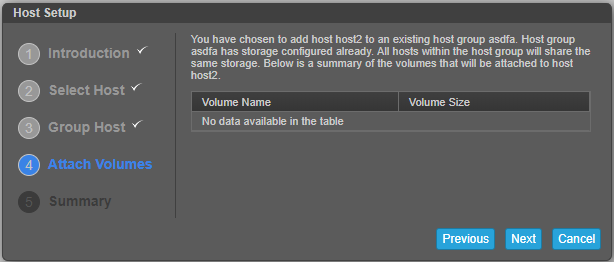
* Mapping a host to a host group mapped with volume groups, the wizard displays no volumes.

Cause
The ME4 is designed to allow a new host to a host group only if the new host is mapped with the same volume, lun numbers, and port numbers of the other host members of the host group.
This is not a bug.
This is not a bug.
Resolution
Follow the below steps manually to successfully add a new host to an existing host group, do not use the wizard :
Can be done either via GUI or CLI :
1. Create initiator. Name the initiator. Repeat this step until all initiators are created for the new host.
From GUI - select hosts > Action > create initiators. From CLI - use the command "create host initiators intiators_IDs hostname"
2. Add these initiators to the host. Name the host.
From GUI - Select the initiators and click "Add to host" from the Action menu. Name the host.
From CLI - Already done in step one.
3. Map the volume/volumes of the host group to the new host. The mappings should be ditto same as the host group including the lun numbers and the port numbers.
From GUI - select "mappings" > Action > Map in GUI
From CLI - use the command - map volume volume_name1 initiator initiator_nicknames ports 0,1,etc lun lun_number
4. Add host to host group.
From GUI - Select the host > action > add to host group. Select the host group from drop-down and click OK.
From CLI - use the command - "add host-group-members hosts host_name hostgroup_name_to-add-to"
Additional Information
NA
Videos
NA
Affected Products
Dell EMC PowerVault ME4012, Dell EMC PowerVault ME4024, Dell EMC PowerVault ME4084Article Properties
Article Number: 000064997
Article Type: Solution
Last Modified: 20 Dec 2022
Version: 6
Find answers to your questions from other Dell users
Support Services
Check if your device is covered by Support Services.