ViPR SRM 4.01:無法使用 https 存取 SRM GUI
Summary: 無法使用 https 存取 SRM GUI
This article applies to
This article does not apply to
This article is not tied to any specific product.
Not all product versions are identified in this article.
Symptoms
無法使用 URL 的 ssl 介面載入 SRM GUI 介面,網址為:https://< ipaddress>:58443/APG
我們收到錯誤訊息如下:
ERR_SSL_OBSOLETE_CIPHER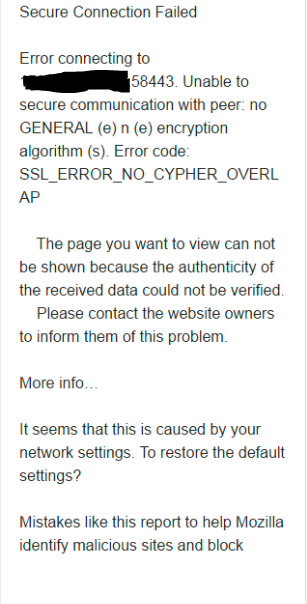
所有瀏覽器都會出現此問題,例如 Chrome、Firefox 和 IE。
我們收到錯誤訊息如下:
ERR_SSL_OBSOLETE_CIPHER
所有瀏覽器都會出現此問題,例如 Chrome、Firefox 和 IE。
Cause
原因是瀏覽器升級。之前使用的密碼不會更新為新密碼。
前面是server.xml檔下的密碼:
前面是server.xml檔下的密碼:
ciphers="TLS_DHE_RSA_WITH_AES_128_CBC_SHA, TLS_DHE_RSA_WITH_AES_256_CBC_SHA"升級server.xml中的正確密碼應為:
ciphers="TLS_ECDHE_RSA_WITH_AES_256_GCM_SHA384, TLS_RSA_WITH_AES_256_GCM_SHA384, TLS_ECDH_RSA_WITH_AES_256_GCM_SHA384, TLS_ECDHE_RSA_WITH_AES_128_CBC_SHA, TLS_ECDHE_RSA_WITH_AES_128_CBC_SHA256, TLS_ECDHE_RSA_WITH_AES_128_GCM_SHA256"
Resolution
請執行以下步驟:
1.登入 SRM 前端伺服器的位置:/opt/APG/Web-Servers/Tomcat/Default/conf
2. vi server.xml
3.在 部分下,存在的密碼是:
連接器應使用 APR 文件中描述的 OpenSSL 樣式配置
-->
4.修改密碼部分,如下所示:
6.前往路徑:/opt/APG/bin
7.使用以下命令重新啟動 tomcat 服務:./manage-modules.sh 服務重新啟動 tomcat
8。開啟瀏覽器視窗,並使用 URL 檢查登入:https://< ipaddress>:58443/APG
9。這樣就能成功載入 SRM GUI 介面。
1.登入 SRM 前端伺服器的位置:/opt/APG/Web-Servers/Tomcat/Default/conf
2. vi server.xml
3.在 部分下,存在的密碼是:
TLS_DHE_RSA_WITH_AES_128_CBC_SHA, TLS_DHE_RSA_WITH_AES_256_CBC_SHA
<!-- Define a SSL HTTP/1.1 Connector on port 8443
此連接器使用 JSSE 配置,使用 APR 時,
連接器應使用 APR 文件中描述的 OpenSSL 樣式配置
-->
   <Connector port="58443" protocol="HTTP/1.1" SSLEnabled="true"
               maxThreads="150" scheme="https" secure="true"
               compression="2048" compressableMimeType="text/"
               clientAuth="false" sslProtocols="TLSv1.2"
               sslEnabledProtocols="TLSv1.2" URIEncoding="UTF-8"
               keystoreFile="/opt/APG/Web-Servers/Tomcat/Default/conf/.keystore"
              keystorePass="watch4net"
               ciphers="TLS_DHE_RSA_WITH_AES_128_CBC_SHA, TLS_DHE_RSA_WITH_AES_256_CBC_SHA"
               SSLDisableCompression="true" />
4.修改密碼部分,如下所示:
ciphers="TLS_ECDHE_RSA_WITH_AES_256_GCM_SHA384, TLS_RSA_WITH_AES_256_GCM_SHA384, TLS_ECDH_RSA_WITH_AES_256_GCM_SHA384, TLS_ECDHE_RSA_WITH_AES_128_CBC_SHA, TLS_ECDHE_RSA_WITH_AES_128_CBC_SHA256, TLS_ECDHE_RSA_WITH_AES_128_GCM_SHA256"5.儲存檔案。
6.前往路徑:/opt/APG/bin
7.使用以下命令重新啟動 tomcat 服務:./manage-modules.sh 服務重新啟動 tomcat
8。開啟瀏覽器視窗,並使用 URL 檢查登入:https://< ipaddress>:58443/APG
9。這樣就能成功載入 SRM GUI 介面。
Affected Products
SRMArticle Properties
Article Number: 000065198
Article Type: Solution
Last Modified: 01 Oct 2025
Version: 4
Find answers to your questions from other Dell users
Support Services
Check if your device is covered by Support Services.