Dell EMC Unity: SRS Centralized Incorrectly Installed
Summary: Dell EMC Unity was configured with SRS Centralized, Dell EMC Support is able to see and access the array, but the array thinks it is not configured.
This article applies to
This article does not apply to
This article is not tied to any specific product.
Not all product versions are identified in this article.
Symptoms
What To Check:
It was noticed that there were issues when Dell EMC Unity arrays are configured with Centralized SRS but are not configured correctly.
Most assume that the array is configured properly because Dell EMC Support is able to see and connect to the arrays. However, the array does not report that SRS is configured.
Log in to the Dell EMC Unity's Unisphere GUI and navigate to: System > Service > Overview
The below information is seen.
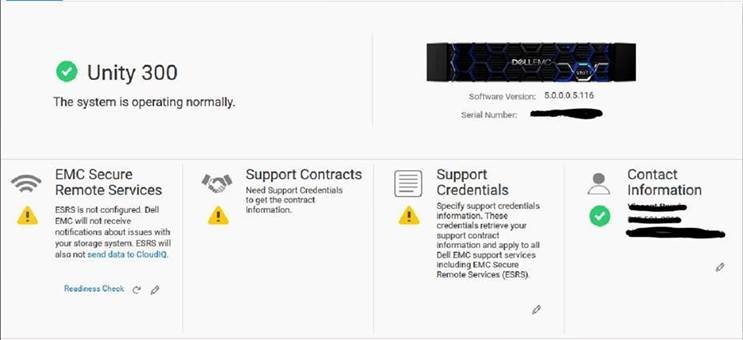
Notice the yellow exclamation mark shown for EMC Secure Remote Services (SRS). This indicates the Unity SRS was not configured properly.
Access the Gateway GUI and navigating to Devices > Manage Device. If the Dell EMC Unity array shows in this list, but the Unisphere GUI resembles the above image, then the Dell EMC Unity was configured incorrectly and needs to be reconfigured.
It was noticed that there were issues when Dell EMC Unity arrays are configured with Centralized SRS but are not configured correctly.
Most assume that the array is configured properly because Dell EMC Support is able to see and connect to the arrays. However, the array does not report that SRS is configured.
Log in to the Dell EMC Unity's Unisphere GUI and navigate to: System > Service > Overview
The below information is seen.
Notice the yellow exclamation mark shown for EMC Secure Remote Services (SRS). This indicates the Unity SRS was not configured properly.
Access the Gateway GUI and navigating to Devices > Manage Device. If the Dell EMC Unity array shows in this list, but the Unisphere GUI resembles the above image, then the Dell EMC Unity was configured incorrectly and needs to be reconfigured.
Cause
Reasons to Reconfigure SRS Correctly:
If the above is confirmed as true, this indicates that the Dell EMC Unity array was manually added to the SRS Gateway. The Dell EMC Unity was designed to add itself to the SRS Gateway via REST API, which also configures other features to work properly.
If the configuration is done manually, rather than by using the Dell EMC Unity SRS Wizard, some issues will be experienced. Dell EMC Support is able to access the array, as long as credentials and permission are provided by the user, which may feel like everything is working correctly. However, the Dell EMC Unity is unable to communicate to the back-end servers. This in turn causes:
If the above is confirmed as true, this indicates that the Dell EMC Unity array was manually added to the SRS Gateway. The Dell EMC Unity was designed to add itself to the SRS Gateway via REST API, which also configures other features to work properly.
If the configuration is done manually, rather than by using the Dell EMC Unity SRS Wizard, some issues will be experienced. Dell EMC Support is able to access the array, as long as credentials and permission are provided by the user, which may feel like everything is working correctly. However, the Dell EMC Unity is unable to communicate to the back-end servers. This in turn causes:
- Failure to send and create Call Home requests for proactive support.
- Failure to upload data used in CloudIQ.
Resolution
In order to correctly configure the Dell EMC Unity array, remove the array from the SRS Gateway first.
- From the SRS Gateway GUI > Devices > Manage Device page, check the box next to the Dell EMC Unity array needing reconfiguration and click Remove at the bottom right of the window.
- Wait for this step to fully sync up with the SRS backend servers. This process takes approximately 16 mins.
- After about 16-20 minutes, refresh the Manage Device page and confirm the Unity array is removed.
- If the array is still there, this requires further assistance from Dell EMC Support and a Service Request should be opened, quoting this KB article (542293).
- If the array is removed, then review and follow KB article 504134: Dell EMC Unity: SRS and CloudIQ Master Checklist (User Correctable) to properly configure the array (Only registered Dell Customers can access the content on the article link via Dell.com/support).
Affected Products
Dell EMC UnityArticle Properties
Article Number: 000078077
Article Type: Solution
Last Modified: 29 Jul 2025
Version: 4
Find answers to your questions from other Dell users
Support Services
Check if your device is covered by Support Services.