如何运行 Dell Data Security 卸载程序
Summary: 了解如何使用 Dell Data Security 卸载程序卸载 Dell Data Security 和 Dell Data Protection 产品。
This article applies to
This article does not apply to
This article is not tied to any specific product.
Not all product versions are identified in this article.
Instructions
提醒:
- 受影响的产品中列出的产品可能未处于活动状态。有关产品支持的最新信息,请参阅 Dell Data Security 产品生命周期(结束支持和停售)政策。如果您对其他文章有任何疑问,请联系您的销售团队或联系 endpointsecurity@dell.com。
- 请参阅端点安全性,了解有关当前产品的其他信息。
Dell Data Security 卸载程序为列出的 Windows Dell Data Security(以前称为 Dell Data Protection)影响的产品提供简化的删除方法。
受影响的产品:
- Dell BitLocker Manager
- Dell Data Guardian
- Dell Data Protection | Enterprise Edition
- Dell Data Protection | Personal Edition
- Dell Data Protection | External Media Edition
- Dell Data Protection | Secure Lifecycle
- Dell Data Protection | Cloud Edition
- Dell Data Protection | Endpoint Security Suite Pro
- Dell Data Protection | Server Encryption
- Dell Data Protection | Security Tools
- Dell Encryption Enterprise
- Dell Encryption External Media
- Dell Encryption Personal
- Dell Endpoint Security Suite Enterprise
- Dell Full Disk Encryption
- Dell Threat Defense
受影响的版本:
- v8.0.0 及更高版本
受影响的操作系统:
- Windows
如何运行适用于 Windows 的 Dell Data Security 卸载程序
持续时间:00:02:25 (hh:mm:ss)
如果可用,可以使用此视频播放器上的 CC 图标选择隐藏式字幕(字幕)语言设置。
Dell Data Security 卸载程序可以通过用户界面 (UI) 或命令行界面 (CLI) 开关运行。Dell Data Security 管理员也可以查看卸载日志记录。单击相应的选项卡以了解更多信息。
提醒:有关获取卸载程序的详细信息,请参阅如何下载 Dell Data Security 卸载程序。
UI
- 双击 DataSecurityUninstaller.exe 以启动应用程序。
 提醒:DataSecurityUninstaller 需要
log4net.dll驻留在同一文件夹中以成功运行。 - 如果用户帐户控制 (UAC) 已启用,则单击是,以提升到管理权限。否则,请转到步骤 3。

- 在 Dell Data Security 卸载程序用户界面 (UI) 中,单击下一步以继续操作。

- (可选)清除任何应用程序的删除复选框,然后单击 Next。
 提醒:
提醒:- 将自动选择或清除所需的依赖关系。
- 端点上可用的应用程序可能与屏幕截图不同。
- 如果使用 Dell Personal Encryption(以前称为 Dell Data Protection |Personal Edition)或 Dell Enterprise Encryption(以前称为 Dell Data Protection |Enterprise Edition) 存在基于策略的加密,请转至步骤 6。否则,请转至步骤 7。
- 在加密代理程序选项 UI 中,选择以下任一项: 单击上面的相应选项以了解后续步骤。
加密删除代理程序 - 从服务器下载密钥
- 选择 Encryption Removal Agent - Download Keys from Server,然后单击 Next。

- 为列出的设备服务器填充取证管理员的凭据。填写后,单击 Next,并转至步骤 8。
 提醒:
提醒:- 通过注册表查询提取 设备服务器 URL ,以
HKLM\SYSTEM\CurrentControlSet\Services\CMGShield REG_SZ: ServletURL。 - 通过注册表查询提取 计算机 ID ,以
HKLM\SYSTEM\CurrentControlSet\Services\CMGShield REG_SZ: MCID。 - 在您的环境中,Device Server 和 Forensic Administrator 将与上面的屏幕截图有所不同。
- Forensic Administrator 必须以通用主体名称 (UPN) 格式填充。例如,Jane_Doe@Dell.com 使用 UPN 格式。
- 通过注册表查询提取 设备服务器 URL ,以
加密删除代理程序 - 从文件导入密钥
- 选择 Encryption Removal Agent - Import Keys from a File,然后单击 Next。

- 浏览至取证下载文件的位置,然后输入该文件的密码。填写后,单击 Next,并转至步骤 8。

不安装加密删除代理程序
- 选择 Do not Install Encryption Removal Agent,单击 Next,然后转至步骤 8。
 注意:安装加密删除代理程序失败会阻止端点解密。受 SDE 密钥保护的数据仍可用。在安装加密删除代理程序之前,受公用密钥或用户密钥保护的数据在卸载后将无法访问。
- 如果在端点上配置了自加密驱动器,则必须先将其停用,然后才能删除。单击确定以关闭 Dell Data Security 卸载程序。如果自加密驱动器已停用或未使用,请转至步骤 8。

- 单击 删除 以卸载步骤 4 中的所选应用程序。

- 完成后,单击完成以重新启动计算机。
 提醒:
提醒:- 需要重新启动,才能从启动周期中清除已删除的应用程序。
- 如果任何应用程序卸载失败,则单击 Uninstall Logging 选项卡。
- 单击是以确认您要重新启动计算机。
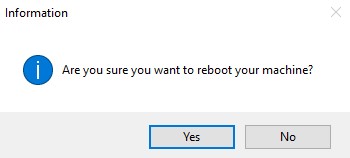
CLI
Dell Data Security 卸载程序允许通过使用参数和数值灵活地删除命令行。
提醒:
- 参数区分大小写。
- DataSecurityUninstaller 需要
log4net.dll驻留在同一文件夹中以成功运行。 - 通过注册表查询提取 设备服务器 URL ,以
HKLM\SYSTEM\CurrentControlSet\Services\CMGShield REG_SZ: ServletURL。 - 通过注册表查询提取 计算机 ID ,以
HKLM\SYSTEM\CurrentControlSet\Services\CMGShield REG_SZ: MCID。
| 参数 | 数值 |
|---|---|
CMG_Decrypt= |
0 (不安装加密删除代理程序) |
CMG_Decrypt= |
1 (使用从 Dell Security Management Server 下载的密钥安装加密删除代理程序) |
CMG_Decrypt= |
2 (使用企业版客户端的取证捆绑包中的密钥安装加密删除代理程序) |
CMG_Decrypt= |
3 (使用个人版客户端的取证捆绑包中的密钥安装加密删除代理程序) |
FORENSIC_ADMIN= |
Dell Security Management Server 的取证管理员的用户名。在以下情况下,此选项是必需的: CMG_Decrypt 选择值 1。值必须包含在引号 ("") 中。用户名必须以通用主体名称 (UPN) 格式填充。例如,Jane_Doe@Dell.com 使用 UPN 格式。 |
FORENSIC_PWD= |
Dell Security Management Server 的取证管理员的密码。在以下情况下,此选项是必需的: CMG_Decrypt 选择值 1。值必须包含在引号 ("") 中。 |
DA_KM_Path= |
取证捆绑包的位置,如果 CMG_Decrypt 选择值 2(或 3)。数值必须包含在引号内。 |
DA_KM_PW= |
取证捆绑包的密码,如果 CMG_Decrypt 选择值 2(或 3)。数值必须包含在引号内。 |
/silent |
在无对话框的情况下运行 DataSecurityUninstaller。 CMG_Decrypt 如果未定义任何变量,则默认设置值 3。此参数必须小写。 |
NOREBOOT |
在卸载后禁止重新启动。没有使用 NOREBOOT 标记一起使用。 |
LOGFILE_PATH= |
为卸载日志设置文件路径的可选参数。如果未选择此选项,则将使用“Uninstall Logging”选项卡下列出的默认位置。值必须包含在引号 ("") 中。 |
LOGFILE_Name= |
在以下情况下用于设置卸载日志的名称: LOGFILE_PATH 被定义。值必须包含在引号 ("") 中。 |
CLI 卸载示例:
示例 1
以下示例在不使用 UI 的情况下运行 DataSecurityUninstaller,并使用取证管理员 (ExampleUser) 直接从 Dell Security Management Server 下载加密密钥。卸载后,将抑制重新启动要求。
卸载命令行示例:
DataSecurityUninstaller.exe CMG_DECRYPT=1 FORENSIC_ADMIN="ExampleUser" FORENSIC_PWD="Passw0rd" NOREBOOT /silent
示例 2
以下示例在没有 UI 的情况下运行 DataSecurityUninstaller,并使用从通过 CMGAd 下载的 Dell Security Management Server 预先下载的加密密钥。CMGAd 是 Dell Encryption Admin Utilities 中的一个实用程序,可从 Dell Encryption 获得。卸载后,将抑制重新启动要求。
卸载命令行示例:
DataSecurityUninstaller.exe CMG_DECRYPT=2 DA_KM_PATH="C:\Dell\KeyBundle\DeviceName.Domain.com" DA_KM_PW="Passw0rd" NOREBOOT /silent
日志记录
默认情况下,Dell Data Security 卸载程序会将卸载日志输出到 C:\ProgramData\Dell\Dell Data Protection)时,此方法起作用。为选择要删除的每个应用程序生成卸载日志。
DDP_AdvancedThreatProtection_Plugins_Uninstall_MSI.log- 包含有关卸载用于从 Advanced Threat Protection 代理程序与 Dell Client Security Framework 通信的戴尔插件程序的信息。DDP_AdvancedThreatProtection_Uninstall_MSI.log- 包含有关卸载高级威胁防护代理的信息。DDP_Authentication_Uninstall_MSI.log- 包含有关卸载高级身份验证组件的信息。DDP_ClientSecurityFramework_Uninstall_MSI.log包含有关删除 Dell Client Security Framework(加密管理代理程序)的信息。DDP_Data_Guardian_Uninstall_MSI.log包含有关删除 Dell Data Guardian 的信息。DDP_Encryption_Uninstall_MSI.log包含有关删除戴尔基于策略的加密应用程序的信息。DDP_ESSE_Uninstall.log- 包含有关删除 Suite 安装程序(如果已利用)的信息。DDP_ESSE_Uninstall_MSI.log- 包含有关删除 Suite 安装程序(如果已利用)的信息。DDPUninstall_Main.log- 包含有关尝试利用 DDS 卸载程序进行卸载的所有信息。DDP_McAfee_Endpoint_Security_Firewall_Uninstall_MSI.log- 包含有关为 Dell Endpoint Security Suite Pro 和 Endpoint Security Suite Enterprise 卸载防火墙组件的信息。DDP_McAfee_Endpoint_Security_Security_Platform_Uninstall_MSI.log- 包含有关为 Dell Endpoint Security Suite Pro 和 Endpoint Security Suite Enterprise 卸载基本 McAfee 组件的信息。DDP_McAfee_Endpoint_Security_Web_Control_Uninstall_MSI.log- 包含有关为 Dell Endpoint Security Suite Pro 和 Endpoint Security Suite Enterprise 卸载 Web 控制组件的信息。DDP_ThreatProtection_Uninstall_MSI.log- 包含有关在 Dell Endpoint Security Suite Pro 和 Endpoint Security Suite Enterprise 的 McAfee 和 Dell Client Security Framework 之间卸载插件的信息。
要联系支持部门,请参阅 Dell Data Security 国际支持电话号码。
转至 TechDirect,在线生成技术支持请求。
要获得更多见解和资源,请加入戴尔安全社区论坛。
Additional Information
Videos
Affected Products
Dell Data Guardian, Dell Encryption, Dell Security Tools, Dell Threat Defense, Dell Endpoint Security Suite EnterpriseArticle Properties
Article Number: 000125052
Article Type: How To
Last Modified: 11 Mar 2025
Version: 20
Find answers to your questions from other Dell users
Support Services
Check if your device is covered by Support Services.