Windows 10 啟用錯誤代碼0xC004C008
Summary: 從 Dell 收到的新系統上的 Windows 10 啟用錯誤代碼0xC004C008問題
This article applies to
This article does not apply to
This article is not tied to any specific product.
Not all product versions are identified in this article.
Symptoms
N/A
Cause
N/A
Resolution
請遵循本文提供的指導方針,在系統開箱 (OOB) 時,解決 Windows 10 啟動錯誤代碼 0xC004C008 (產品金鑰已在使用中)。
錯誤代碼0xC004C008
您可能會在從 Dell 收到的新系統上遇到 Windows 10 啟用問題。在初始系統開機時,您可能會看到下列錯誤 (圖 1):
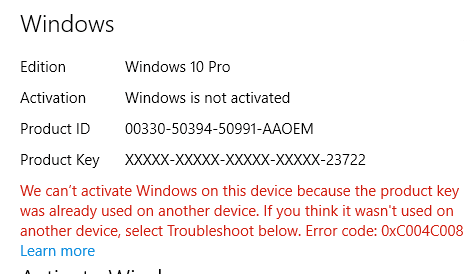
圖 1:Windows 10 啟用錯誤,產品金鑰已在使用中
啟動伺服器發現 Windows 10 產品金鑰可能已用於多部個人電腦時,才會產生此錯誤。當您安裝 Windows 8.1 或 Windows 10 作業系統產品特定次數時,錯誤代碼0xC004C008出現,因為 Windows 8.1 或 Windows 10 授權只能安裝在單一裝置上。
解決方案
 註:執行幾次系統重新開機,然後重試啟動順序,即可解決某些啟動錯誤。參考資料:Microsoft Windows IT Center 文章:
您也可以參閱 啟用故障診斷工具 ,以嘗試解決此問題。故障診斷程式會加速下載 OA3 (OEM 啟用程序 3.0) 所需的更新。
如果問題持續發生,Microsoft請撥打啟用畫面上列出的支援號碼 (「例如,在美國和加拿大:1-800-936-5700“),並說明您收到的錯誤訊息是在新的 Dell 電腦上。
Microsoft可以提供電話啟動。
Affected Products
Alienware, Inspiron, Legacy Desktop Models, OptiPlex, Vostro, XPS, G Series, G Series, Alienware, Inspiron, Latitude, Vostro, XPS, Legacy Laptop Models, Fixed Workstations, Mobile WorkstationsArticle Properties
Article Number: 000130292
Article Type: Solution
Last Modified: 17 Jul 2025
Version: 6
Find answers to your questions from other Dell users
Support Services
Check if your device is covered by Support Services.