Cannot Power Docking Station Using Type-C Power Adapter Connected to Type-C Port of Dock
Summary: The following article provides information about why certain docking stations cannot be powered using a Type-C power adapter connected to the Type-C port of the dock.
This article applies to
This article does not apply to
This article is not tied to any specific product.
Not all product versions are identified in this article.
Symptoms
Affected Docking Stations:
- WD19
- WD19S
- WD19DC
- WD19DCS
- WD19TB
- WD19TBS
- TB18DC
- TB16
End users may try to use a Type-C charging adapter that did not come with the dock to power it. The female type-C port on the dock is only for connecting peripherals. It does not provide power to the system, though the system continues to run off its own battery, and no error message is displayed.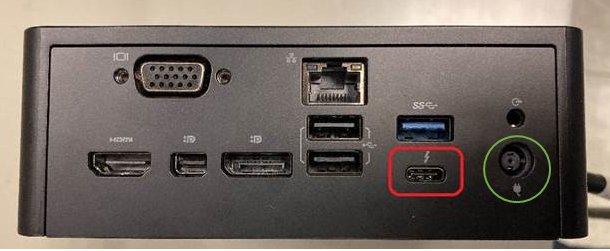
(Figure 1: Dell Dock Ports)
Cause
The dock was designed to work only with the AC adapter that was included with it.
Resolution
The dock was designed to work only with the AC adapter included with it. This adapter should be plugged into the correct port marked with the power plug icon, circled in green in Figure 1. The Type-C port circled in red, is only for attaching peripherals.
Affected Products
Dell Thunderbolt Dock TB16, Dell Precision Dual USB-C Thunderbolt Dock - TB18DC, Dell Dock WD19, Dell Performance Dock - WD19DC, Dell Performance Dock – WD19DCS, Dell Dock – WD19S, Dell Thunderbolt Dock - WD19TB, Dell Thunderbolt Dock – WD19TBSArticle Properties
Article Number: 000134396
Article Type: Solution
Last Modified: 03 Apr 2025
Version: 9
Find answers to your questions from other Dell users
Support Services
Check if your device is covered by Support Services.