DBCC CHECKDB Felsökning av SQL Server-databasfel
Summary: DBCC CHECKDB, DBCC, databasreparation, databas, skadad databas
Symptoms
Cause
Resolution
DBCC är ett inbyggt verktyg i Microsoft SQL Server som är utformat för att kontrollera och reparera Microsoft SQL Server-databaser. I den här artikeln beskrivs kommando och alternativ för DBCC CHECKDB vid kontroll av databasens logiska och fysiska integritet.
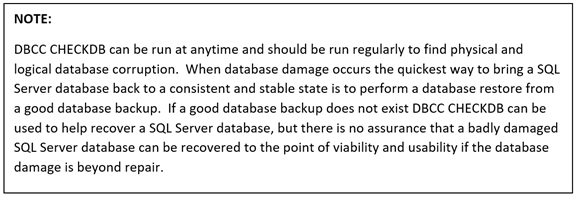
DBCC CHECKDB (Transact SQL):

Steg för att köra CHECKDB för DBCC:
- Öppna SQL Server Studio Management
- Öppna ett frågefönster
- Skriv "DBCC CHECKDB (database name)"
Reparationsalternativ för DBCC
- REPAIR_REBUILD: Kommandot nedan försätter databasen i ett läge som möjliggör reparation.
USE Master;
GO
ALTER DATABASE TSQL2012
SET SINGLE_USER
WITH ROLLBACK IMMEDIATE;
GO
DBCC CHECKDB (TSQL2012, REPAIR_REBUILD)
GO
ALTER DATABASE TSQL2012
SET MULTI_USER;
GO
Kopiera kommandot nedan och klistra in i frågesessionen med rätt databasnamn:
--Command below performs a Database repair not allowing Data loss

USE Master;
GO
ALTER DATABASE TSQL2012
SET SINGLE_USER
WITH ROLLBACK IMMEDIATE;
GO
DBCC CHECKDB (TSQL2012,REPAIR_REBUILD)
GO
ALTER DATABASE TSQL2012
SET MULTI_USER;
GO
2. REPAIR_ALLOW_DATA_LOSS: Kommandot nedan utför databasreparation och kan resultera i dataförlust för att slutföra reparationsprocessen.
--Command below performs a database repair that may result in data loss,
 --replace TSQL2012 with the database name of database being repaired
USE Master
GO
ALTER DATABASE TSQL2012
SET SINGLE_USER
WITH ROLLBACK IMMEDIATE
GO
DBCC CHECKDB (TSQL2012, REPAIR_ALLOW_DATA_LOSS)
GO
ALTERDATABASE TSQL2012
SET MULTI_USER
GO
Kopiera kommandot nedan och klistra in i frågesessionen med rätt databasnamn:
Kommandona nedan är användbara om databasens fysiska diskutrymme börjar ta slut.
--Command below estimates the size TEMPDB must be to complete the DBCC CHECKDB job
USE Master;
GO
ALTER DATABASE TSQL2012
SET SINGLE_USER
WITH ROLLBACK IMMEDIATE;
GO
DBCC CHECKDB (TSQL2012, REPAIR_REBUILD)
WITH ESTIMATEONLY;
GO
ALTER DATABASE TSQL2012
SET MULTI_USER
GO
Kopiera kommandot nedan och klistra in i frågesessionen med rätt databasnamn:
--Command below estimates the size TEMPDB must be to complete the DBCC CHECKDB job

USE Master;
GO
ALTER DATABASE TSQL2012
SET SINGLE_USER
WITH ROLLBACK IMMEDIATE;
GO
DBCC CHECKDB (TSQL2012, REPAIR_REBUILD)
WITH ESTIMATEONLY;
GO
ALTER DATABASE TSQL2012
SET MULTI_USER
GO
--Command below will run DBCC CHECKDB without using TEMDB and creating a DB
--snapshot. When not using TEMPDB with a DB snapshot all data will be checked in
-- the live database not not a database snapshot.

USE Master;
GO
ALTER DATABASE TSQL2012
SET SINGLE_USER
WITH ROLLBACK IMMEDIATE;
GO
DBCC CHECKDB (TSQL2012, REPAIR_REBUILD)
WITH TABLOCK;
GO
ALTER DATABASE TSQL2012
SET MULTI_USER
GO
Kopiera kommandot nedan och klistra in i frågesessionen och ange rätt databasnamn:
--Command below will run DBCC CHECKDB without using TEMPDB and creating a DB
--snapshot. When not using TEMPDB with a DB snapshot all data will be checked in ---the live database not a database snapshot.

USE Master;
GO
ALTER DATABASE TSQL2012
SET SINGLE_USER
WITH ROLLBACK IMMEDIATE;
GO
DBCC CHECKDB (TSQL2012, REPAIR_REBUILD)
WITH TABLOCK;
GO
ALTER DATABASE TSQL2012
SET MULTI_USER
GO