How to configure Virtual Router Redundancy Protocol (VRRP) for IPv6 clients on DELL EMC Networking OS10 switches
Summary: How to configure Virtual Router Redundancy Protocol (VRRP) for IPv6 clients on DELL EMC Networking OS10 switches
This article applies to
This article does not apply to
This article is not tied to any specific product.
Not all product versions are identified in this article.
Symptoms
Table of Contents
What is VRRP
Requirement
Configuration
Sample IPv6 VRRP setup
Topology
Sample Output
Verify that VRRP is working.
What is VRRP
VRRP allows us to configure virtual routers from groups of physical routers/layer three switches on a LAN. These virtual routing platforms form primary and backup pairs. VRRP helps us to avoid a single point of failure of a routers/layer three switches in the network.
Requirement
By Default OS10 is having VRRP version 2. We must configure VRRP Version 3 on switches to support IPv6. Changing the VRRP version in a switch must be done with proper planning. Click here for more details on VRRP Version 3
Configuration
| Command | Purpose |
| OS10-Switch1# configure terminal | Enter Configure Mode |
| OS10-Switch1(config)# vrrp version 3 | Configure a VRRP version for the system |
| OS10-Switch1(config)# interface vlan <ID>/Interface <Port> | Configure Vlan/Interface |
| OS10-Switch1(conf-if-XX-X)# ipv6 address <IPv6> | Configure IPv6 IP address |
| OS10-Switch1(conf-if-XX-X)# vrrp-ipv6-group <ID> | Enter a VRRP group identification number (1 to 255) |
| OS10-Switch1(conf-XX-vrid-v6-Y)# virtual-address <IPv6 address> | Configures virtual router IPv6 addresses |
| OS10-Switch1(conf-XX-vrid-v6-Y)# priority <Priority> | Set a virtual router priority <Value 1 - 254, default 100> (Optional) |
| OS10-Switch1(conf-XX-vrid-v6-Y)# advertise-interval <Interval> | Change the advertisement interval setting <Value Centiseconds : 25 - 4075, default 100> (Optional) |
Sample VRRP IPv6 Setup
To demonstrate the configuration of VRRP lets use a sample topology.
IPv6 address is configured in vlan 1 on both VRRP peers.
IPv6 address on vlan 1 in Switch 1: 1000::1/64
IPv6 address on vlan 1 in Switch 2: 1000::2/64
IPv6 Virtual Address of VRRP: 1000::1000
VRRP Priority on Switch 1: 150
VRRP Priority on Switch 2: 200 =>This causes the switch 2 to be elected as primary.
The Switch 1 Vlan 1 IPv6 address is able to ping to Switch 2 Vlan 1 IPv6 address
Topology

Cause
Sample Configuration
OS10-Switch1
OS10-Switch1# configure terminal
OS10-Switch1(config)# vrrp version 3
OS10-Switch1(config)# interface vlan 1
OS10-Switch1(conf-if-vl-1)# ipv6 address 1000::1/64
OS10-Switch1(conf-if-vl-1)# vrrp-ipv6-group 1
OS10-Switch1(conf-vlan1-vrid-v6-1)# virtual-address 1000::1000
OS10-Switch1(conf-vlan1-vrid-v6-1)# priority 150
OS10-Switch1# show running-configuration interface vlan 1
!
interface vlan1
no shutdown
ipv6 address 1000::1/64
!
vrrp-ipv6-group 1
priority 150
virtual-address 1000::1000
OS10-Switch2
OS10-Switch2# configure terminal
OS10-Switch2(config)# vrrp version 3
OS10-Switch2(config)# interface vlan 1
OS10-Switch2(conf-if-vl-1)# ipv6 address 1000::2/64
OS10-Switch2(conf-if-vl-1)# vrrp-ipv6-group 1
OS10-Switch2(conf-vlan1-vrid-v6-1)# virtual-address 1000::1000
OS10-Switch2(conf-vlan1-vrid-v6-1)# priority 200
OS10-Switch2# show running-configuration interface vlan 1
!
interface vlan1
no shutdown
ipv6 address 1000::2/64
!
vrrp-ipv6-group 1
priority 200
virtual-address 1000::1000
Resolution
Verify that VRRP is Working
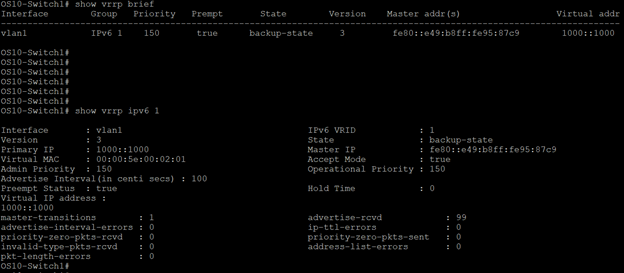
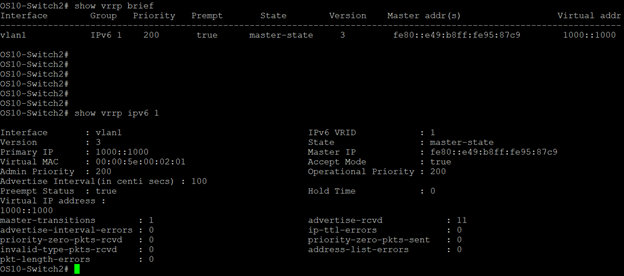
Use the command show vrrp brief and show vrrp ipv6 <VRRP ID> to verify if VRRP is working as expected
OS10-Switch1
OS10-Switch2
Affected Products
PowerSwitch S3048-ON, PowerSwitch S4048-ON, PowerSwitch S4810-ON, Dell EMC Networking MX5108n, Dell EMC Networking MX9116n, PowerSwitch S4048T-ON, PowerSwitch S4112F-ON/S4112T-ON, PowerSwitch S4128F-ON/S4128T-ON
, PowerSwitch S4148F-ON/S4148T-ON/S4148FE-ON, PowerSwitch S4148U-ON, PowerSwitch S4248FB-ON /S4248FBL-ON, PowerSwitch S5148F-ON, PowerSwitch S5212F-ON, PowerSwitch S5224F-ON, PowerSwitch S5232F-ON, PowerSwitch S5248F-ON, PowerSwitch S5296F-ON, PowerSwitch S6100-ON, PowerSwitch Z9100-ON, PowerSwitch Z9264F-ON, SmartFabric OS10 Software
...
Article Properties
Article Number: 000134676
Article Type: Solution
Last Modified: 11 Oct 2023
Version: 5
Find answers to your questions from other Dell users
Support Services
Check if your device is covered by Support Services.