Understanding USB Type-C Features and Benefits
Summary: Learn about USB Type-C: faster data transfer, power delivery, and video support. Compare with other USB types, find adapters, and get answers to FAQs on compatibility and device usage.
Instructions
Table of Contents:
- What is USB Type-C?
- Key Features of USB Type-C
- Comparison of different USB Connectors
- USB Type-C Adapters or Converters
- Frequently Asked Questions
What is USB Type-C?
USB Type-C is a new connector type. One cable type is all that you need for power, video, and data transfers across multiple devices, so long as the devices themselves support USB Type-C and various functionalities that USB Type-C has to offer. It offers a data transfer rate at incredible speeds, charge other devices, powers mobile devices, and even support video transmission, all with one cable. USB Type-C connector is supported by many device manufacturers.
Faster Data Transfer Speeds
USB Type-C can transfer data at up to 10Gbps^ speed with improved cables and connectors.
USB Power Delivery
USB Type-C cable supports up to 130W* of power transmission along the same cable for compatible devices compared to 2.5W on its predecessors, USB 2.0 or USB 3.0. This helps power devices like cellphones, and tablets and also charge compatible laptops or ultrabooks.
Alternate Mode
USB Type-C uses a 24-pin double-sided connector allowing for device manufacturers to enable Alternate Mode, which unlocks the ability to use alternate data protocols for direct device-to-host transmission. This allows you to output VGA, HDMI, DisplayPort, Thunderbolt, Ethernet, or other types of connections from a single USB Type-C port with the help of compatible adapters.
Reversible Connector
The USB Type-C is a new reversible connector that allows you to connect the cable to your device in any direction, unlike its predecessors.
Key Features of USB Type-C
- Robust connector strong enough for laptops, tablets, and larger platforms.
- Reversible plug orientation and cable direction.
- Supports scalable power and performance to help future-proof your solution.
- A slim form factor that can be used on laptops, ultrabooks, and mobile devices.
- USB Type-C is not USB 3.1 - The USB Type-C is a connector and cable specification which can use USB 2.0, USB 3.0, or USB 3.1 protocols for data or power delivery.
- USB Type-C is not USB Power Delivery - USB Power Delivery is a protocol/hardware solution that increases USB power capabilities up to 130W on supported platforms. If a product features USB Type-C, it need not necessarily support USB Power Delivery or USB 3.1
Comparison of different USB Connectors
Here is a comparison of different USB Connectors.
| USB Type | Image |
|---|---|
| USB Type-A | 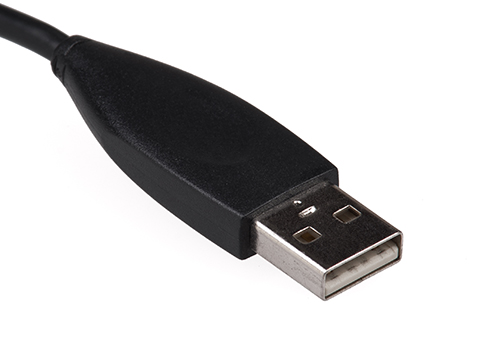 |
| USB Type-B | 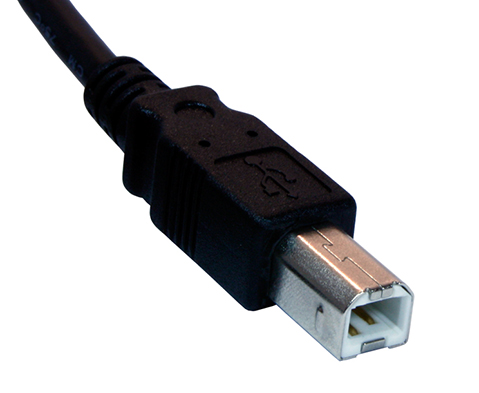 |
| Mini USB | 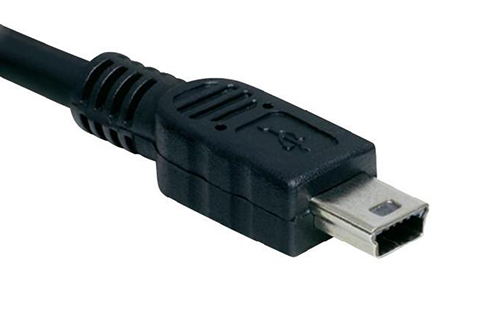 |
| Micro USB | 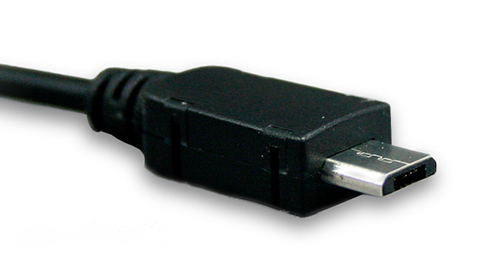 |
| USB Type-A 3.0 | 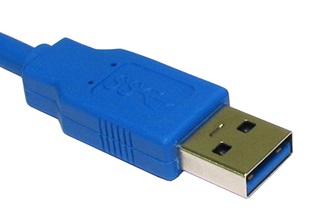 |
| USB Type-C | 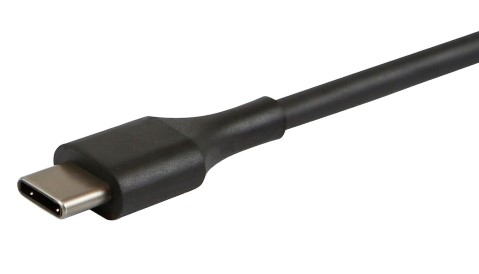 |
USB Type-C Adapters or Converters
USB Type-C Adapters are the range of adapters that expand the connectivity from a single USB Type-C port to various display devices, Gigabit Ethernet, and USB-A 3.0
USB Type-C ports can support various different protocols using "alternate modes," which allows you to have adapters that can output HDMI, VGA, DisplayPort, or other types of connections from that single USB port. Dell’s USB Type-C to HDMI, USB Type-C to DisplayPort, and USB Type-C to VGA adapters allow you to streamline VGA, DisplayPort, and HDMI into a single type of port.
Key features of the USB Type-C Adapters are:
- USB Type-C to VGA and USB Type-C to HDMI adapters enable laptops or tablets with USB Type-C to connect with various displays/projectors/TVs using VGA and HDMI.
- USB Type-C to Gigabit Ethernet adapters enables laptops or tablets with USB Type-C to connect to the network using the RJ45 port.
- USB Type-C to USB-A 3.0 adapters enable laptops or tablets with USB Type-C to connect to legacy devices (for example, a mouse or a printer).
Additional Information
Frequently Asked Questions
Here are some frequently asked questions about USB Type-C.
Question: Is USB Type-C be backward compatible?
Answer: USB Type-C connector itself is not backward compatible with previous USB Types and may require appropriate adapters for connecting the devices together. Some older non-self-powered devices may not be compatible due to power requirements. Data transfer speeds are limited to the older device.
Question: What is the difference between USB Type-A and USB Type-C?
Answer: USB Type-A is the current connector type that is primarily used on most USB devices. USB Type-C is the new connector type. Due to the difference in connector shape, they are not compatible with each other. You need an appropriate adapter or converter for this.
USB Type-C has a reversible connector and is capable of Data, Video, and Power transmission along the same cable. See What is USB Type-C section?, for more information.
Question: What type of devices use USB Type-C?
Answer: All standard devices like Tablets, Mobile devices, accessories, Audio or Video adapters, External Hard Disk Drives, and Monitors.
Question: How fast is USB Type-C compared to previous versions of USB, Serial-ATA, or Thunderbolt?
Answer: USB Type-C is a new type of connector. Depending on the device type and the protocols that are implemented, faster data transfer can be achieved.
Question: What are some key features and benefits of USB Type-C?
Answer: Reversible connector and the ability to use a single cable for data transfer, deliver video to a display, and power delivery are the key features of USB Type-C.
Question: Must I purchase all new cables?
Answer: USB Type-C is backward compatible with USB 2.0 and USB 3.0 protocols. However, due to the difference in the design of the USB Type-C plug or port, you may have to purchase compatible adapters which allow you to plug your legacy devices into a USB Type-C port.
Question: Can I charge my laptop with a USB power bank using the USB Type-C port?
Answer: Depending on your computer, you may or may not be able to charge your computer with a USB power bank using the USB Type-C port. The Setup and Specifications manual for your computer provides that information.