FluidFS: Controller fails to boot with UNEXPECTED INCONSISTENCY RUN FSCK MANUALLY
Summary: After a power outage, controller shutdown, or controller removal for maintenance, the possibility exists for the clock to revert to zero-time-value. This will cause the next controller boot to fail. ...
This article applies to
This article does not apply to
This article is not tied to any specific product.
Not all product versions are identified in this article.
Symptoms
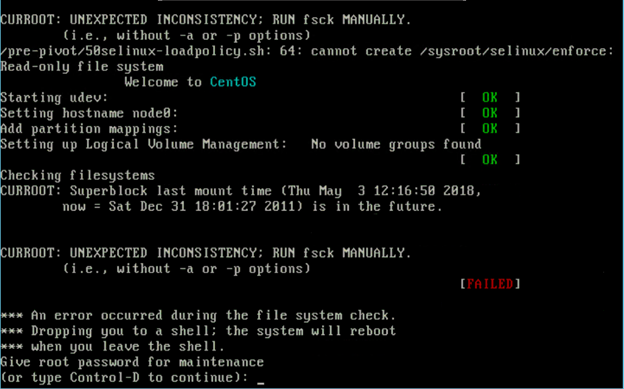
Following a power outage, reboot, shutdown, or removal for maintenance, if the Time of Day (TOD) clock battery is drained, the clock reverts to zero-time-value. The next controller boot fails the File System Check (FSCK) phase. During the boot-up sequence, errors such as this are presented:
UNEXPECTED INCONSISTENCY; RUN fsck MANUALLY
Checking filesystems
Superblock last mount time ( <time>,
Now = <time> ) is in the future.

Give root password for maintenance
(or type Control-D to continue):
Example of the error:
Cause
The issue occurs when the ToD clock battery is drained, causing the clock to revert to zero-time-value. The drained coin-cell battery results in the controller failing at the FSCK phase during the next boot.
Resolution
Temporary Workaround:
Reseat the controller or press Control-D from the prompt.
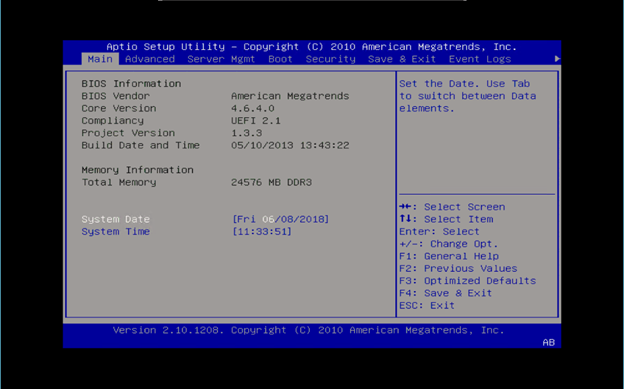
Enter the BIOS setup during Power On Self-Test (POST) and manually set the correct time.
If the BIOS displays only a black screen and is inaccessible, contact Dell Technical Support and reference internal article 000129279.
Example:
Permanent Solution:
Once the time is set correctly, the controller boots successfully. However, this change does not persist if the controller is rebooted again with a faulty coin-cell battery.
Dell Technical Support can help with replacing the faulty coin-cell battery and upgrading the FluidFS firmware.
Applicable Versions: This issue does not occur on the following versions:
- Dell Compellent FS8600: Version 6.0.110054 and Higher
- EqualLogic FS7600 and FS7610: Version 4.0.400005
Contact technical support and reference this article and internal article 000129279 for further details.
Affected Products
Dell Compellent FS8600, EqualLogic FS7600, EqualLogic FS7610Article Properties
Article Number: 000143916
Article Type: Solution
Last Modified: 29 Jul 2025
Version: 6
Find answers to your questions from other Dell users
Support Services
Check if your device is covered by Support Services.