VPLEX:如何解决正常作期间出现的问题
Summary: 本文详细介绍了生成 SolVe Desktop 过程的步骤,以解决在正常 VPLEX作期间出现的任何问题。
This article applies to
This article does not apply to
This article is not tied to any specific product.
Not all product versions are identified in this article.
Instructions
此过程可在以下位置的 Solve Desktop 步骤生成器中找到:
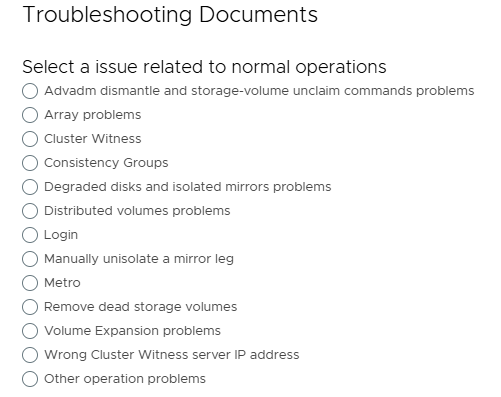
VPLEX —> 其他 —> 故障处理 —> 故障处理文档 —> 故障处理类别 —> 正常作期间的问题
将根据以下选项生成过程:
提醒:如果需要 SolVe Desktop,请按照知识库文章如何下载和安装 SolVe Desktop 进行安装。(需要戴尔支持帐户才能查看本文)
Affected Products
VPLEX, VPLEX GeoSynchronyProducts
VPLEX VS2, VPLEX VS6Article Properties
Article Number: 000158200
Article Type: How To
Last Modified: 30 Sept 2025
Version: 5
Find answers to your questions from other Dell users
Support Services
Check if your device is covered by Support Services.