PowerPath for Windowsでストレージを管理する方法
Summary: ディスクがPowermtディスプレイ オプションに表示されず、ストレージ アレイが管理対象外であるとお客様から報告された場合は、管理対象にする方法
This article applies to
This article does not apply to
This article is not tied to any specific product.
Not all product versions are identified in this article.
Instructions
特定のシナリオでは、PowerPathのストレージ アレイから提供されたディスクに気付かないとお客様から報告を受けた場合。powermt display optionsを実行したときに、そのストレージ アレイが「管理対象外」になっている場合は、PowerPathを使用するWindows環境です。このKBの推奨アクション プランに従って、「管理対象」と同じにしてください。
これは、お客様がSymmetrixストレージ アレイからディスクを提示し、アップグレード後にPowerPathでディスクを検出できないと報告してきたシナリオです。
「powermt display options」の出力には、次の情報が表示されます。
** POWERMT表示オプション**
CLARiX LUN名の表示: true
パス レイテンシー モニター: オフ
パス情報を保持します。オン
パフォーマンス モニター:無効
自動スタンバイ: 障害あたりのIO数(iopf):有効
iopfエージング期間: 1 d
IOPF 制限: 6000
Auto Host Registration: disabled
Storage
System Class Attributes
------------ ----------
Symmetrix periodic autorestore = on
reactive autorestore = on
status = unmanaged
proximity based autostandby = on
proximity based autostandby threshold = default
CLARiiON periodic autorestore = on
reactive autorestore = on
status = unmanaged
proximity based autostandby = N/A
Invista periodic autorestore = on
reactive autorestore = on
status = managed
proximity based autostandby = N/A
Hitachi periodic autorestore = on
reactive autorestore = on
status = unmanaged
proximity based autostandby = N/A
HP xp periodic autorestore = on
reactive autorestore = on
status = unmanaged
proximity based autostandby = N/A
Ess periodic autorestore = on
reactive autorestore = on
status = unmanaged
proximity based autostandby = N/A
Generic periodic autorestore = on
reactive autorestore = on
status = managed
proximity based autostandby = N/A
VPLEX periodic autorestore = on
reactive autorestore = on
status = managed
proximity based autostandby = on
proximity based autostandby threshold = default
VNX periodic autorestore = on
reactive autorestore = on
status = unmanaged
proximity based autostandby = N/A
NetApp periodic autorestore = on
reactive autorestore = on
status = unmanaged
proximity based autostandby = N/A
XtremIO periodic autorestore = on
reactive autorestore = on
status = managed
proximity based autostandby = N/A
Unity periodic autorestore = on
reactive autorestore = on
status = unmanaged
proximity based autostandby = N/A
SC periodic autorestore = on
reactive autorestore = on
status = managed
proximity based autostandby = off
Notice how some of the storage array and especially Symmetrix here is "unmanaged"
Here are the steps along with the screenshot from our lab server , how to make it "Managed"
Open Control Panel :
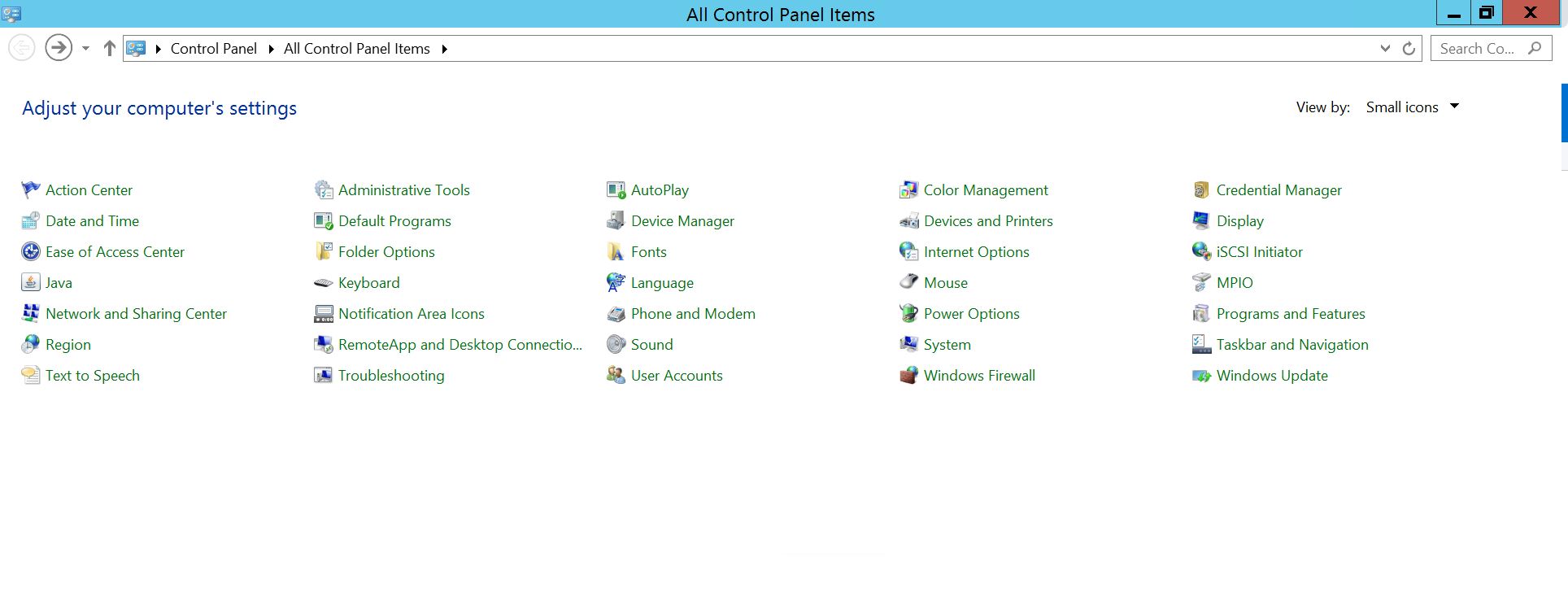
[プログラムと機能]を選択します
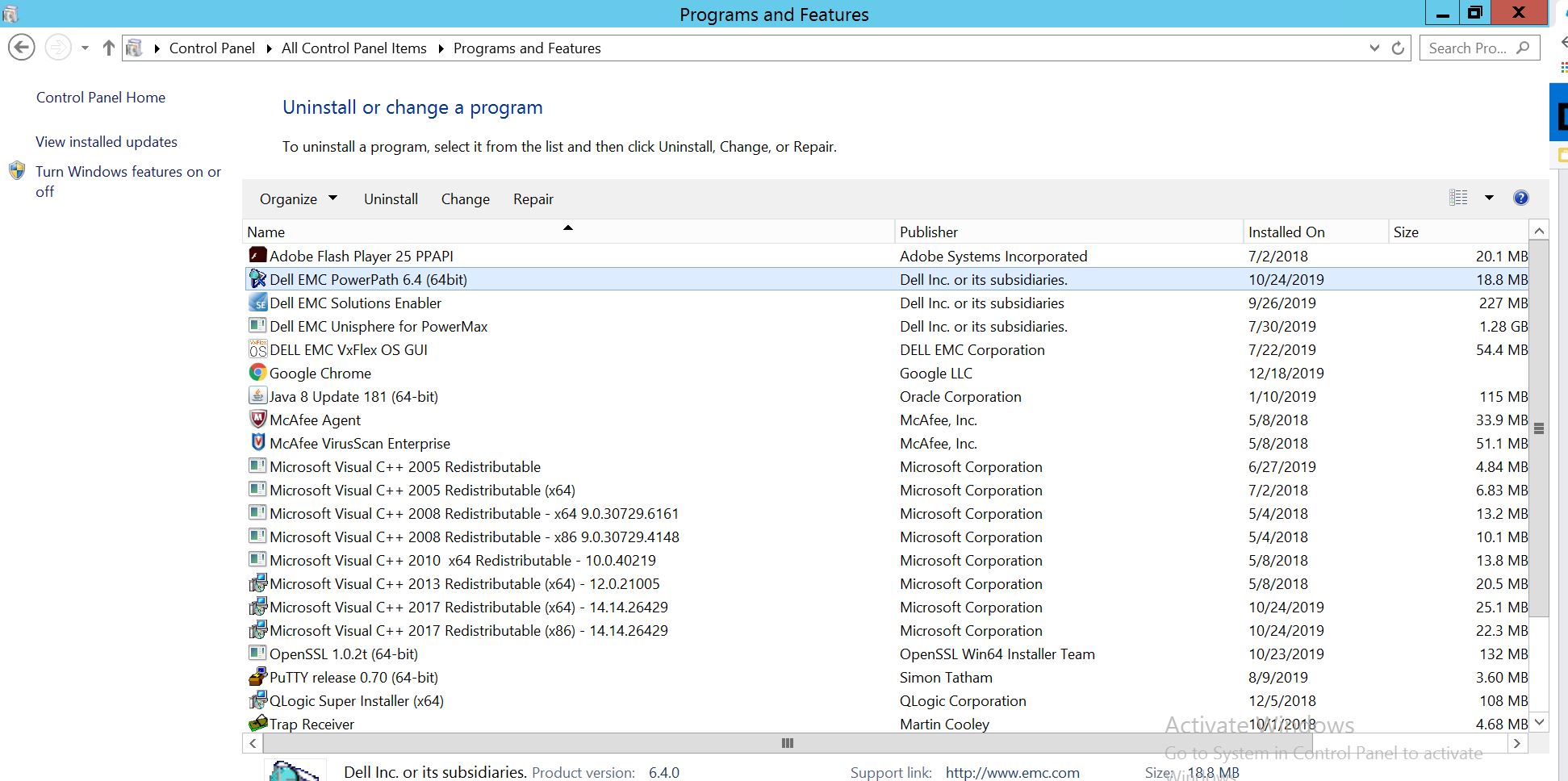
PowerPathを選択し、[変更/変更]を選択してインストーラー プロンプトを開きます。
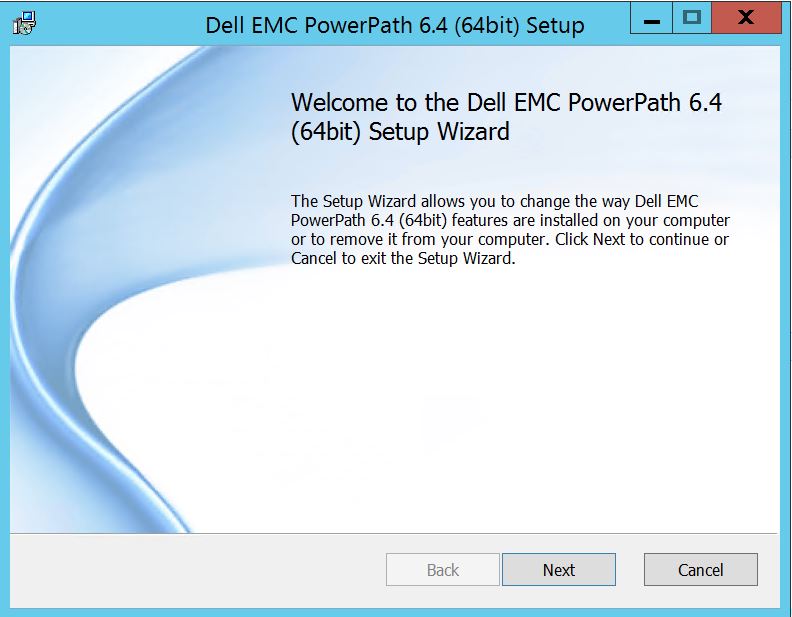
[次へ]をクリックして、変更を選択します:
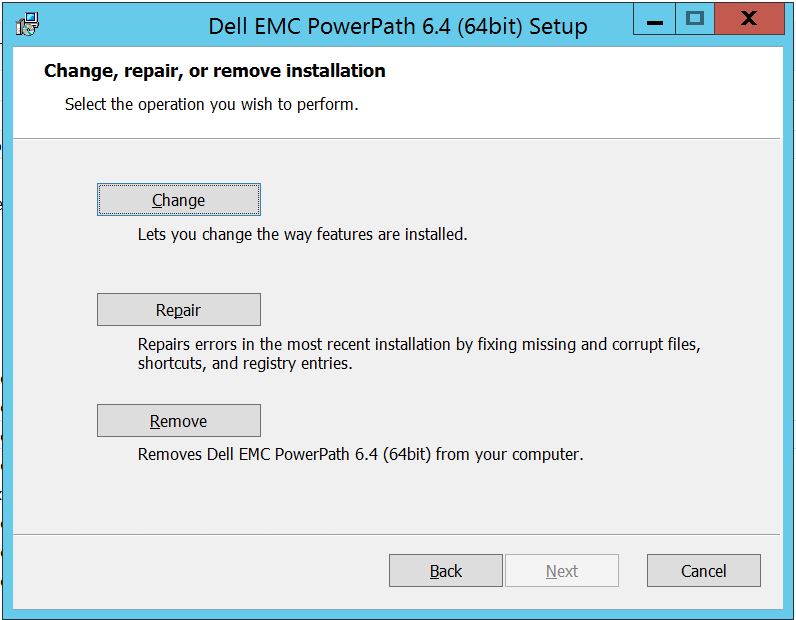
これにより、カスタムセットアップに移動します。
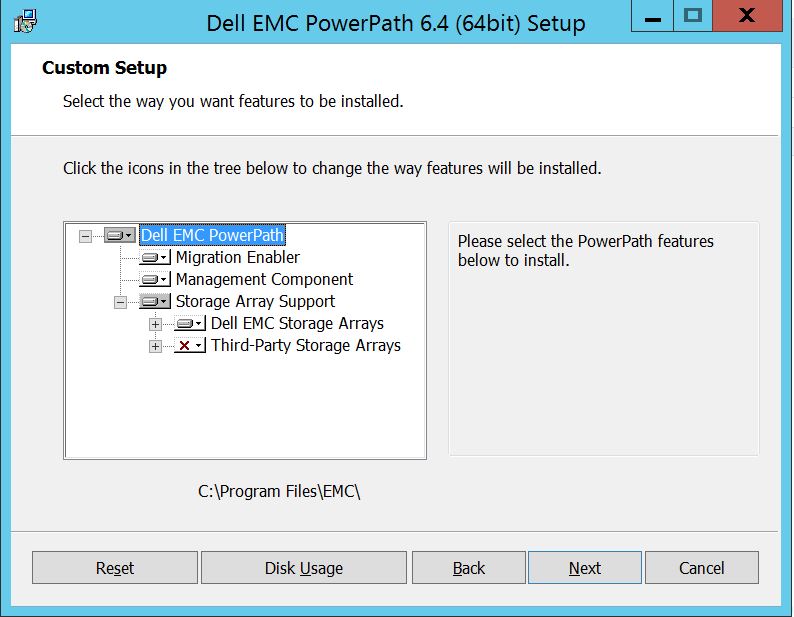
これで、ストレージ アレイのサポートをまだ展開できます。また、Dell EMCストレージ アレイを展開して、PowerPathでサポートされているすべてのストレージ アレイを表示できます。
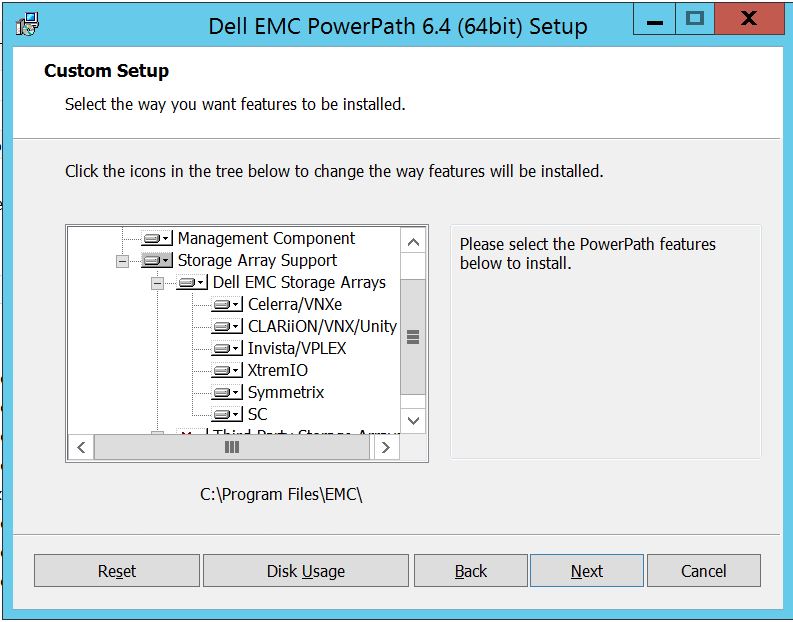
その後、任意のストレージの近くにある小さなダウンキーをさらに使用できます。ここでは、Symmetrixを例にとってみましょう。さらに2つのオプションが表示されます。
1.ローカル ハード ドライブ
2にインストールされます。機能全体がローカルのハード ドライブにインストールされ
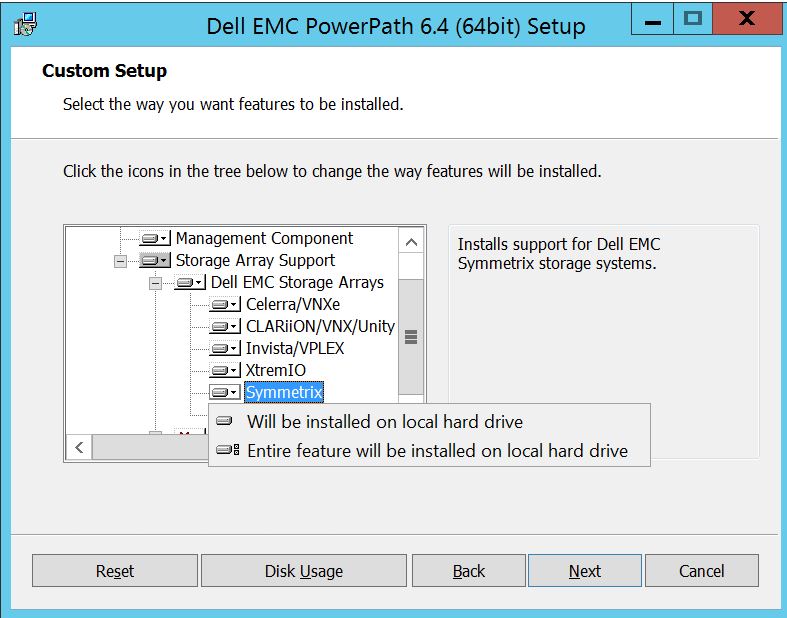
すべてのDell EMCストレージ アレイを管理する場合(基本的にはデフォルトです)
[Dell EMC Storage Array]ドロップダウンでも同じ操作を実行できます:
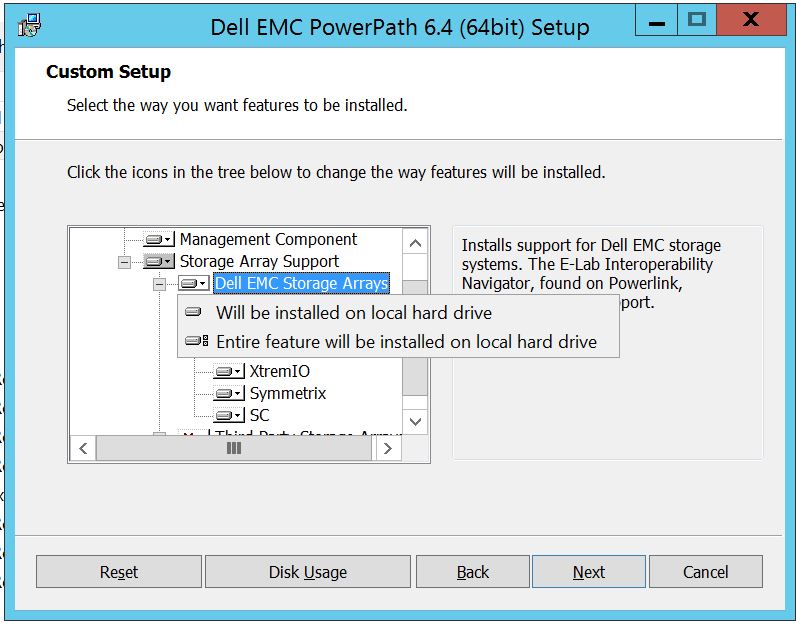
完了したら、[次へ]を選択します
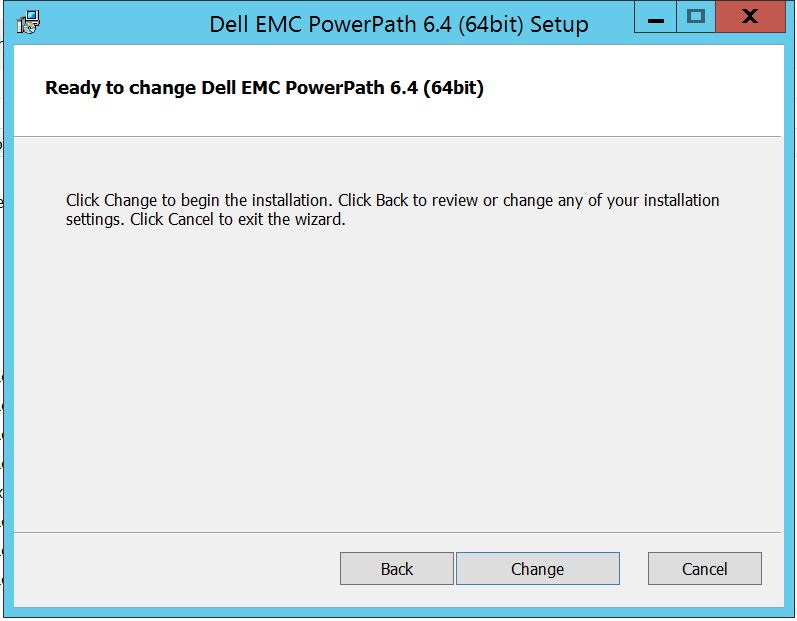
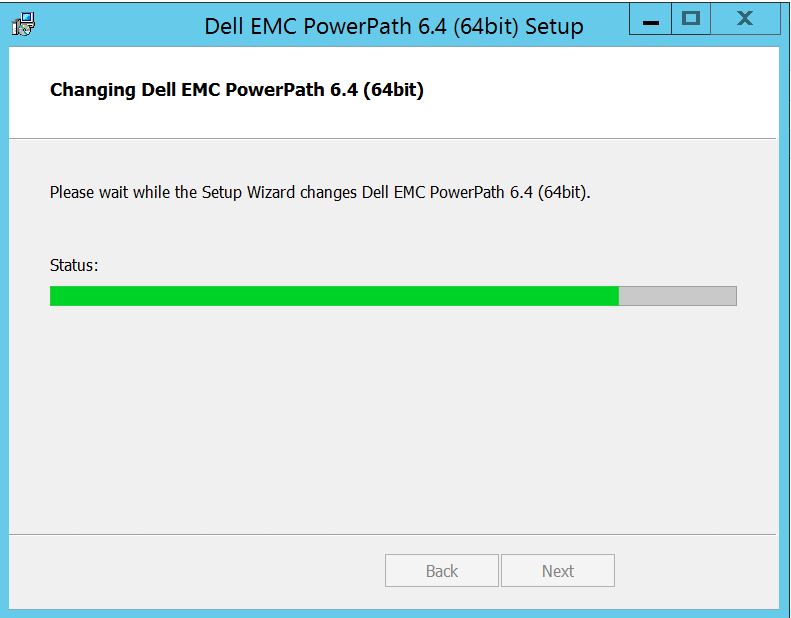
[変更]をクリックして、必要な変更を完了します。
[Finish ]を選択できる場所にこれが表示されるはずです
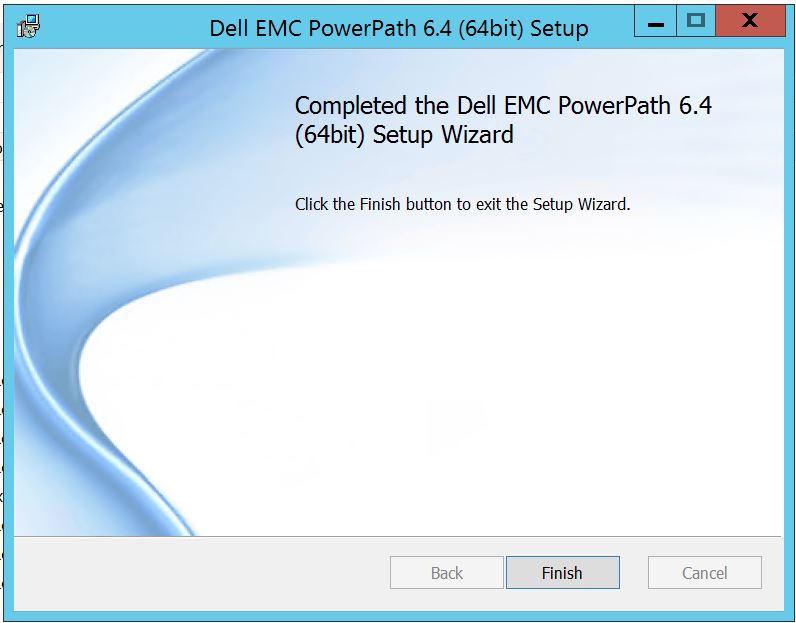
終了後、 再起動を求めるポップアップが表示されます。サーバー レベルで変更を実装する必要があるため、サーバーを再起動してください。これにより、ストレージ アレイ ディスクがPowerPathに表示されます。
再起動後、powermt display optionsを実行すると、出力は次のようになります
** POWERMT表示オプション **
CLARiX LUN名の表示: true
パス レイテンシー モニター: オフ
パス情報を保持します。オン
パフォーマンス モニター:無効
自動スタンバイ: 障害あたりのIO数(iopf):有効
iopfエージング期間: 1 d
IOPF 制限: 6000
Storage
System Class Attributes
------------ ----------
Symmetrix periodic autorestore = on
reactive autorestore = on
status = managed
proximity based autostandby = off
auto host registration = enabled
app finger printing = enabled
device to array performance report = enabled
device in use to array report = enabled
CLARiiON periodic autorestore = on
reactive autorestore = on
status = managed
proximity based autostandby = N/A
auto host registration = disabled
app finger printing = N/A
device to array performance report = N/A
device in use to array report = N/A
Invista periodic autorestore = on
reactive autorestore = on
status = managed
proximity based autostandby = N/A
auto host registration = N/A
app finger printing = N/A
device to array performance report = N/A
device in use to array report = N/A
Hitachi periodic autorestore = on
reactive autorestore = on
status = unmanaged
proximity based autostandby = N/A
auto host registration = N/A
app finger printing = N/A
device to array performance report = N/A
device in use to array report = N/A
HP xp periodic autorestore = on
reactive autorestore = on
status = unmanaged
proximity based autostandby = N/A
auto host registration = N/A
app finger printing = N/A
device to array performance report = N/A
device in use to array report = N/A
Ess periodic autorestore = on
reactive autorestore = on
status = unmanaged
proximity based autostandby = N/A
auto host registration = N/A
app finger printing = N/A
device to array performance report = N/A
device in use to array report = N/A
Generic periodic autorestore = on
reactive autorestore = on
status = managed
proximity based autostandby = N/A
auto host registration = N/A
app finger printing = N/A
device to array performance report = N/A
device in use to array report = N/A
VPLEX periodic autorestore = on
reactive autorestore = on
status = managed
proximity based autostandby = on
proximity based autostandby threshold = default
auto host registration = N/A
app finger printing = N/A
device to array performance report = N/A
device in use to array report = N/A
VNX periodic autorestore = on
reactive autorestore = on
status = managed
proximity based autostandby = N/A
auto host registration = disabled
app finger printing = N/A
device to array performance report = N/A
device in use to array report = N/A
NetApp periodic autorestore = on
reactive autorestore = on
status = unmanaged
proximity based autostandby = N/A
auto host registration = N/A
app finger printing = N/A
device to array performance report = N/A
device in use to array report = N/A
XtremIO periodic autorestore = on
reactive autorestore = on
status = managed
proximity based autostandby = N/A
auto host registration = N/A
app finger printing = N/A
device to array performance report = N/A
device in use to array report = N/A
Unity periodic autorestore = on
reactive autorestore = on
status = managed
proximity based autostandby = N/A
auto host registration = disabled
app finger printing = N/A
device to array performance report = N/A
device in use to array report = N/A
SC periodic autorestore = on
reactive autorestore = on
status = managed
proximity based autostandby = N/A
auto host registration = N/A
app finger printing = N/A
device to array performance report = N/A
device in use to array report = N/A
これは、お客様がSymmetrixストレージ アレイからディスクを提示し、アップグレード後にPowerPathでディスクを検出できないと報告してきたシナリオです。
「powermt display options」の出力には、次の情報が表示されます。
** POWERMT表示オプション**
CLARiX LUN名の表示: true
パス レイテンシー モニター: オフ
パス情報を保持します。オン
パフォーマンス モニター:無効
自動スタンバイ: 障害あたりのIO数(iopf):有効
iopfエージング期間: 1 d
IOPF 制限: 6000
Auto Host Registration: disabled
Storage
System Class Attributes
------------ ----------
Symmetrix periodic autorestore = on
reactive autorestore = on
status = unmanaged
proximity based autostandby = on
proximity based autostandby threshold = default
CLARiiON periodic autorestore = on
reactive autorestore = on
status = unmanaged
proximity based autostandby = N/A
Invista periodic autorestore = on
reactive autorestore = on
status = managed
proximity based autostandby = N/A
Hitachi periodic autorestore = on
reactive autorestore = on
status = unmanaged
proximity based autostandby = N/A
HP xp periodic autorestore = on
reactive autorestore = on
status = unmanaged
proximity based autostandby = N/A
Ess periodic autorestore = on
reactive autorestore = on
status = unmanaged
proximity based autostandby = N/A
Generic periodic autorestore = on
reactive autorestore = on
status = managed
proximity based autostandby = N/A
VPLEX periodic autorestore = on
reactive autorestore = on
status = managed
proximity based autostandby = on
proximity based autostandby threshold = default
VNX periodic autorestore = on
reactive autorestore = on
status = unmanaged
proximity based autostandby = N/A
NetApp periodic autorestore = on
reactive autorestore = on
status = unmanaged
proximity based autostandby = N/A
XtremIO periodic autorestore = on
reactive autorestore = on
status = managed
proximity based autostandby = N/A
Unity periodic autorestore = on
reactive autorestore = on
status = unmanaged
proximity based autostandby = N/A
SC periodic autorestore = on
reactive autorestore = on
status = managed
proximity based autostandby = off
Notice how some of the storage array and especially Symmetrix here is "unmanaged"
Here are the steps along with the screenshot from our lab server , how to make it "Managed"
Open Control Panel :
[プログラムと機能]を選択します
PowerPathを選択し、[変更/変更]を選択してインストーラー プロンプトを開きます。
[次へ]をクリックして、変更を選択します:
これにより、カスタムセットアップに移動します。
これで、ストレージ アレイのサポートをまだ展開できます。また、Dell EMCストレージ アレイを展開して、PowerPathでサポートされているすべてのストレージ アレイを表示できます。
その後、任意のストレージの近くにある小さなダウンキーをさらに使用できます。ここでは、Symmetrixを例にとってみましょう。さらに2つのオプションが表示されます。
1.ローカル ハード ドライブ
2にインストールされます。機能全体がローカルのハード ドライブにインストールされ
すべてのDell EMCストレージ アレイを管理する場合(基本的にはデフォルトです)
[Dell EMC Storage Array]ドロップダウンでも同じ操作を実行できます:
完了したら、[次へ]を選択します
[変更]をクリックして、必要な変更を完了します。
[Finish ]を選択できる場所にこれが表示されるはずです
終了後、 再起動を求めるポップアップが表示されます。サーバー レベルで変更を実装する必要があるため、サーバーを再起動してください。これにより、ストレージ アレイ ディスクがPowerPathに表示されます。
再起動後、powermt display optionsを実行すると、出力は次のようになります
** POWERMT表示オプション **
CLARiX LUN名の表示: true
パス レイテンシー モニター: オフ
パス情報を保持します。オン
パフォーマンス モニター:無効
自動スタンバイ: 障害あたりのIO数(iopf):有効
iopfエージング期間: 1 d
IOPF 制限: 6000
Storage
System Class Attributes
------------ ----------
Symmetrix periodic autorestore = on
reactive autorestore = on
status = managed
proximity based autostandby = off
auto host registration = enabled
app finger printing = enabled
device to array performance report = enabled
device in use to array report = enabled
CLARiiON periodic autorestore = on
reactive autorestore = on
status = managed
proximity based autostandby = N/A
auto host registration = disabled
app finger printing = N/A
device to array performance report = N/A
device in use to array report = N/A
Invista periodic autorestore = on
reactive autorestore = on
status = managed
proximity based autostandby = N/A
auto host registration = N/A
app finger printing = N/A
device to array performance report = N/A
device in use to array report = N/A
Hitachi periodic autorestore = on
reactive autorestore = on
status = unmanaged
proximity based autostandby = N/A
auto host registration = N/A
app finger printing = N/A
device to array performance report = N/A
device in use to array report = N/A
HP xp periodic autorestore = on
reactive autorestore = on
status = unmanaged
proximity based autostandby = N/A
auto host registration = N/A
app finger printing = N/A
device to array performance report = N/A
device in use to array report = N/A
Ess periodic autorestore = on
reactive autorestore = on
status = unmanaged
proximity based autostandby = N/A
auto host registration = N/A
app finger printing = N/A
device to array performance report = N/A
device in use to array report = N/A
Generic periodic autorestore = on
reactive autorestore = on
status = managed
proximity based autostandby = N/A
auto host registration = N/A
app finger printing = N/A
device to array performance report = N/A
device in use to array report = N/A
VPLEX periodic autorestore = on
reactive autorestore = on
status = managed
proximity based autostandby = on
proximity based autostandby threshold = default
auto host registration = N/A
app finger printing = N/A
device to array performance report = N/A
device in use to array report = N/A
VNX periodic autorestore = on
reactive autorestore = on
status = managed
proximity based autostandby = N/A
auto host registration = disabled
app finger printing = N/A
device to array performance report = N/A
device in use to array report = N/A
NetApp periodic autorestore = on
reactive autorestore = on
status = unmanaged
proximity based autostandby = N/A
auto host registration = N/A
app finger printing = N/A
device to array performance report = N/A
device in use to array report = N/A
XtremIO periodic autorestore = on
reactive autorestore = on
status = managed
proximity based autostandby = N/A
auto host registration = N/A
app finger printing = N/A
device to array performance report = N/A
device in use to array report = N/A
Unity periodic autorestore = on
reactive autorestore = on
status = managed
proximity based autostandby = N/A
auto host registration = disabled
app finger printing = N/A
device to array performance report = N/A
device in use to array report = N/A
SC periodic autorestore = on
reactive autorestore = on
status = managed
proximity based autostandby = N/A
auto host registration = N/A
app finger printing = N/A
device to array performance report = N/A
device in use to array report = N/A
Affected Products
PowerPath for WindowsProducts
PowerPath for WindowsArticle Properties
Article Number: 000158477
Article Type: How To
Last Modified: 17 Oct 2025
Version: 4
Find answers to your questions from other Dell users
Support Services
Check if your device is covered by Support Services.