Så här hanterar du lagringen i PowerPath för Windows
Summary: Om kunden rapporterar att diskar inte är synliga och i Powermt-visningsalternativ om du märker att lagringsmatrisen är ohanterad, Hur man gör det hanterat
This article applies to
This article does not apply to
This article is not tied to any specific product.
Not all product versions are identified in this article.
Instructions
I vissa fall, när en kund rapporterar att de inte kan se några diskar som tillhandahållits från lagringsmatrisen i PowerPath. När du kör powermt-bildskärmsalternativ, Om du märker att lagringsmatrisen är "Ohanterad" och sedan I en Windows-miljö med PowerPath. Följ den rekommenderade handlingsplanen i denna KB för att göra samma sak som "Managed".
Här är ett scenario där kunden har presenterat diskar från Symmetrix lagringsdisksystem och har rapporterat att de inte kan upptäcka några diskar i PowerPath efter uppgraderingen.
Utdata från " powermt-visningsalternativ " visar:
** POWERMT-VISNINGSALTERNATIV **
Visa CLARiiON LUN-namn: Övervakare av svarstid för sann
sökväg: Av
beständig sökvägsinformation: På
prestandaövervakaren: inaktiverat
Autostandby: IO per fel (IOPF): aktiverad
IOPF-åldringsperiod: 1 d
IOPF-gräns: 6000
Auto Host Registration: disabled
Storage
System Class Attributes
------------ ----------
Symmetrix periodic autorestore = on
reactive autorestore = on
status = unmanaged
proximity based autostandby = on
proximity based autostandby threshold = default
CLARiiON periodic autorestore = on
reactive autorestore = on
status = unmanaged
proximity based autostandby = N/A
Invista periodic autorestore = on
reactive autorestore = on
status = managed
proximity based autostandby = N/A
Hitachi periodic autorestore = on
reactive autorestore = on
status = unmanaged
proximity based autostandby = N/A
HP xp periodic autorestore = on
reactive autorestore = on
status = unmanaged
proximity based autostandby = N/A
Ess periodic autorestore = on
reactive autorestore = on
status = unmanaged
proximity based autostandby = N/A
Generic periodic autorestore = on
reactive autorestore = on
status = managed
proximity based autostandby = N/A
VPLEX periodic autorestore = on
reactive autorestore = on
status = managed
proximity based autostandby = on
proximity based autostandby threshold = default
VNX periodic autorestore = on
reactive autorestore = on
status = unmanaged
proximity based autostandby = N/A
NetApp periodic autorestore = on
reactive autorestore = on
status = unmanaged
proximity based autostandby = N/A
XtremIO periodic autorestore = on
reactive autorestore = on
status = managed
proximity based autostandby = N/A
Unity periodic autorestore = on
reactive autorestore = on
status = unmanaged
proximity based autostandby = N/A
SC periodic autorestore = on
reactive autorestore = on
status = managed
proximity based autostandby = off
Notice how some of the storage array and especially Symmetrix here is "unmanaged"
Here are the steps along with the screenshot from our lab server , how to make it "Managed"
Open Control Panel :
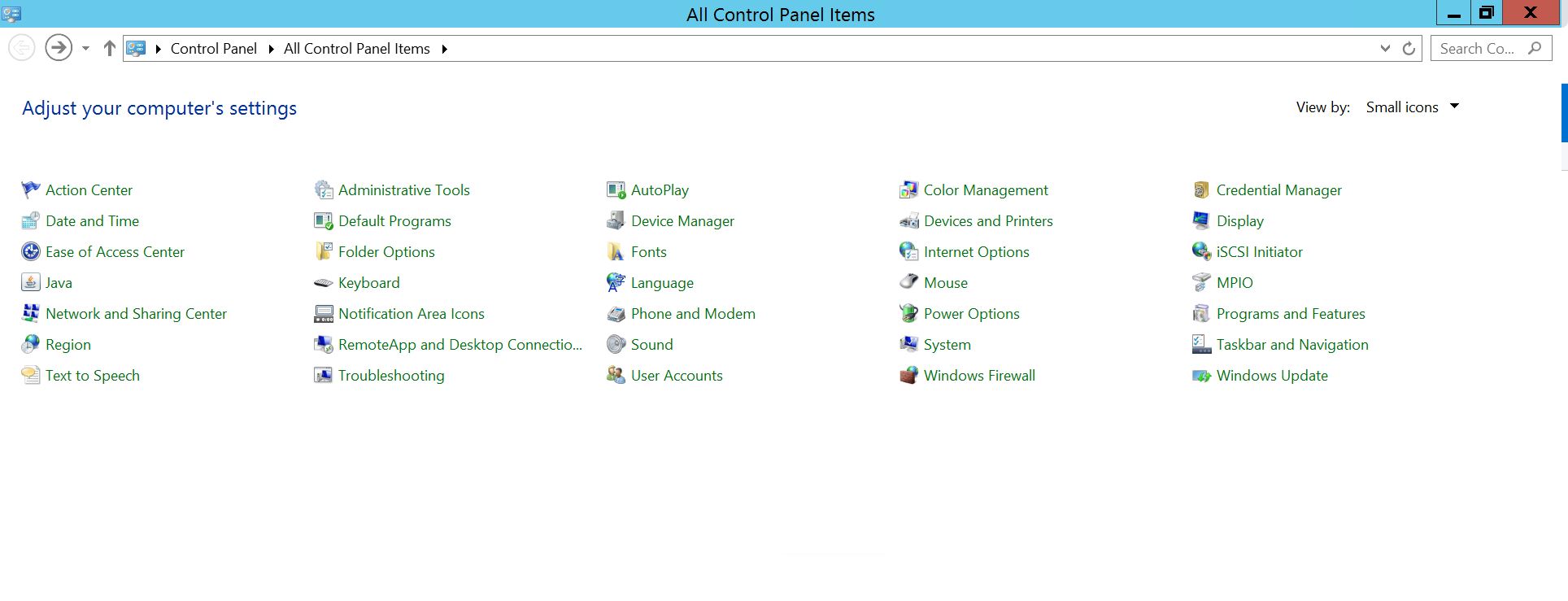
Välj Program och funktioner
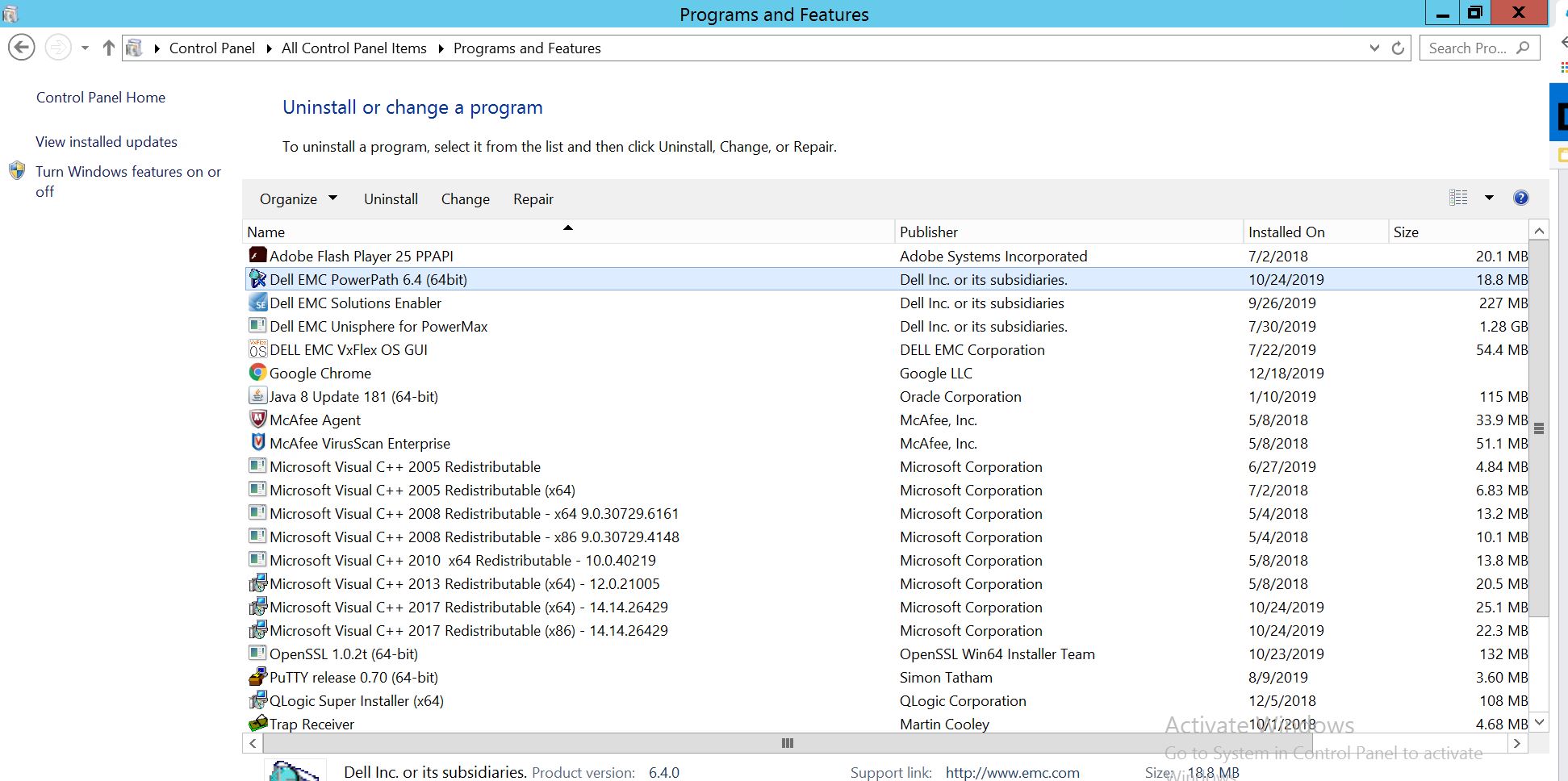
Välj PowerPath och välj Ändra/Ändra, vilket öppnar installationsprompten:
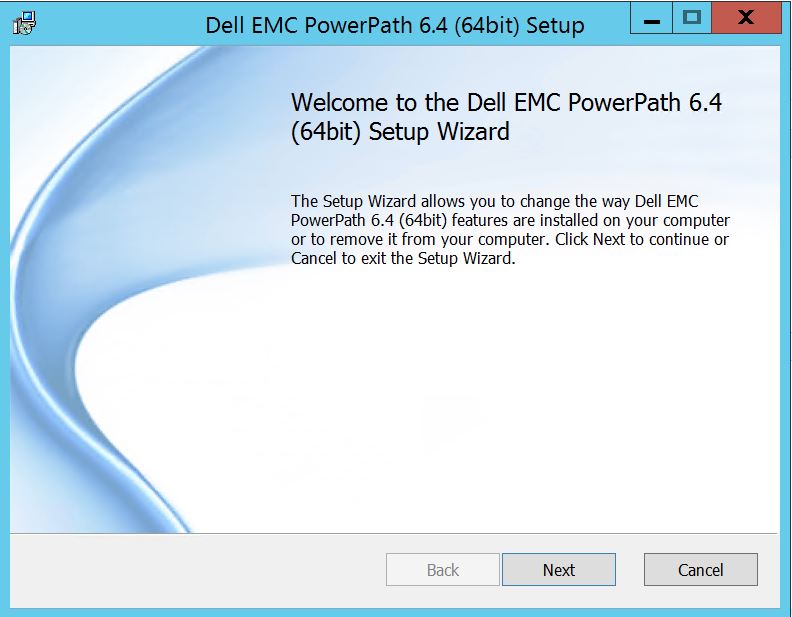
Klicka på Nästa och följ den valda ändringen:
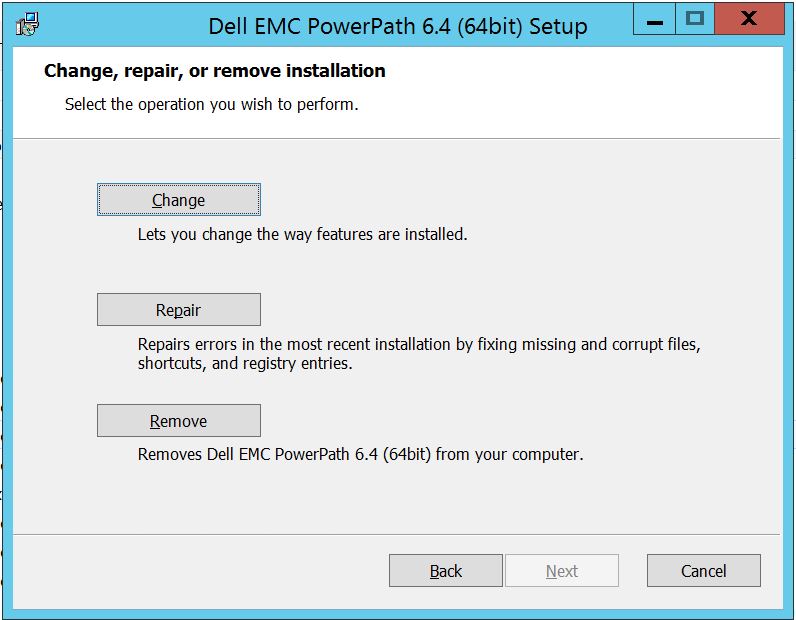
Vilket tar dig till anpassade inställningar:
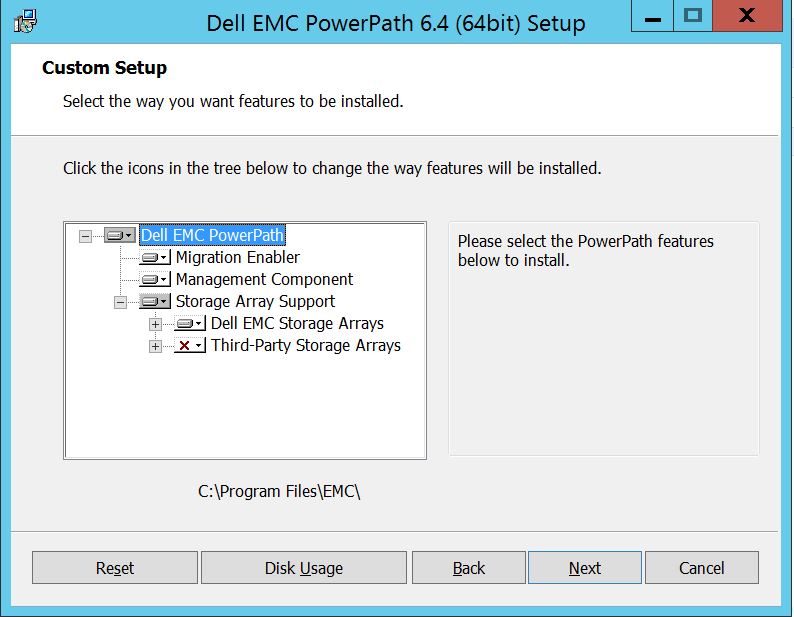
Du kan nu utöka stödet för lagringsdisksystem, om det inte redan finns, och även utöka Dell EMC-lagringsdisksystem som visar alla lagringsdisksystem som stöds under PowerPath:
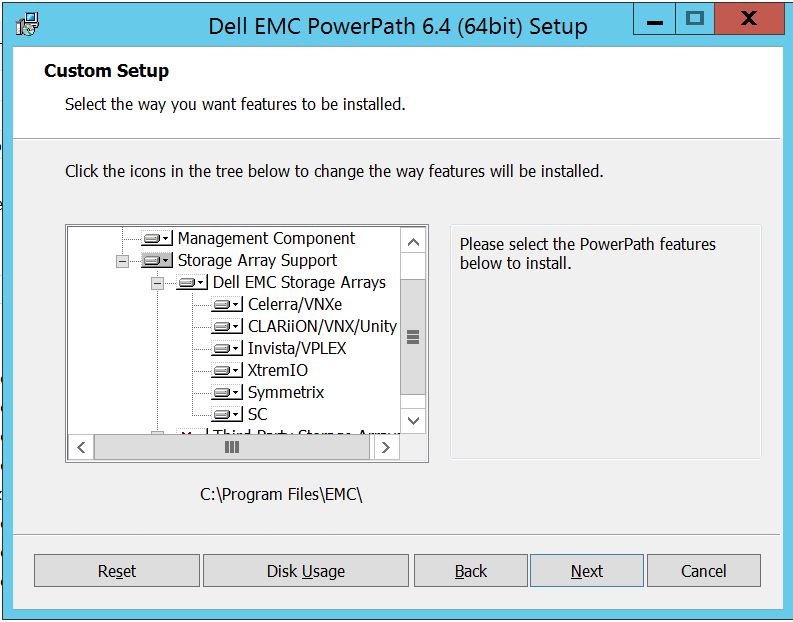
Sedan kan du fortsätta att använda den lilla nyckeln nära vilken som helst av lagringarna. Låt oss till exempel ta Symmetrix. Det kommer vidare att visa 2 alternativ:
1. Installeras på lokal hårddisk
2. Hela funktionen installeras på den lokala hårddisken
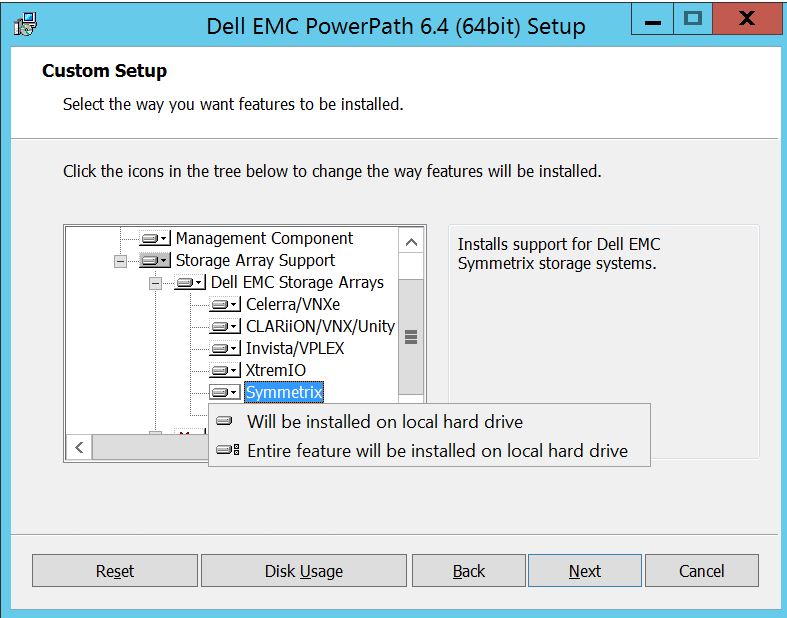
Om du vill att alla Dell EMC-lagringsdisksystem ska hanteras (vilket i princip är standardinställningen)
kan du även göra samma sak i listrutan Dell EMC-lagringsdisksystem:

När det är klart väljer du nästa
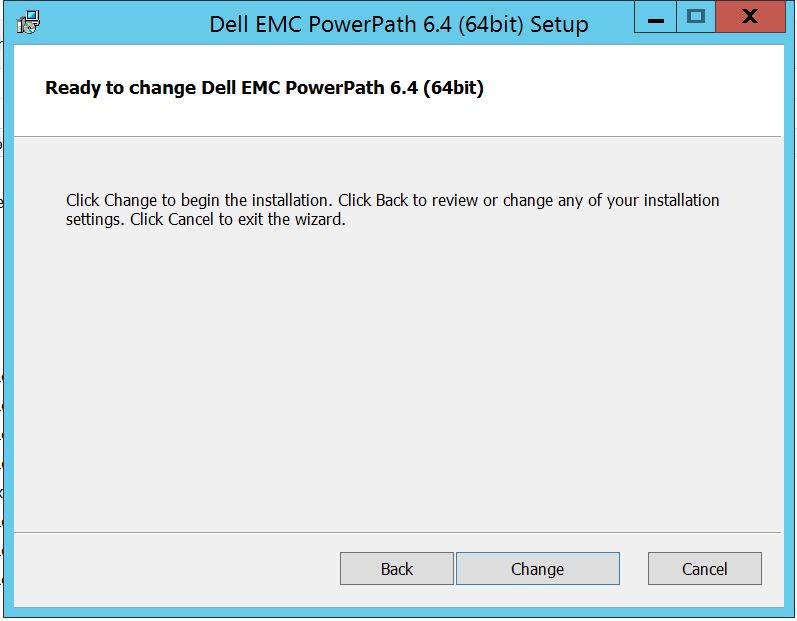
Klicka på Ändra för att slutföra de nödvändiga ändringarna:
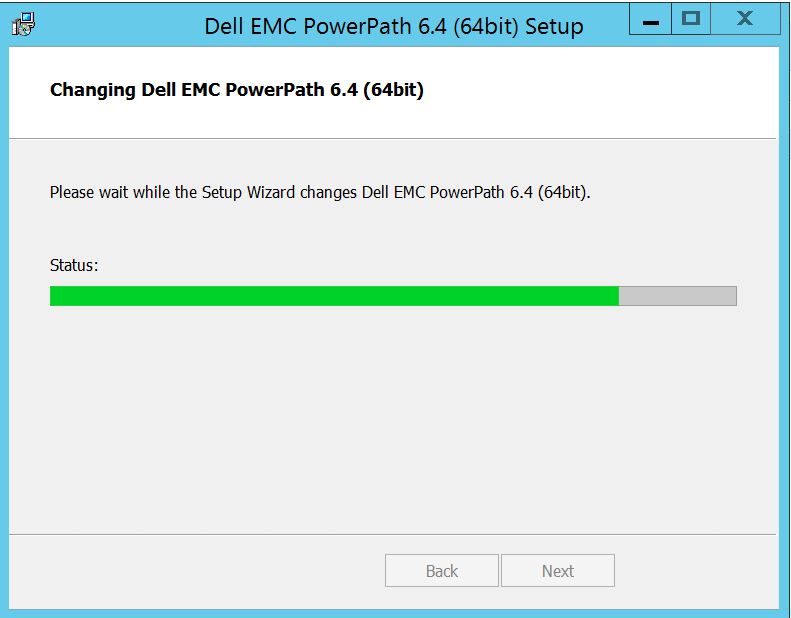
Post som du bör se detta där du kan välja "Slutför"
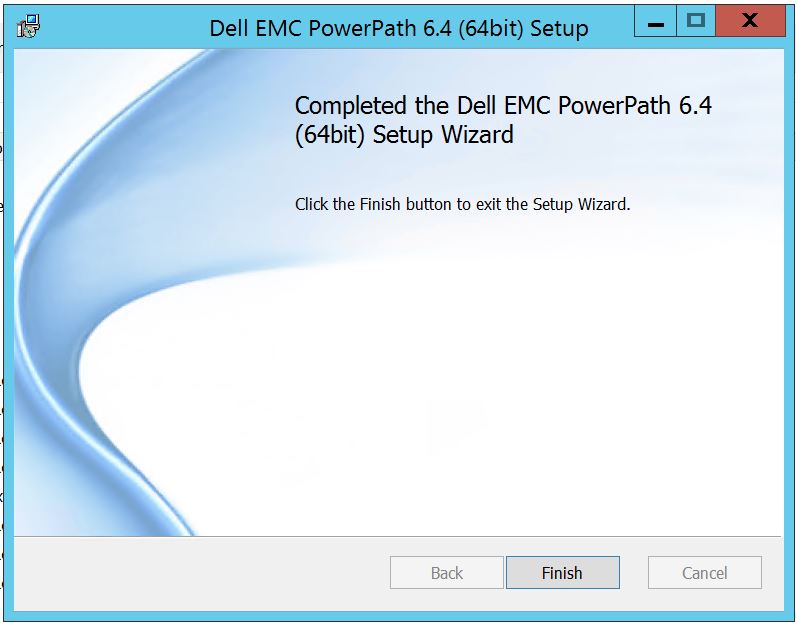 Efter avslutad kommer du att få ett popup-fönster som ber om omstart. Välj för att starta om servern eftersom ändringarna måste implementeras på servernivå som sedan gör lagringsdiskarna synliga i PowerPath.
Efter omstart när du kör powermt-visningsalternativ, så här kommer utgången att se ut:
** POWERMT-VISNINGSALTERNATIV **
Visa CLARiiON LUN-namn: Övervakare av svarstid för sann
sökväg: Av
beständig sökvägsinformation: På
prestandaövervakaren: inaktiverat
Autostandby: IO per fel (IOPF): aktiverad
IOPF-åldringsperiod: 1 d
IOPF-gräns: 6000
Storage
System Class Attributes
------------ ----------
Symmetrix periodic autorestore = on
reactive autorestore = on
status = managed
proximity based autostandby = off
auto host registration = enabled
app finger printing = enabled
device to array performance report = enabled
device in use to array report = enabled
CLARiiON periodic autorestore = on
reactive autorestore = on
status = managed
proximity based autostandby = N/A
auto host registration = disabled
app finger printing = N/A
device to array performance report = N/A
device in use to array report = N/A
Invista periodic autorestore = on
reactive autorestore = on
status = managed
proximity based autostandby = N/A
auto host registration = N/A
app finger printing = N/A
device to array performance report = N/A
device in use to array report = N/A
Hitachi periodic autorestore = on
reactive autorestore = on
status = unmanaged
proximity based autostandby = N/A
auto host registration = N/A
app finger printing = N/A
device to array performance report = N/A
device in use to array report = N/A
HP xp periodic autorestore = on
reactive autorestore = on
status = unmanaged
proximity based autostandby = N/A
auto host registration = N/A
app finger printing = N/A
device to array performance report = N/A
device in use to array report = N/A
Ess periodic autorestore = on
reactive autorestore = on
status = unmanaged
proximity based autostandby = N/A
auto host registration = N/A
app finger printing = N/A
device to array performance report = N/A
device in use to array report = N/A
Generic periodic autorestore = on
reactive autorestore = on
status = managed
proximity based autostandby = N/A
auto host registration = N/A
app finger printing = N/A
device to array performance report = N/A
device in use to array report = N/A
VPLEX periodic autorestore = on
reactive autorestore = on
status = managed
proximity based autostandby = on
proximity based autostandby threshold = default
auto host registration = N/A
app finger printing = N/A
device to array performance report = N/A
device in use to array report = N/A
VNX periodic autorestore = on
reactive autorestore = on
status = managed
proximity based autostandby = N/A
auto host registration = disabled
app finger printing = N/A
device to array performance report = N/A
device in use to array report = N/A
NetApp periodic autorestore = on
reactive autorestore = on
status = unmanaged
proximity based autostandby = N/A
auto host registration = N/A
app finger printing = N/A
device to array performance report = N/A
device in use to array report = N/A
XtremIO periodic autorestore = on
reactive autorestore = on
status = managed
proximity based autostandby = N/A
auto host registration = N/A
app finger printing = N/A
device to array performance report = N/A
device in use to array report = N/A
Unity periodic autorestore = on
reactive autorestore = on
status = managed
proximity based autostandby = N/A
auto host registration = disabled
app finger printing = N/A
device to array performance report = N/A
device in use to array report = N/A
SC periodic autorestore = on
reactive autorestore = on
status = managed
proximity based autostandby = N/A
auto host registration = N/A
app finger printing = N/A
device to array performance report = N/A
device in use to array report = N/A
Här är ett scenario där kunden har presenterat diskar från Symmetrix lagringsdisksystem och har rapporterat att de inte kan upptäcka några diskar i PowerPath efter uppgraderingen.
Utdata från " powermt-visningsalternativ " visar:
** POWERMT-VISNINGSALTERNATIV **
Visa CLARiiON LUN-namn: Övervakare av svarstid för sann
sökväg: Av
beständig sökvägsinformation: På
prestandaövervakaren: inaktiverat
Autostandby: IO per fel (IOPF): aktiverad
IOPF-åldringsperiod: 1 d
IOPF-gräns: 6000
Auto Host Registration: disabled
Storage
System Class Attributes
------------ ----------
Symmetrix periodic autorestore = on
reactive autorestore = on
status = unmanaged
proximity based autostandby = on
proximity based autostandby threshold = default
CLARiiON periodic autorestore = on
reactive autorestore = on
status = unmanaged
proximity based autostandby = N/A
Invista periodic autorestore = on
reactive autorestore = on
status = managed
proximity based autostandby = N/A
Hitachi periodic autorestore = on
reactive autorestore = on
status = unmanaged
proximity based autostandby = N/A
HP xp periodic autorestore = on
reactive autorestore = on
status = unmanaged
proximity based autostandby = N/A
Ess periodic autorestore = on
reactive autorestore = on
status = unmanaged
proximity based autostandby = N/A
Generic periodic autorestore = on
reactive autorestore = on
status = managed
proximity based autostandby = N/A
VPLEX periodic autorestore = on
reactive autorestore = on
status = managed
proximity based autostandby = on
proximity based autostandby threshold = default
VNX periodic autorestore = on
reactive autorestore = on
status = unmanaged
proximity based autostandby = N/A
NetApp periodic autorestore = on
reactive autorestore = on
status = unmanaged
proximity based autostandby = N/A
XtremIO periodic autorestore = on
reactive autorestore = on
status = managed
proximity based autostandby = N/A
Unity periodic autorestore = on
reactive autorestore = on
status = unmanaged
proximity based autostandby = N/A
SC periodic autorestore = on
reactive autorestore = on
status = managed
proximity based autostandby = off
Notice how some of the storage array and especially Symmetrix here is "unmanaged"
Here are the steps along with the screenshot from our lab server , how to make it "Managed"
Open Control Panel :
Välj Program och funktioner
Välj PowerPath och välj Ändra/Ändra, vilket öppnar installationsprompten:
Klicka på Nästa och följ den valda ändringen:
Vilket tar dig till anpassade inställningar:
Du kan nu utöka stödet för lagringsdisksystem, om det inte redan finns, och även utöka Dell EMC-lagringsdisksystem som visar alla lagringsdisksystem som stöds under PowerPath:
Sedan kan du fortsätta att använda den lilla nyckeln nära vilken som helst av lagringarna. Låt oss till exempel ta Symmetrix. Det kommer vidare att visa 2 alternativ:
1. Installeras på lokal hårddisk
2. Hela funktionen installeras på den lokala hårddisken
Om du vill att alla Dell EMC-lagringsdisksystem ska hanteras (vilket i princip är standardinställningen)
kan du även göra samma sak i listrutan Dell EMC-lagringsdisksystem:
När det är klart väljer du nästa
Klicka på Ändra för att slutföra de nödvändiga ändringarna:
Post som du bör se detta där du kan välja "Slutför"
Efter avslutad kommer du att få ett popup-fönster som ber om omstart. Välj för att starta om servern eftersom ändringarna måste implementeras på servernivå som sedan gör lagringsdiskarna synliga i PowerPath.
Efter omstart när du kör powermt-visningsalternativ, så här kommer utgången att se ut:
** POWERMT-VISNINGSALTERNATIV **
Visa CLARiiON LUN-namn: Övervakare av svarstid för sann
sökväg: Av
beständig sökvägsinformation: På
prestandaövervakaren: inaktiverat
Autostandby: IO per fel (IOPF): aktiverad
IOPF-åldringsperiod: 1 d
IOPF-gräns: 6000
Storage
System Class Attributes
------------ ----------
Symmetrix periodic autorestore = on
reactive autorestore = on
status = managed
proximity based autostandby = off
auto host registration = enabled
app finger printing = enabled
device to array performance report = enabled
device in use to array report = enabled
CLARiiON periodic autorestore = on
reactive autorestore = on
status = managed
proximity based autostandby = N/A
auto host registration = disabled
app finger printing = N/A
device to array performance report = N/A
device in use to array report = N/A
Invista periodic autorestore = on
reactive autorestore = on
status = managed
proximity based autostandby = N/A
auto host registration = N/A
app finger printing = N/A
device to array performance report = N/A
device in use to array report = N/A
Hitachi periodic autorestore = on
reactive autorestore = on
status = unmanaged
proximity based autostandby = N/A
auto host registration = N/A
app finger printing = N/A
device to array performance report = N/A
device in use to array report = N/A
HP xp periodic autorestore = on
reactive autorestore = on
status = unmanaged
proximity based autostandby = N/A
auto host registration = N/A
app finger printing = N/A
device to array performance report = N/A
device in use to array report = N/A
Ess periodic autorestore = on
reactive autorestore = on
status = unmanaged
proximity based autostandby = N/A
auto host registration = N/A
app finger printing = N/A
device to array performance report = N/A
device in use to array report = N/A
Generic periodic autorestore = on
reactive autorestore = on
status = managed
proximity based autostandby = N/A
auto host registration = N/A
app finger printing = N/A
device to array performance report = N/A
device in use to array report = N/A
VPLEX periodic autorestore = on
reactive autorestore = on
status = managed
proximity based autostandby = on
proximity based autostandby threshold = default
auto host registration = N/A
app finger printing = N/A
device to array performance report = N/A
device in use to array report = N/A
VNX periodic autorestore = on
reactive autorestore = on
status = managed
proximity based autostandby = N/A
auto host registration = disabled
app finger printing = N/A
device to array performance report = N/A
device in use to array report = N/A
NetApp periodic autorestore = on
reactive autorestore = on
status = unmanaged
proximity based autostandby = N/A
auto host registration = N/A
app finger printing = N/A
device to array performance report = N/A
device in use to array report = N/A
XtremIO periodic autorestore = on
reactive autorestore = on
status = managed
proximity based autostandby = N/A
auto host registration = N/A
app finger printing = N/A
device to array performance report = N/A
device in use to array report = N/A
Unity periodic autorestore = on
reactive autorestore = on
status = managed
proximity based autostandby = N/A
auto host registration = disabled
app finger printing = N/A
device to array performance report = N/A
device in use to array report = N/A
SC periodic autorestore = on
reactive autorestore = on
status = managed
proximity based autostandby = N/A
auto host registration = N/A
app finger printing = N/A
device to array performance report = N/A
device in use to array report = N/A
Affected Products
PowerPath for WindowsProducts
PowerPath for WindowsArticle Properties
Article Number: 000158477
Article Type: How To
Last Modified: 17 Oct 2025
Version: 4
Find answers to your questions from other Dell users
Support Services
Check if your device is covered by Support Services.