Avamar:SQL AlwaysOnクラスターの参照に失敗しました
Summary: このKB記事では、SQL AlwaysOnクラスターがデフォルト以外のポートでリッスンするように構成されている場合に、ネットワーク関連またはインスタンス固有のエラーによる構造化照会言語(SQL)AlwaysOn(AO)クラスターの参照およびバックアップの失敗を解決するための回避策について説明します。
This article applies to
This article does not apply to
This article is not tied to any specific product.
Not all product versions are identified in this article.
Symptoms
SQL AlwaysOn(AO)クラスターは、次のようなエラー メッセージで参照またはバックアップに失敗することがあります。
avsql Error <9072>: sqlconnectimpl_smo::connect Microsoft.SqlServer.Management.Common.ConnectionFailureException: Failed to connect to server EMClistener. ---> System.Data.SqlClient.SqlException: A network-related or instance-specific error occurred while establishing a connection to SQL Server. The server was not found or was not accessible. Verify that the instance name is correct and that SQL Server is configured to allow remote connections. (provider: Named Pipes Provider, error: 40 - Could not open a connection to SQL Server) ---> System.ComponentModel.Win32Exception: The system cannot find the file specifiedCause
SQL AOリスナーは、デフォルト以外のポートでリッスンするように構成されています。デフォルトでは、TCPポート1433でリスンするように構成されています。
Resolution
Avamar SQL AlwaysOn可用性グループ用に指定された共有varフォルダーにavsql.cmdファイルを作成し、次のフラグを追加します。
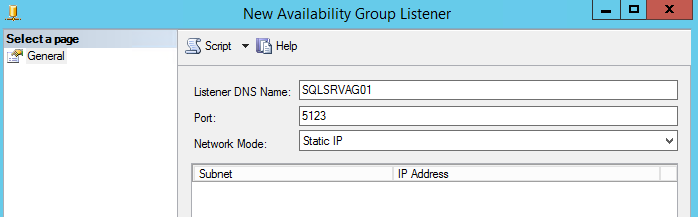
--sqlserver=<availability group listener's IP address>,<listener port>
Example:
--sqlserver=172.1.1.1,5123
AOリスナー ポートに設定されたIPアドレスとポートは、SQL Server Management Studioに移動すると見つかります。
Affected Products
Avamar, Avamar Plug-in for SQLArticle Properties
Article Number: 000162984
Article Type: Solution
Last Modified: 23 Sept 2025
Version: 4
Find answers to your questions from other Dell users
Support Services
Check if your device is covered by Support Services.