Avamar: Niepowodzenie przeglądania klastra SQL AlwaysOn
Summary: W tym artykule bazy wiedzy omówiono obejście problemu polegającego na rozwiązywaniu problemów z przeglądaniem i tworzeniem kopii zapasowych klastra języka SQL (SQL) AlwaysOn (AO) z powodu błędów związanych z siecią lub specyficznych dla wystąpienia, gdy klaster SQL AlwaysOn jest skonfigurowany do nasłuchiwania na porcie innym niż domyślny. ...
This article applies to
This article does not apply to
This article is not tied to any specific product.
Not all product versions are identified in this article.
Symptoms
Klaster SQL AlwaysOn (AO) może nie przeglądać lub tworzyć kopii zapasowej z komunikatem o błędzie podobnym do następującego:
avsql Error <9072>: sqlconnectimpl_smo::connect Microsoft.SqlServer.Management.Common.ConnectionFailureException: Failed to connect to server EMClistener. ---> System.Data.SqlClient.SqlException: A network-related or instance-specific error occurred while establishing a connection to SQL Server. The server was not found or was not accessible. Verify that the instance name is correct and that SQL Server is configured to allow remote connections. (provider: Named Pipes Provider, error: 40 - Could not open a connection to SQL Server) ---> System.ComponentModel.Win32Exception: The system cannot find the file specifiedCause
Odbiornik SQL AO jest skonfigurowany do nasłuchiwania na porcie innym niż domyślny. Domyślnie jest skonfigurowany do nasłuchiwania na porcie TCP 1433.
Resolution
Utwórz plik avsql.cmd w udostępnionym folderze var przeznaczonym dla grupy dostępności Avamar SQL AlwaysOn i dodaj następującą flagę:
--sqlserver=<availability group listener's IP address>,<listener port>
Przykład:
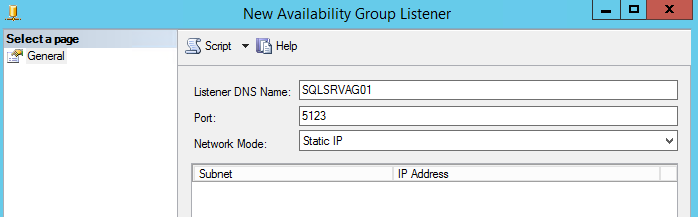
--sqlserver=172.1.1.1,5123
Adres IP i port skonfigurowany dla portu odbiornika AO można znaleźć, przechodząc do SQL Server Management Studio:
Affected Products
Avamar, Avamar Plug-in for SQLArticle Properties
Article Number: 000162984
Article Type: Solution
Last Modified: 23 Sept 2025
Version: 4
Find answers to your questions from other Dell users
Support Services
Check if your device is covered by Support Services.