Avamar. Сбой обзора кластера SQL AlwaysOn
Summary: В этой статье базы знаний описывается временное решение для устранения сбоев просмотра и резервного копирования кластера AlwaysOn (AO) на языке структурированных запросов (SQL) из-за ошибок, связанных с сетью или экземпляром, когда кластер SQL AlwaysOn настроен на прослушивание порта, отличного от порта по умолчанию. ...
This article applies to
This article does not apply to
This article is not tied to any specific product.
Not all product versions are identified in this article.
Symptoms
Кластер SQL AlwaysOn (AO) может не выполнять просмотр или резервное копирование с сообщением об ошибке, подобным следующему:
avsql Error <9072>: sqlconnectimpl_smo::connect Microsoft.SqlServer.Management.Common.ConnectionFailureException: Failed to connect to server EMClistener. ---> System.Data.SqlClient.SqlException: A network-related or instance-specific error occurred while establishing a connection to SQL Server. The server was not found or was not accessible. Verify that the instance name is correct and that SQL Server is configured to allow remote connections. (provider: Named Pipes Provider, error: 40 - Could not open a connection to SQL Server) ---> System.ComponentModel.Win32Exception: The system cannot find the file specifiedCause
Прослушиватель SQL AO настроен на прослушивание порта, отличного от порта по умолчанию. По умолчанию он настроен на прослушивание TCP-порта 1433.
Resolution
Создайте файл avsql.cmd в общей папке var, предназначенной для группы доступности Avamar SQL AlwaysOn, и добавьте следующий флаг:
--sqlserver=<availability group listener's IP address>,<listener port>
Пример:
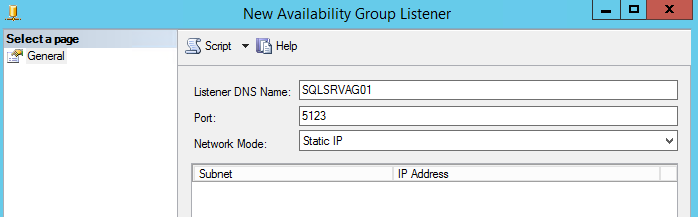
--sqlserver=172.1.1.1,5123
IP-адрес и порт, настроенные для порта прослушивателя AO, можно узнать, перейдя в среду SQL Server Management Studio:
Affected Products
Avamar, Avamar Plug-in for SQLArticle Properties
Article Number: 000162984
Article Type: Solution
Last Modified: 23 Sept 2025
Version: 4
Find answers to your questions from other Dell users
Support Services
Check if your device is covered by Support Services.