Avamar:SQL AlwaysOn 叢集瀏覽失敗
Summary: 本知識文章探討當 SQL AlwaysOn 叢集設定為偵聽非預設連接埠時,解決因網路相關或例項特定錯誤而導致的結構化查詢語言 (SQL) AlwaysOn (AO) 叢集瀏覽和備份失敗的因應措施。
This article applies to
This article does not apply to
This article is not tied to any specific product.
Not all product versions are identified in this article.
Symptoms
SQL AlwaysOn (AO) 叢集可能無法瀏覽或備份,並出現類似以下的錯誤訊息:
avsql Error <9072>: sqlconnectimpl_smo::connect Microsoft.SqlServer.Management.Common.ConnectionFailureException: Failed to connect to server EMClistener. ---> System.Data.SqlClient.SqlException: A network-related or instance-specific error occurred while establishing a connection to SQL Server. The server was not found or was not accessible. Verify that the instance name is correct and that SQL Server is configured to allow remote connections. (provider: Named Pipes Provider, error: 40 - Could not open a connection to SQL Server) ---> System.ComponentModel.Win32Exception: The system cannot find the file specifiedCause
SQL AO 偵聽器配置為偵聽非預設埠。默認情況下,它配置為偵聽 TCP 連接埠 1433。
Resolution
在為 Avamar SQL AlwaysOn 可用性群組指定的共用 var 資料夾中建立avsql.cmd檔案,並新增下列旗標:
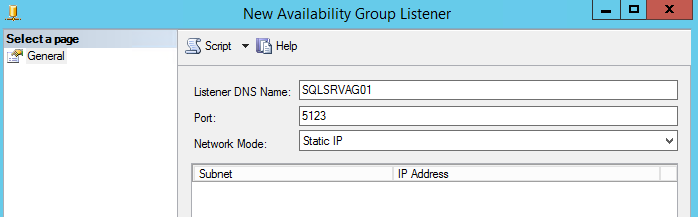
--sqlserver=<availability group listener's IP address>,<listener port>
範例:
--sqlserver=172.1.1.1,5123
您可以進入 SQL Server Management Studio 找到為 AO 偵聽器連接埠設定的 IP 位址與連接埠:
Affected Products
Avamar, Avamar Plug-in for SQLArticle Properties
Article Number: 000162984
Article Type: Solution
Last Modified: 23 Sept 2025
Version: 4
Find answers to your questions from other Dell users
Support Services
Check if your device is covered by Support Services.