Авамар: SQL AlwaysOn кластерний перегляд невдало
Summary: У цій статті KB розглядається обхідний шлях усунення збоїв кластерного перегляду та резервного копіювання через мережеві або інстанційні помилки, коли кластер SQL AlwaysOn налаштований на прослуховування на нестандартному порту. ...
This article applies to
This article does not apply to
This article is not tied to any specific product.
Not all product versions are identified in this article.
Symptoms
Кластер SQL AlwaysOn (AO) може не переглядати або робити резервне копіювання з повідомленням про помилку, подібне до наступного:
avsql Error <9072>: sqlconnectimpl_smo::connect Microsoft.SqlServer.Management.Common.ConnectionFailureException: Failed to connect to server EMClistener. ---> System.Data.SqlClient.SqlException: A network-related or instance-specific error occurred while establishing a connection to SQL Server. The server was not found or was not accessible. Verify that the instance name is correct and that SQL Server is configured to allow remote connections. (provider: Named Pipes Provider, error: 40 - Could not open a connection to SQL Server) ---> System.ComponentModel.Win32Exception: The system cannot find the file specifiedCause
Слухач SQL AO налаштований на прослуховування на нестандартному порту. За замовчуванням він налаштований на прослуховування на TCP-порті 1433.
Resolution
Створіть avsql.cmd-файл у спільній папці var, призначеній для групи доступності Avamar SQL AlwaysOn, і додайте наступний прапорець:
--sqlserver=<availability group listener's IP address>,<listener port>
Приклад:
--sqlserver=172.1.1.1,5123
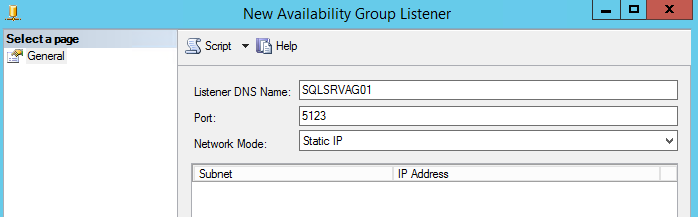
IP-адресу та порт, налаштовані для порту слухача AO, можна знайти, зайшовши в SQL Server Management Studio:
Affected Products
Avamar, Avamar Plug-in for SQLArticle Properties
Article Number: 000162984
Article Type: Solution
Last Modified: 23 Sept 2025
Version: 4
Find answers to your questions from other Dell users
Support Services
Check if your device is covered by Support Services.