Avamar:SQL AlwaysOn 群集浏览失败
Summary: 本知识库文章讨论了在将 SQL AlwaysOn 群集配置为侦听非默认端口时,解决结构化查询语言 (SQL) AlwaysOn (AO) 群集浏览和备份失败的解决方法:网络相关错误或特定于实例的错误。
This article applies to
This article does not apply to
This article is not tied to any specific product.
Not all product versions are identified in this article.
Symptoms
SQL AlwaysOn (AO) 群集可能无法浏览或备份,并显示类似于以下内容的错误消息:
avsql Error <9072>: sqlconnectimpl_smo::connect Microsoft.SqlServer.Management.Common.ConnectionFailureException: Failed to connect to server EMClistener. ---> System.Data.SqlClient.SqlException: A network-related or instance-specific error occurred while establishing a connection to SQL Server. The server was not found or was not accessible. Verify that the instance name is correct and that SQL Server is configured to allow remote connections. (provider: Named Pipes Provider, error: 40 - Could not open a connection to SQL Server) ---> System.ComponentModel.Win32Exception: The system cannot find the file specifiedCause
SQL AO 侦听器配置为侦听非默认端口。默认情况下,它配置为侦听 TCP 端口 1433。
Resolution
在为 Avamar SQL AlwaysOn 可用性组指定的共享 var 文件夹中创建一个 avsql.cmd 文件,并添加以下标记:
--sqlserver=<availability group listener's IP address>,<listener port>
示例:
--sqlserver=172.1.1.1,5123
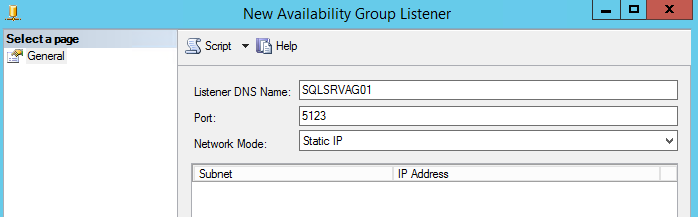
通过进入 SQL Server Management Studio,可以找到为 AO 侦听器端口配置的 IP 地址和端口:
Affected Products
Avamar, Avamar Plug-in for SQLArticle Properties
Article Number: 000162984
Article Type: Solution
Last Modified: 23 Sept 2025
Version: 4
Find answers to your questions from other Dell users
Support Services
Check if your device is covered by Support Services.