IDPA:部署无法继续,并显示错误:ACM 主机名与 ACM IP 的 DNS 不匹配
Summary: 部署配置屏幕出现错误“ACM hostname does not match with the DNS entry for ACM IP address {0}.Refresh the page after correcting ACM hostname.“(更正 ACM 主机名后刷新页面。)”,因为混淆了专用和公用网络接口。
This article applies to
This article does not apply to
This article is not tied to any specific product.
Not all product versions are identified in this article.
Symptoms
在 IDPA 部署期间,“配置”屏幕显示以下错误:
"ACM hostname does not match with the DNS entry for ACM IP address {0}. Refresh the page after correcting ACM hostname."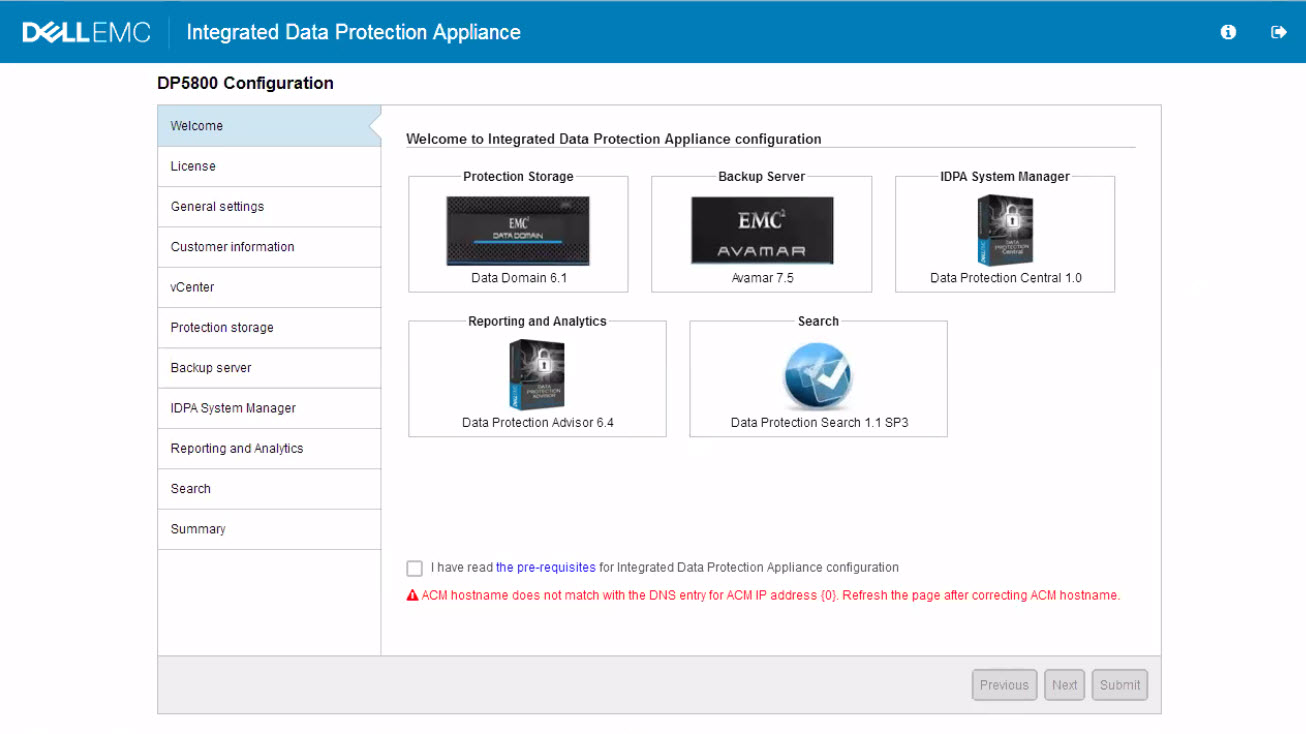
Cause
ACM 列出时具有 Eth1 接口的专用 IP,而不是公有 IP。
Resolution
将 ACM 上的 eth1 更改为公有 IP,将 eth2 更改为 ACM 上的私有 IP。
在 ACM 上重新启动 WebApp 服务:
- 以 root 身份使用 putty 连接到 ACM
- 重新启动 WebApp 服务:
service dataprotection_webapp restart- 等待 15 分钟,然后再登录回 ACM,应该会看到错误不再存在。
Products
Integrated Data Protection Appliance FamilyArticle Properties
Article Number: 000165315
Article Type: Solution
Last Modified: 02 Apr 2025
Version: 3
Find answers to your questions from other Dell users
Support Services
Check if your device is covered by Support Services.