Avamar: ログイン失敗の結果: 0 エラー終了コード 66: Avamarデータベースでユーザーが見つからない
Summary: Lightweight Directory Access Protocol(LDAP)認証を使用してログインできませんでした。
This article applies to
This article does not apply to
This article is not tied to any specific product.
Not all product versions are identified in this article.
Symptoms
Avamar AdministratorにアクセスするユーザーのLDAP認証を正しく設定した後、ログインしようとすると、次のエラー メッセージが表示されます。
"Login Failed! Result: 0 ERROR! Exit code 66: User not found in Avamar database 2019/01/14-18:39:02.89046 [avmgr] ERROR: 0001> uplinkcallbase:: send Could not send message to dispatcher"

Cause
不正なユーザー名構文が使用されていました。
Resolution
LDAP認証を使用してログインするには、正しいユーザー名構文を使用します。次のいずれかです。
username@domain_name
例:johndoe@enterprise.com
注:domain_nameはで設定されたものと同じものとする。
/usr/local/avamar/etc/ldap.properties and /usr/local/avamar/etc/krb5.conf
例:
root@avamar:/usr/local/avamar/etc/#: grep ldap.qualified-name-default ldap.properties
ldap.qualified-name-default=enterprise.com

root@avamar:/usr/local/avamar/etc/#: grep default_domain krb5.conf
default_domain = enterprise.com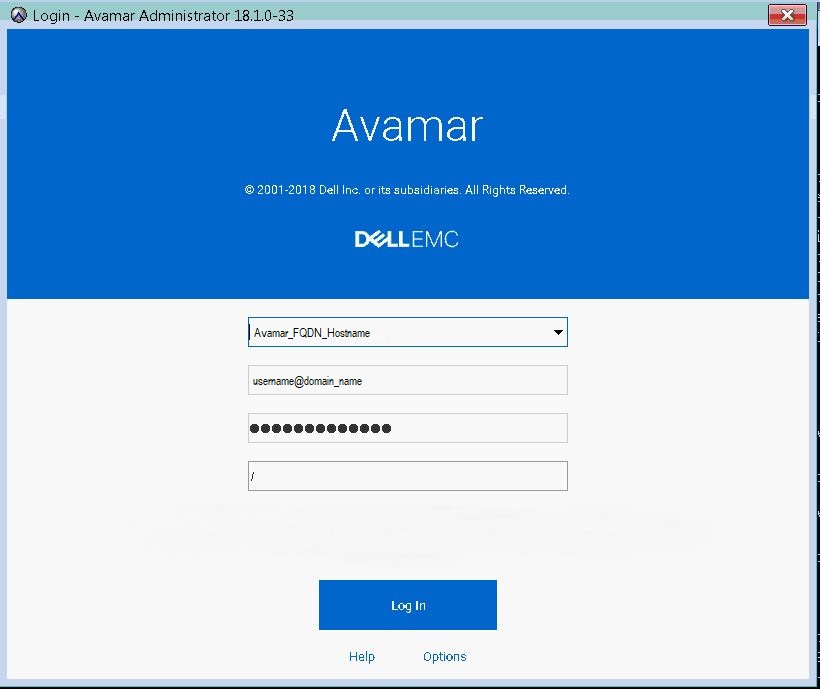
Additional Information
LDAPを適切に構成する基本的な手順については、以下の記事を参照してください。
詳細については、使用中のバージョンの『Avamar管理ガイド』を参照してください。
Affected Products
AvamarProducts
AvamarArticle Properties
Article Number: 000167659
Article Type: Solution
Last Modified: 17 Oct 2025
Version: 4
Find answers to your questions from other Dell users
Support Services
Check if your device is covered by Support Services.