Avamar:18.2 「進行状況バイト数」は、Windows VMイメージ ジョブが実行中の状態である場合に0バイトを示します
Summary: Avamar 18.2の「進行状況バイト数」に「Windows VMイメージ ジョブが実行中の状態」で0バイトと表示される
This article applies to
This article does not apply to
This article is not tied to any specific product.
Not all product versions are identified in this article.
Symptoms
Windows VMwareイメージ バックアップを実行している場合、アクティビティー レポートには実行中のジョブが表示されますが、ジョブが完了するまでは進行状況バイト数が0と表示されます。その後、バックアップの実際のサイズが報告されます。
Avamar HTML5クライアントから

または、Avamar Javaクライアント(MC GUI)から、アクティビティー モニターには0バイトが表示されますが、サーバー セッション モニターは適切なサイズをモニターします
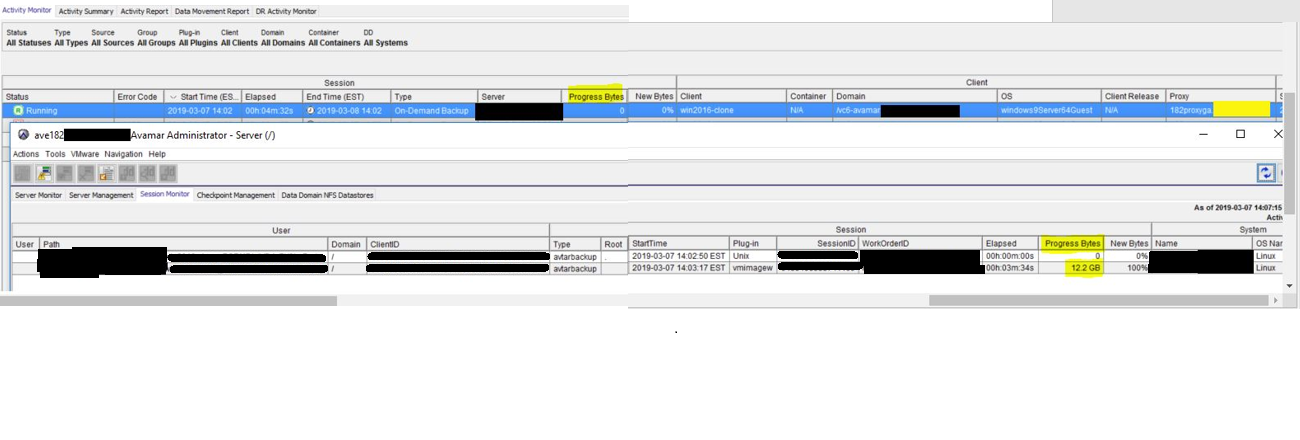
また、Avamar MCCLIコマンドでは、このサイズが誤って0バイトとして報告されます。
root@ave182:~/#: mccli activity show --active
0,23000,CLI command completed successfully.
ID Status Error Code Start Time Elapsed End Time Type Progress Bytes New Bytes Client Domain
-- ------ ---------- ---------- ------- -------- ---- -------------- --------- ------ ------
9154714890809709 Running 0 2019-01-10 14:35 EST 00h:05m:30s 2019-01-11 14:35 EST On-Demand Backup 0 bytes 0% Win2016-Clone
Cause
この問題は、Dell EMCエンジニアリング部門ですでに調査済みです。恒久的な修正が利用可能です。
Resolution
この問題は、次回のmcs累積ホットフィックスで解決される予定です
現時点では回避策はありません。ジョブが完了すると、アクティビティー モニターは適切なサイズを報告します。
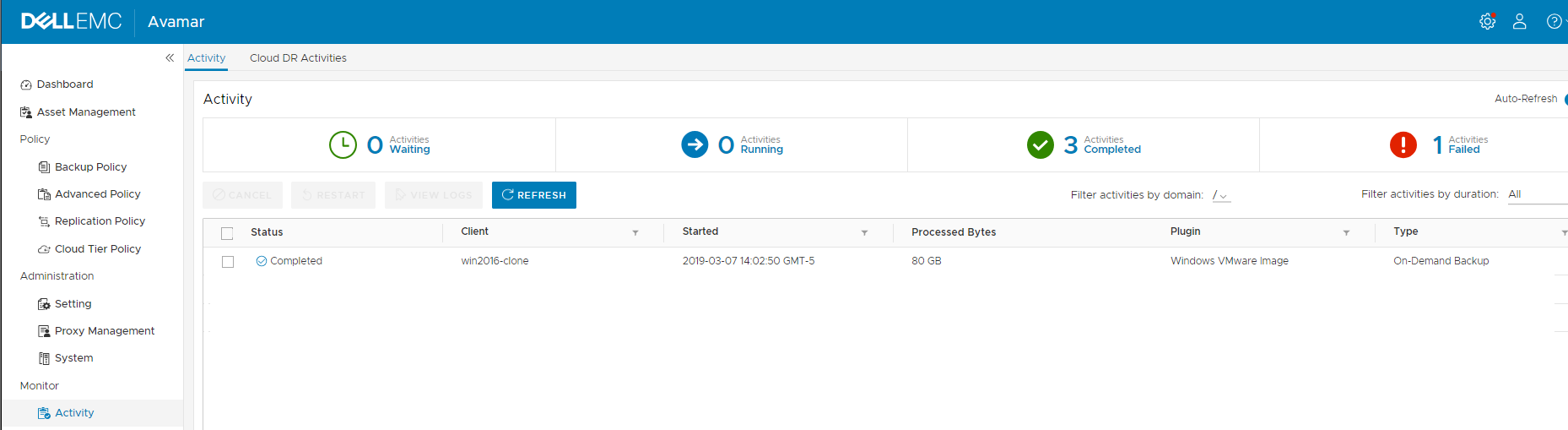
現時点では回避策はありません。ジョブが完了すると、アクティビティー モニターは適切なサイズを報告します。
root@ave182:~/#: mccli activity show --active
0,23000,CLI command completed successfully.
ID Status Error Code Start Time Elapsed End Time Type Progress Bytes New Bytes Client Domain
-- ------ ---------- ---------- ------- -------- ---- -------------- --------- ------ ------
9154689393688909 Completed 0          2019-01-07 15:45 EST 00h:12m:50s 2019-01-07 >15:58 EST On-Demand Backup 104.0 GB       0.5%      Win2016-Clone
Affected Products
AvamarProducts
AvamarArticle Properties
Article Number: 000168604
Article Type: Solution
Last Modified: 11 Mar 2025
Version: 3
Find answers to your questions from other Dell users
Support Services
Check if your device is covered by Support Services.