Så här hämtar du Netskope REST API-nyckeln
Summary: Den här artikeln visar hur du hämtar din Netskope REST API-nyckel som kan användas för att integrera Netskope med andra program.
This article applies to
This article does not apply to
This article is not tied to any specific product.
Not all product versions are identified in this article.
Instructions
Berörda produkter:
- Netskope
Så här hämtar du Netskope REST API-nyckeln:
- Gå till Netskope-webbkonsolen i en webbläsare:
- Datacenter i USA: https://[TENANT].goskope.com/
- Datacenter i EU: https://[TENANT].eu.goskope.com/
- Datacenter i Frankfurt: https://[TENANT].de.goskope.com/
Obs! [TENANT] = Klientorganisationens namn i din miljö
- Logga in på Netskope-webbkonsolen.

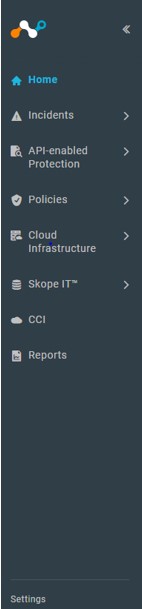
- På Netskopes startsida klickar du på Inställningar.
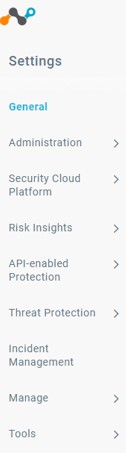
- På sidan Inställningar klickar du på Verktyg och väljer sedan REST API.

- REST API-sidan visas. Klicka på SHOW-knappen för att exponera din Netskope REST API-nyckel.
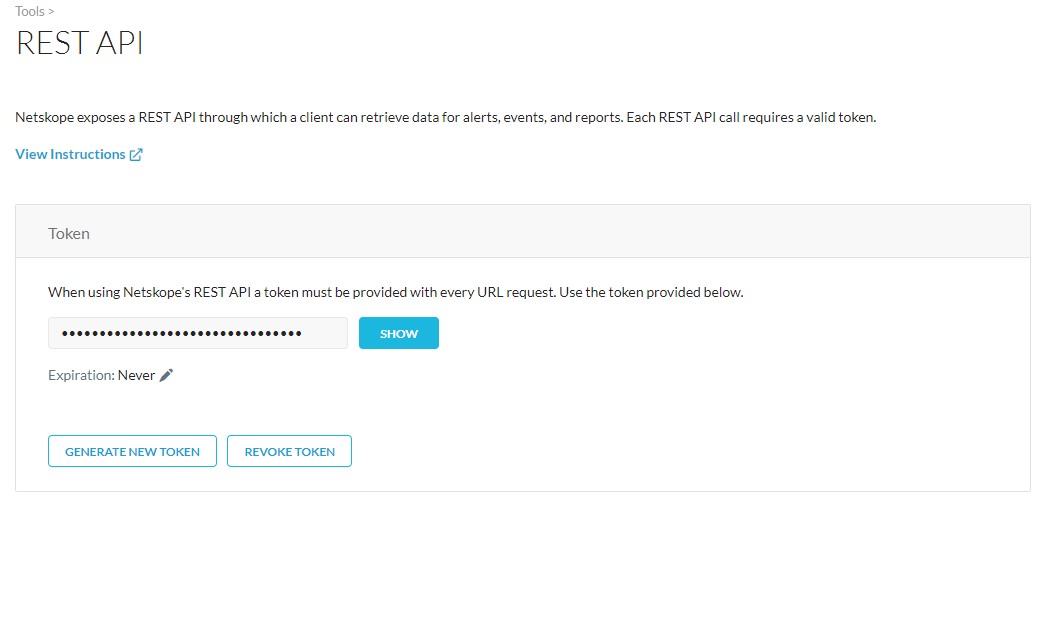
- Nu kan du kopiera din Netskope REST API-nyckel och använda den för att integrera ett annat program med Netskope.
Om du vill kontakta support, se Dell Data Security telefonnummer till internationell support.
Gå till TechDirect för att skapa en begäran om teknisk support online.
Om du vill ha mer information och resurser kan du gå med i Dell Security Community-forumet.
Additional Information
Videos
Affected Products
NetskopeArticle Properties
Article Number: 000181116
Article Type: How To
Last Modified: 09 Dec 2024
Version: 6
Find answers to your questions from other Dell users
Support Services
Check if your device is covered by Support Services.