PowerProtect Data Manager:SQL 备份失败,并显示错误“无法登录”
Summary: 由于 PowerProtect 凭据信息无效,SQL 备份失败并显示错误“无法登录”。
This article applies to
This article does not apply to
This article is not tied to any specific product.
Not all product versions are identified in this article.
Symptoms
PowerProtect Data Manager Jobs窗格在 Protection选项卡上显示严重错误。分析错误的详细信息时,步骤 1 会列出以下内容:
Description

The operation failed due to following reason : master, msdb, Matt failed due to error message: Unable to log in.

Summary

sql.powerprotect.com

Failed to perform operation on asset(s) -Matt, msdb, master
Reason for restore failure: master, msdb, Matt failed due to error message: Unable to log in.

The PowerProtect /var/log/brs/adm/adm.log 显示:
Line 5851: 2021-01-21T03:08:07.960Z INFO [] [monitorActorSystem-akka.actor.default-dispatcher-13] [][][][][] [c.e.d.e.a.s.s.i.ActivityServiceImpl.completeTask(152)] - Completed task=acc66b7a-127d-4bc1-af65-130e063d1887, result=ActivityResource.Result[status=FAILED,summaries=[sql.powerprotect.com, , Failed to perform operation on asset(s) -master, Matt, msdb, Reason for restore failure: msdb, Matt, master failed due to error message: Unable to log in.
主机代理服务在以下位置登录: C:\Program Files\DPSAPPS\AgentService\logs 显示:
[2021-01-21 17:53:59,717 GMT| 2021-01-21 09:53:59,717015 Pacific Standard Time| DBGAPPBACKUPASSETS| PID-6452| TID-8940| INFO] nsr/AppAgentService/AddOns/7FFEFD30_C062_4803_BFE7_8A52A9BC4442\AddOnJobManager.py-execute()-Line 323- Process stdout data: {"response":{"jobId":"2339871181","status":"FAILURE","applicationInstances":[{"applicationInstance":"MSSQLSERVER","status":"FAILURE","successfulSources":[],"failedSources":[],"backupCommand":"C:\\Program Files\\DPSAPPS\\MSAPPAGENT\\bin\\ddbmsqlsv.exe -c sql.powerprotect.com -l full -a NSR_DFA_SI_DD_HOST=10.240.194.24 -a NSR_DFA_SI_DEVICE_PATH=/PPDMsql-svcaccout-ppdm-2a284 -a NSR_DFA_SI_DD_USER=PPDMsql-svcaccout-ppdm-2a284 -a JOB_ID=2339871181 -a ENCRYPT_USING_DEFAULT_VALUES=FALSE -a BACKUP_PROMOTION=ALL -y +2d -I C:\\Program Files\\DPSAPPS\\MSAPPAGENT\\tmp\\Ddb80CF.tmp MSSQL:","output":""}]},"errors":[{"type":"systemErr","text":"Unable to log in.\n"}]}
Cause
PowerProtect 凭据创建包含无效的用户名或密码。PowerProtect 凭据创建不会运行身份验证检查,因此在进行身份验证之前不会出现该症状。用户名可以以“域\用户名”格式或“username@domain.suffix”格式列出。使用username@domain格式时,必须指定域后缀(.org、.com、.edu)。
有效用户名示例:
administrator@my-domain.com
my-domain\administrator
无效用户名的示例:
administrator@my-domain
administrator
Resolution
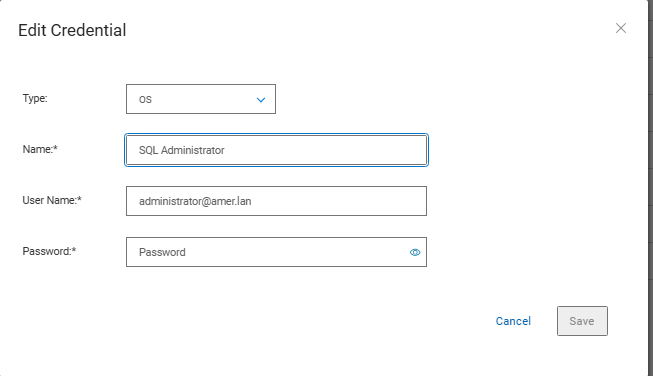
更新 PowerProtect 凭据以反映正确的用户名格式并包含正确的密码。
- 在 PowerProtect 中,单击 AdministrationCredentials>。
- 选择凭据,然后单击 编辑。
- 输入正确的用户名和密码。
- 单击 Save。
Affected Products
PowerProtect SoftwareProducts
PowerProtect Data ManagerArticle Properties
Article Number: 000182211
Article Type: Solution
Last Modified: 28 Oct 2025
Version: 2
Find answers to your questions from other Dell users
Support Services
Check if your device is covered by Support Services.