Come gestire le modifiche del certificato AWS S3 dal 23 marzo 2021
Summary: AWS sta modificando i certificati server per S3 in certificati emessi dalla CA di Amazon Trust Services. Questo accade a partire dal 23 marzo 2021 in base alla comunicazione AWS. Questa modifica influisce sui sistemi Data Domain configurati con Cloud Tier e Data domain Virtual Edition (DDVE) implementati sulla piattaforma cloud AWS con ATOS (Active Tier on Object Storage). ...
This article applies to
This article does not apply to
This article is not tied to any specific product.
Not all product versions are identified in this article.
Symptoms
Questa modifica del certificato fa sì che l'unità cloud venga disconnessa per i sistemi Data Domain configurati con cloud tier:
OPPURE,
per DDVE implementato su AWS con ATOS, il file system è disabilitato con i seguenti messaggi di avviso:
# alert show current
Id Post Time Severity Class Object Message ----- ------------------------ -------- ----- ------------------------ -------------------------------------------------------------------------
m0-76 Mon Apr 19 15:34:03 2021 CRITICAL CloudUnit=aws-unit EVT-CLOUD-00001: Impossibile accedere al provider per l'unità cloud aws-unit.
----- ------------------------ -------- ----- ------------------------ -------------------------------------------------------------------------
è presente 1 avviso attivo.
# stato del profilo dell'elenco delle unità cloud
-------------- --------- ------------
aws-unit aws disconnesso
-------------- --------- ------------
Id Post Time Severity Class Object Message ----- ------------------------ -------- ----- ------------------------ -------------------------------------------------------------------------
m0-76 Mon Apr 19 15:34:03 2021 CRITICAL CloudUnit=aws-unit EVT-CLOUD-00001: Impossibile accedere al provider per l'unità cloud aws-unit.
----- ------------------------ -------- ----- ------------------------ -------------------------------------------------------------------------
è presente 1 avviso attivo.
# stato del profilo dell'elenco delle unità cloud
-------------- --------- ------------
aws-unit aws disconnesso
-------------- --------- ------------
OPPURE,
per DDVE implementato su AWS con ATOS, il file system è disabilitato con i seguenti messaggi di avviso:
Alert History
------------- Id Post Time Clear Time Severity Class Object Message
----- ------------------------ ------------------------ -------- ----------------- ------ --------------------------------------------------------------------------------------
m0-26 Mar 6 apr 13:58:41 2021 Mar 6 apr 6 13:59:03 2021 ERROR Filesystem EVT-FILESYS-00008: Il file system ha riscontrato un errore e si sta riavviando.
m0-27 mar 6 apr 14:19:59 2021 mar 6 apr 14:20:03 2021 ALERT File system EVT-FILESYS-00002: Il problema impedisce al file system di
------------- Id Post Time Clear Time Severity Class Object Message
----- ------------------------ ------------------------ -------- ----------------- ------ --------------------------------------------------------------------------------------
m0-26 Mar 6 apr 13:58:41 2021 Mar 6 apr 6 13:59:03 2021 ERROR Filesystem EVT-FILESYS-00008: Il file system ha riscontrato un errore e si sta riavviando.
m0-27 mar 6 apr 14:19:59 2021 mar 6 apr 14:20:03 2021 ALERT File system EVT-FILESYS-00002: Il problema impedisce al file system di
Cause
AWS sta modificando i certificati server per S3 in certificati emessi dalla CA di Amazon Trust Services. A partire dal 23 marzo 2021.
Per accedere ai bucket S3, il sistema richiede un nuovo certificato rootCA Starfield Class 2 Certification Authority anziché il certificato root CyberTrust di CyberTrust presente.
Resolution
I seguenti passaggi sono applicabili ai sistemi Data Domain configurati con Cloud Tier e DDVE implementati sulla piattaforma cloud AWS con ATOS.
- Verificare se il sistema utilizza attualmente "CyberTrust Root"per l'applicazione cloud in base al seguente esempio:
sysadmin@dd01# adminaccess certificate show
Subject Type Application Valid From Valid Until Fingerprint
------------------------- ------------- ----------- ------------------------ ------------------------ -----------------------------------------------------------
dd01.example.com host https Tue Mar 26 10:38:34 2019 Wed Jan 31 10:48:38 2024 30:78:FE:93:DF:2F:9D:B5:08:D7:EC:5E:9E:89:E2:BD:16:13:E1:BA
dd01.example.com ca trusted-ca Wed Mar 27 17:38:34 2019 Wed Jan 31 10:16:38 2024 CB:9D:64:39:56:48:FB:58:C6:93:40:FB:29:91:56:9A:BD:08:7A:C8
dd01.example.com imported-host ddboost Sat Jun 20 15:09:16 2020 Thu Jun 19 15:09:16 2025 12:DB:62:AA:E8:59:5B:E9:63:29:A0:DC:6B:63:B2:BB:E5:77:07:C6
avamar.example.com imported-ca login-auth Fri Jun 19 17:25:13 2020 Wed Jun 18 17:25:13 2025 D8:03:BB:B0:31: C4:6D:E5:9E:14:92:A8:E2:36:99:3E:97:BB:31:25
avamar.example.com imported-ca ddboost ven 19 giu 17:25:13 Mer 18 giu 2020 17:25:13 D8:03:BB:B0:31:C4:6D:E5:9E:14:92:A8:E2:36:99:3E:97:BB:31:25
CyberTrust Root imported-ca cloud Ven 12 mag 11:46:00 2000 Lun 12 mag 16:59:00 2025 D4:DE:20:D0:5E:66:FC:53:FE:1A:50:88:2C:78:DB:28:52:CA:E4:74
------------------------- ------------- ----------- ------------------------ ------------------------ ----------------------------------------------------------- Richiesta di firma del
certificato (CSR) presente in /ddvar/certificates/CertificateSigningRequest.csr
Subject Type Application Valid From Valid Until Fingerprint
------------------------- ------------- ----------- ------------------------ ------------------------ -----------------------------------------------------------
dd01.example.com host https Tue Mar 26 10:38:34 2019 Wed Jan 31 10:48:38 2024 30:78:FE:93:DF:2F:9D:B5:08:D7:EC:5E:9E:89:E2:BD:16:13:E1:BA
dd01.example.com ca trusted-ca Wed Mar 27 17:38:34 2019 Wed Jan 31 10:16:38 2024 CB:9D:64:39:56:48:FB:58:C6:93:40:FB:29:91:56:9A:BD:08:7A:C8
dd01.example.com imported-host ddboost Sat Jun 20 15:09:16 2020 Thu Jun 19 15:09:16 2025 12:DB:62:AA:E8:59:5B:E9:63:29:A0:DC:6B:63:B2:BB:E5:77:07:C6
avamar.example.com imported-ca login-auth Fri Jun 19 17:25:13 2020 Wed Jun 18 17:25:13 2025 D8:03:BB:B0:31: C4:6D:E5:9E:14:92:A8:E2:36:99:3E:97:BB:31:25
avamar.example.com imported-ca ddboost ven 19 giu 17:25:13 Mer 18 giu 2020 17:25:13 D8:03:BB:B0:31:C4:6D:E5:9E:14:92:A8:E2:36:99:3E:97:BB:31:25
CyberTrust Root imported-ca cloud Ven 12 mag 11:46:00 2000 Lun 12 mag 16:59:00 2025 D4:DE:20:D0:5E:66:FC:53:FE:1A:50:88:2C:78:DB:28:52:CA:E4:74
------------------------- ------------- ----------- ------------------------ ------------------------ ----------------------------------------------------------- Richiesta di firma del
certificato (CSR) presente in /ddvar/certificates/CertificateSigningRequest.csr
- Scaricare il certificato rootCA dell'Autorità di certificazione Starfield Class 2 dalla pagina seguente
https://aws.amazon.com/blogs/security/how-to-prepare-for-aws-move-to-its-own-certif: autorità di certificazione/
Cliccare con il pulsante destro del mouse su"qui"e salvare come:
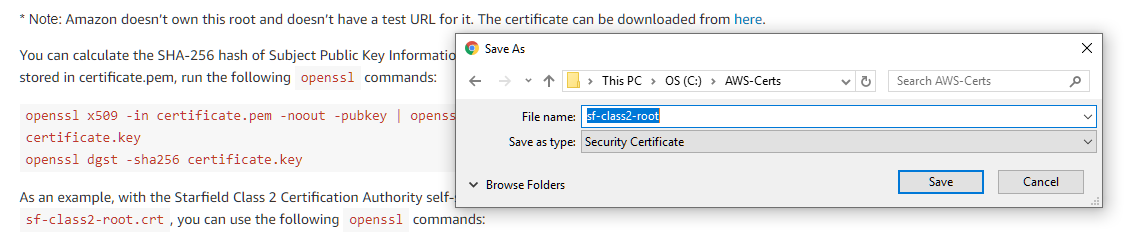
Cliccare con il pulsante destro del mouse su"qui"e salvare come:
Link alternativo per scaricare il certificato: https://certs.secureserver.net/repository/sf-class2-root.crt
- Rinominare il file sf-class2-root.crt in sf-class2-root.pem (modificare solo l'estensione).
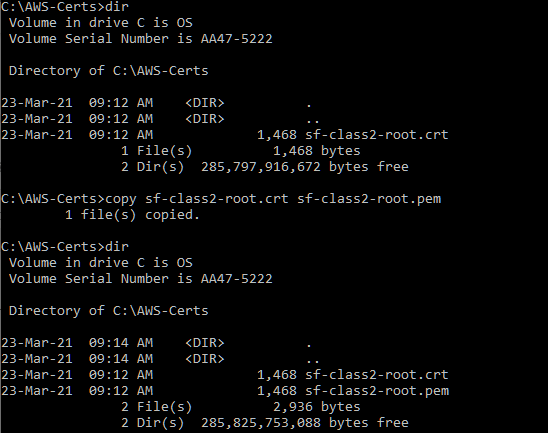
- Importare il certificato utilizzando la GUI di System Manager di Data Domain.
- Unità cloud: "Gestione dei dati" > "File System" > "Unità cloud" > "Gestione certificati" > Aggiunta

- Data Domain Virtual Edition: "Amministrazione" > "Accesso" > "GESTISCI CERTIFICATI CA" > "+ Aggiungi
- Quindi eseguire il passaggio 2 della CLI. (che si trova sotto queste schermate)
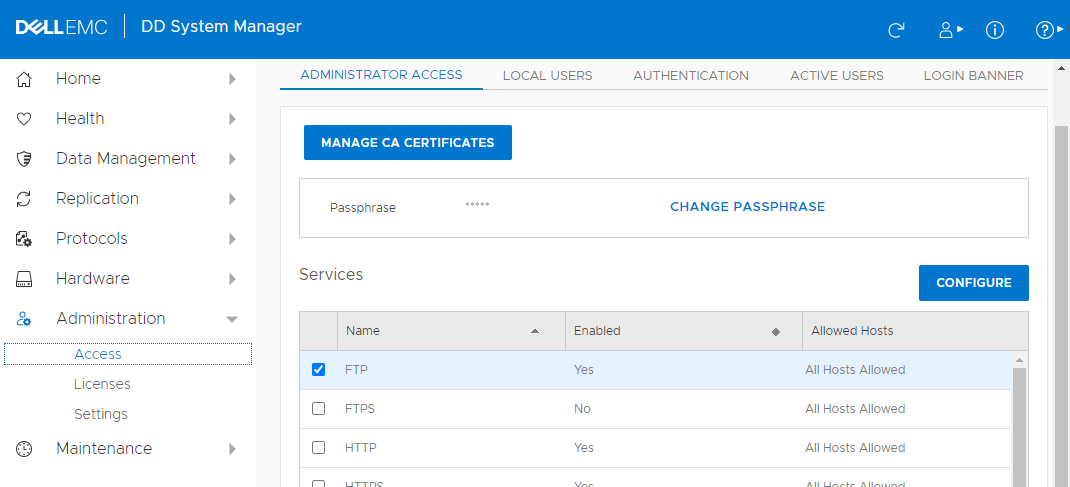

In alternativa, dalla CLI
- Trasferimento di sf-class2-root.pem a /ddr/var/certificates utilizzando il metodo scp o sftp
- Importare il certificato
# adminaccess certificate import ca application cloud file sf-class2-root.pem
- NOTA: Questo certificato può mostrare l'oggetto come vuoto nella GUI o nell'output 'adminaccess certificate show', che può essere ignorato (nessun problema di funzionalità tranne la visualizzazione vuota).

sysadmin@dd01# adminaccess certificate show
Subject Type Application Valid From Valid Until Fingerprint
------------------------- ------------- ----------- ------------------------ ------------------------ -----------------------------------------------------------
dd01.example.com host https Tue Mar 26 10:38:34 2019 Wed Jan 31 10:48:38 2024 30:78:FE:93:DF:2F:9D:B5:08:D7:EC:5E:9E:89:E2:BD:16:13:E1:BA
dd01.example.com ca trusted-ca Wed Mar 27 17:38:34 2019 Wed Jan 31 10:16:38 2024 CB:9D:64:39:56:48:FB:58:C6:93:40:FB:29:91:56:9A:BD:08:7A:C8
dd01.example.com imported-host ddboost Sat Jun 20 15:09:16 2020 Thu Jun 19 15:09:16 2025 12:DB:62:AA:E8:59:5B:E9:63:29:A0:DC:6B:63:B2:BB:E5:77:07:C6
avamar.example.com imported-ca login-auth Fri Jun 19 17:25:13 2020 Wed Jun 18 17:25:13 2025 D8:03:BB:B0:31: C4:6D:E5:9E:14:92:A8:E2:36:99:3E:97:BB:31:25
avamar.example.com imported-ca ddboost Fri Jun 19 17:25:13 2020 Wed Jun 18 17:25:13 2025 D8:03:BB:B0:31:C4:6D:E5:9E:14:92:A8:E2:36:99:3E:97:BB:31:25
Baltimore CyberTrust Root imported-ca cloud Fri May 12 11:46:00 2000 Mon May 12 16:59:00 2025 D4:DE:20:D0:5E:66:FC:53:FE:1A:50:88:2C:78:DB:28:52:CA:E4:74
- imported-ca cloud Tue Jun 29 10:39:16 2004 Thu Jun 29 10:39:16 2034 AD:7E:1C:28:B0:64:EF:8F:60:03:40:20:14:C3:D0:E3:37:0E:B5:8A
------------------------- ------------- ----------- ------------------------ ------------------------ -----------------------------------------------------------
Certificate signing request (CSR) exists at /ddvar/certificates/CertificateSigningRequest.csr
Subject Type Application Valid From Valid Until Fingerprint
------------------------- ------------- ----------- ------------------------ ------------------------ -----------------------------------------------------------
dd01.example.com host https Tue Mar 26 10:38:34 2019 Wed Jan 31 10:48:38 2024 30:78:FE:93:DF:2F:9D:B5:08:D7:EC:5E:9E:89:E2:BD:16:13:E1:BA
dd01.example.com ca trusted-ca Wed Mar 27 17:38:34 2019 Wed Jan 31 10:16:38 2024 CB:9D:64:39:56:48:FB:58:C6:93:40:FB:29:91:56:9A:BD:08:7A:C8
dd01.example.com imported-host ddboost Sat Jun 20 15:09:16 2020 Thu Jun 19 15:09:16 2025 12:DB:62:AA:E8:59:5B:E9:63:29:A0:DC:6B:63:B2:BB:E5:77:07:C6
avamar.example.com imported-ca login-auth Fri Jun 19 17:25:13 2020 Wed Jun 18 17:25:13 2025 D8:03:BB:B0:31: C4:6D:E5:9E:14:92:A8:E2:36:99:3E:97:BB:31:25
avamar.example.com imported-ca ddboost Fri Jun 19 17:25:13 2020 Wed Jun 18 17:25:13 2025 D8:03:BB:B0:31:C4:6D:E5:9E:14:92:A8:E2:36:99:3E:97:BB:31:25
Baltimore CyberTrust Root imported-ca cloud Fri May 12 11:46:00 2000 Mon May 12 16:59:00 2025 D4:DE:20:D0:5E:66:FC:53:FE:1A:50:88:2C:78:DB:28:52:CA:E4:74
- imported-ca cloud Tue Jun 29 10:39:16 2004 Thu Jun 29 10:39:16 2034 AD:7E:1C:28:B0:64:EF:8F:60:03:40:20:14:C3:D0:E3:37:0E:B5:8A
------------------------- ------------- ----------- ------------------------ ------------------------ -----------------------------------------------------------
Certificate signing request (CSR) exists at /ddvar/certificates/CertificateSigningRequest.csr
- Non rimuovere il vecchio certificato "CyberTrust Root". In alcuni casi, AWS è tornato al certificato Certificate Certificate.
- Conservarlo insieme al nuovo certificato Starfield.
Affected Products
Data Domain, PowerProtect Data Protection SoftwareArticle Properties
Article Number: 000184415
Article Type: Solution
Last Modified: 22 Aug 2022
Version: 13
Find answers to your questions from other Dell users
Support Services
Check if your device is covered by Support Services.