虚拟机备份失败,并显示“Unable to delete pre-existing snapshots: Another task is already in progress.”
Summary: 虚拟机备份失败,并显示以下错误: 2021-04-14T17:46:35Z ERROR: [@(#) Build number: 51] Failed to complete removal of snapshot "snapshot-347817": Another task is already in progress.2021-04-14T17:46:35Z ERROR: [@(#) Build number: 51] Unable to delete pre-existing snapshots: Another task is already in progress. ...
This article applies to
This article does not apply to
This article is not tied to any specific product.
Not all product versions are identified in this article.
Symptoms
单个虚拟机的虚拟机备份失败。
为虚拟机手动创建快照也会失败,并显示以下错误: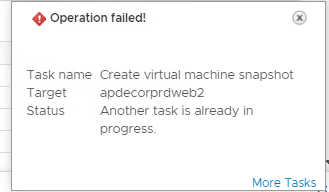
为虚拟机手动创建快照也会失败,并显示以下错误:
Cause
ESXi 主机上显示该特定虚拟机的过时任务。
Resolution
1) 登录到 vcenter,检查是否有任何旧快照连接到虚拟机(如果有,请删除/合并它们)。
2) 检查 vproxy 上是否有任何快照(如果有,请删除/合并它们)。
如果在虚拟机或 vproxy 上没有看到较旧的快照,请执行以下步骤,在 ESXI 主机上检查是否有活动的虚拟机任务:
1) 在控制台或通过 SSH 登录到 ESX 主机
2) 为了生成与特定虚拟机关联的任务列表,您必须首先获取虚拟机的 Vmid。运行命令:
vim-cmd vmsvc/getallvms
输出类似于:
Vmid Name File Guest OS Version Annotation
112 VM-1 [Datastore] VM-3/VM-3.vmx winLonghornGuest vmx-04
128 VM-2 [Datastore] VM-3/VM-3.vmx winXPProGuest vmx-04
144 VM-3 [Datastore] VM-3/VM-3.vmx winNetStandardGuest vmx-04
3) 记下 Vmid 列中的值,后面的步骤中将会引用它们。
4) 拥有 Vmid 后,您可以获取与特定虚拟机关联的任务列表。运行命令:
vim-cmd vmsvc/get.tasklist VMID
其中 VMID 是步骤 3 中确定的编号。
输出类似于:
(ManagedObjectReference) [
'vim.Task:haTask-112-vim.VirtualMachine.createSnapshot-3887'
]
5) 记下任务标识符。在上面的示例中,任务标识符是:
haTask-112-vim.VirtualMachine.createSnapshot-3887
6) 要获取有关特定任务状态的信息,请运行以下命令:
vim-cmd vimsvc/task_info task_identifier
其中 task_identifier 是步骤 5 中记录的字符串。
输出类似于:
(vim.TaskInfo) {
dynamicType = ,
key = "haTask-112-vim.VirtualMachine.createSnapshot-3887",
task = 'vim.Task:haTask-112-vim.VirtualMachine.createSnapshot-3887',
description = (vmodl.LocalizableMessage) null,
name = "vim.VirtualMachine.createSnapshot",
descriptionId = "VirtualMachine.createSnapshot",
entity = 'vim.VirtualMachine:112',
entityName = "deploy-test",
state = "running",
cancelled = false,
cancelable = false,
error = (vmodl.MethodFault) null,
result = ,
progress = 15,
reason = (vim.TaskReasonUser) {
dynamicType = ,
userName = "root",
},
queueTime = "2012-11-28T01:29:35.233835Z",
startTime = "2012-11-28T01:29:35.234891Z",
completeTime = ,
eventChainId = 2936866,
changeTag = ,
parentTaskKey = ,
rootTaskKey = ,
如果存在任何活动任务,则需要由 VMware 团队再次确认,并由 VMware 支持人员采取相应的后续操作。
2) 检查 vproxy 上是否有任何快照(如果有,请删除/合并它们)。
如果在虚拟机或 vproxy 上没有看到较旧的快照,请执行以下步骤,在 ESXI 主机上检查是否有活动的虚拟机任务:
1) 在控制台或通过 SSH 登录到 ESX 主机
2) 为了生成与特定虚拟机关联的任务列表,您必须首先获取虚拟机的 Vmid。运行命令:
vim-cmd vmsvc/getallvms
输出类似于:
Vmid Name File Guest OS Version Annotation
112 VM-1 [Datastore] VM-3/VM-3.vmx winLonghornGuest vmx-04
128 VM-2 [Datastore] VM-3/VM-3.vmx winXPProGuest vmx-04
144 VM-3 [Datastore] VM-3/VM-3.vmx winNetStandardGuest vmx-04
3) 记下 Vmid 列中的值,后面的步骤中将会引用它们。
4) 拥有 Vmid 后,您可以获取与特定虚拟机关联的任务列表。运行命令:
vim-cmd vmsvc/get.tasklist VMID
其中 VMID 是步骤 3 中确定的编号。
输出类似于:
(ManagedObjectReference) [
'vim.Task:haTask-112-vim.VirtualMachine.createSnapshot-3887'
]
5) 记下任务标识符。在上面的示例中,任务标识符是:
haTask-112-vim.VirtualMachine.createSnapshot-3887
6) 要获取有关特定任务状态的信息,请运行以下命令:
vim-cmd vimsvc/task_info task_identifier
其中 task_identifier 是步骤 5 中记录的字符串。
输出类似于:
(vim.TaskInfo) {
dynamicType = ,
key = "haTask-112-vim.VirtualMachine.createSnapshot-3887",
task = 'vim.Task:haTask-112-vim.VirtualMachine.createSnapshot-3887',
description = (vmodl.LocalizableMessage) null,
name = "vim.VirtualMachine.createSnapshot",
descriptionId = "VirtualMachine.createSnapshot",
entity = 'vim.VirtualMachine:112',
entityName = "deploy-test",
state = "running",
cancelled = false,
cancelable = false,
error = (vmodl.MethodFault) null,
result = ,
progress = 15,
reason = (vim.TaskReasonUser) {
dynamicType = ,
userName = "root",
},
queueTime = "2012-11-28T01:29:35.233835Z",
startTime = "2012-11-28T01:29:35.234891Z",
completeTime = ,
eventChainId = 2936866,
changeTag = ,
parentTaskKey = ,
rootTaskKey = ,
如果存在任何活动任务,则需要由 VMware 团队再次确认,并由 VMware 支持人员采取相应的后续操作。
Article Properties
Article Number: 000185657
Article Type: Solution
Last Modified: 23 Aug 2022
Version: 5
Find answers to your questions from other Dell users
Support Services
Check if your device is covered by Support Services.