「IDPA:アップグレードの検証で「redirection failed」というメッセージが表示されたため、ACMアップグレードUIにアクセスできません
Summary: この記事では、IDPAアップグレード検証プロセス中にACMアップグレードUIのリダイレクトが失敗するシナリオについて説明します。これは、ACMにアクセスするシステムとACM間のネットワーク ファイアウォールでポート9443がブロックされている場合に発生する可能性があります。
This article applies to
This article does not apply to
This article is not tied to any specific product.
Not all product versions are identified in this article.
Symptoms
ACMでアップグレード バイナリーの抽出が成功したことを確認します。
PuTTYまたはSSHを使用してrootユーザーとしてACMにログインし、次のコマンドを実行します。
cat /data01/tmp/patch/logs/extract.log

05/01/21 06:43:33 ************ Executing extract.sh ************

05/01/21 06:43:34 Dataprotection upgrade rpm not found.

05/01/21 06:43:34 Deploying dataprotection-upgrade binary in tomcat.

05/01/21 06:44:08 Checking for the mandatory files in tar

05/01/21 06:44:08 Creating second instance of tomcat

05/01/21 06:44:41 Successfully created second tomcat instance
2回目のアップグレードTomcatプロセスの作成が成功したことを確認します。
tail -5 /data01/tmp/patch/logs/tomcat_creation.log

05/01/21 06:44:41 Upgrade war exists in old tomcat. Removing war

05/01/21 06:44:41 Successfully deleted dataprotection upgrade war from old tomcat

05/01/21 06:44:41 Dataprotection upgrade directory exists in old tomcat. Removing war

05/01/21 06:44:41 Successfully deleted dataprotection upgrade directory from old tomcat

05/01/21 06:44:41 Successfully created second tomcat instance
次のコマンドを使用して、ACMがポート9443をリスンしていることを確認します。
netstat -apn |grep 9443
次のコマンドを使用して、アップグレード サービスが動作していることを確認します。
service dataprotection_webapp_upgrade status

dataprotection_webapp_upgrade.service - SYSV: Apache Tomcat init script

   Loaded: loaded (/etc/init.d/dataprotection_webapp_upgrade)

   Active: active (exited) since Sat 2021-05-01 06:44:12 PDT; 4 days ago

  Process: 17035 ExecStart=/etc/init.d/dataprotection_webapp_upgrade start (code=exited, status=0/SUCCESS)
別のユースケースでは、次のメッセージが ACM upgrade-utility.logが使用するJava Runtime Environmentへのパスを定義します。
grep -i "java.net.ConnectException" /data01/tmp/patch/logs/upgrade-utility.log

2020-10-16 10:59:41,576 ERROR [https-jsse-nio-8543-exec-8]-util.RestUtil: Error occured while executing REST request. due to java.net.ConnectException: Connection timed out (Connection timed out)
ACMにアクセスするシステムとACM自体の間のネットワーク ファイアウォールでポート9443が開いているかどうかを確認します。
Cause
ACMにアクセスするシステムとACMの間のネットワーク ファイアウォールでポート9443がブロックされていたため、この問題が発生しました。
Resolution
注:「
goidpa tool が、この問題に関する詳細情報を提供できます。次の記事に従って、 goidpa toolが使用するJava Runtime Environmentへのパスを定義します。PowerProtect Data Protection Appliance: GoIDPAツール
ACMで次のコマンドを実行します。
./goidpa system upgrade-port-check
これにより、システムからポート9443に到達可能かどうかをテストできます。
Fix:
ACM UIにアクセスするシステムとACM VMの間のネットワーク ファイアウォールでポート9443を開く必要があります。
対処方法:
回避策として、PuTTYでトンネルを作成してポートフォワーディングを実行できる場合があります。
- PuTTYを右クリックして、Connection >SSH >Tunnelsに移動します。
- 詳細を次の形式で入力します。
Source Port 443

Destination IP: ACM Public IP Address

Destination Port: 443
- [追加]をクリックします。
- 以下の詳細に従って、9443の2番目のポート トンネルを追加し、[Add]をクリックします。
Source Port 9443

Destination IP: ACM Public IP Address

Destination Port: 9443
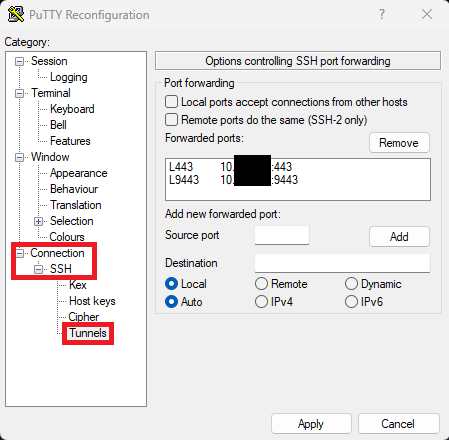
- 次のURLでIDPAアップグレードUIを開きます。
https://localhost:9443/dataprotection-upgrade
Affected Products
Integrated Data Protection Appliance FamilyArticle Properties
Article Number: 000186345
Article Type: Solution
Last Modified: 30 May 2025
Version: 9
Find answers to your questions from other Dell users
Support Services
Check if your device is covered by Support Services.