Avamar: Hyper-V CSV yedeklemeleri "CSV is not online" hatasıyla başarısız oluyor
Summary: Çevrimdışı CSV nedeniyle başarısız olan Hyper-V yedeklemelerine çözüm sağlayan Knowledge Base (KB) makalesi
This article applies to
This article does not apply to
This article is not tied to any specific product.
Not all product versions are identified in this article.
Symptoms
Hyper-V CSV yedeklemeleri aşağıdaki hatalarla başarısız oluyor:
avhypervvss Error <19387>: CSV 'Cluster Disk 2' is not online. Please check the state and restart the back-up
avhypervvss Error <19354>: Could not assign CSV(s) to user specified multi proxy nodes for better backup performance
avhypervvss Error <42458>: Failed to manage csv ownership for multiproxy backups.
avhypervvss Error <41659>: Backup did not complete successfully
Cause
Bir veya daha fazla CSV (Küme Paylaşılan Disk Bölümleri) çevrimdışı.
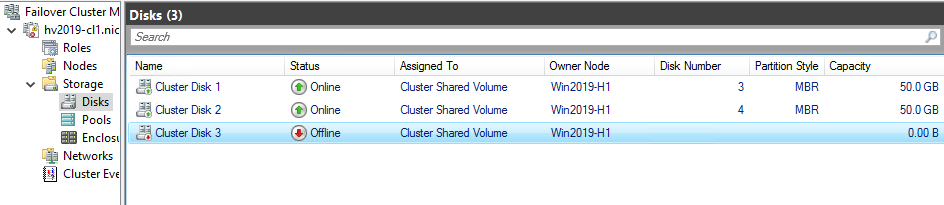
Kümenin parçası olan tüm CSV'ler çevrimiçi olmalıdır.
Resolution
Çevrimdışı CSV'ye sağ tıklayıp "Çevrimiçi Getir" seçeneğini belirleyerek çevrimdışı CSV'yi yeniden çevrimiçi duruma getirin.
Affected Products
Avamar Plug-in for Hyper-V VSSArticle Properties
Article Number: 000186556
Article Type: Solution
Last Modified: 28 Oct 2025
Version: 2
Find answers to your questions from other Dell users
Support Services
Check if your device is covered by Support Services.