Avamar: I backup CSV di Hyper-V non riescono con il messaggio "CSV is not online"
Summary: Articolo della Knowledge Base (KB) che fornisce la risoluzione dei backup di Hyper-V non riusciti a causa di CSV offline
This article applies to
This article does not apply to
This article is not tied to any specific product.
Not all product versions are identified in this article.
Symptoms
I backup CSV di Hyper-V hanno esito negativo con i seguenti errori:
avhypervvss Error <19387>: CSV 'Cluster Disk 2' is not online. Please check the state and restart the back-up
avhypervvss Error <19354>: Could not assign CSV(s) to user specified multi proxy nodes for better backup performance
avhypervvss Error <42458>: Failed to manage csv ownership for multiproxy backups.
avhypervvss Error <41659>: Backup did not complete successfully
Cause
Uno o più CSV (volumi condivisi cluster) sono offline.
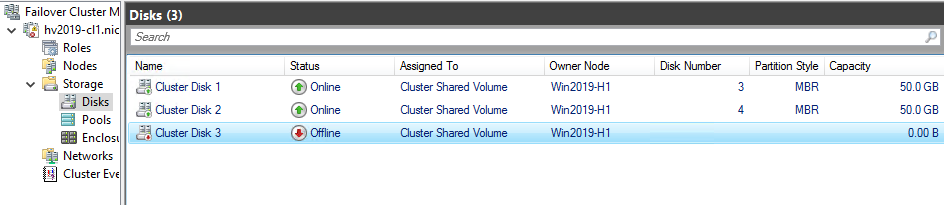
Tutti i CSV che fanno parte del cluster devono essere online.
Resolution
Riportare online il file CSV offline facendo clic con il pulsante destro del mouse sul file CSV offline e selezionando l'opzione "Bring Online".
Affected Products
Avamar Plug-in for Hyper-V VSSArticle Properties
Article Number: 000186556
Article Type: Solution
Last Modified: 28 Oct 2025
Version: 2
Find answers to your questions from other Dell users
Support Services
Check if your device is covered by Support Services.