Avamar: Tworzenie kopii zapasowych pliku CSV funkcji Hyper-V kończy się niepowodzeniem z komunikatem "CSV is not online"
Summary: Artykuł z bazy wiedzy (KB) zawierający rozwiązanie problemu niepowodzenia tworzenia kopii zapasowych funkcji Hyper-V z powodu pliku CSV w trybie offline
This article applies to
This article does not apply to
This article is not tied to any specific product.
Not all product versions are identified in this article.
Symptoms
Tworzenie kopii zapasowych CSV funkcji Hyper-V kończy się niepowodzeniem z następującymi błędami:
avhypervvss Error <19387>: CSV 'Cluster Disk 2' is not online. Please check the state and restart the back-up
avhypervvss Error <19354>: Could not assign CSV(s) to user specified multi proxy nodes for better backup performance
avhypervvss Error <42458>: Failed to manage csv ownership for multiproxy backups.
avhypervvss Error <41659>: Backup did not complete successfully
Cause
Co najmniej jeden plik CSV (Cluster Shared Volumes) jest w trybie offline.
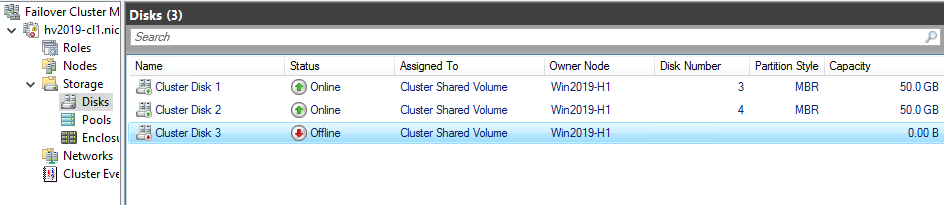
Wszystkie woluminy CSV, które należą do klastra, muszą być w trybie online.
Resolution
Przełącz plik CSV z powrotem do trybu online, klikając go prawym przyciskiem myszy i wybierając opcję "Przełącz do trybu online".
Affected Products
Avamar Plug-in for Hyper-V VSSArticle Properties
Article Number: 000186556
Article Type: Solution
Last Modified: 28 Oct 2025
Version: 2
Find answers to your questions from other Dell users
Support Services
Check if your device is covered by Support Services.