Avamar: Come creare, modificare o verificare le impostazioni utente NDMP di NetApp per le operazioni di backup
Summary:
Istruzioni per creare, modificare o verificare le impostazioni utente NDMP (Network Data Management Protocol) NetApp utilizzando l'interfaccia utente di System Manager. Notando un
problema dell'interfaccia utente in cui le password non sono impostate; utilizzare la CLI per generare la password utente NDMP (livello di nodo: 'ndmpd password ndmp password `; Livello SVM: 'vServer services ndmp generate-password -vserver -utente ndmp')
Verificare lo stato del servizio NDMP con "system services ndmp show" (nodo) o "vserver services ndmp show" (SVM).
...
This article applies to
This article does not apply to
This article is not tied to any specific product.
Not all product versions are identified in this article.
Instructions
Creare, modificare o verificare le impostazioni utente NDMP di NetApp.
Metodo dell'interfaccia utente web
Utilizzare NetApp System Manager per aggiungere un nuovo utente NDMP.
- Aprire un web browser e passare a
https://<NETAPP_MANAGEMENT_IP>/ - Vai a Configurations > Users
- Fare clic sull'icona Aggiungi per creare un nuovo utente.
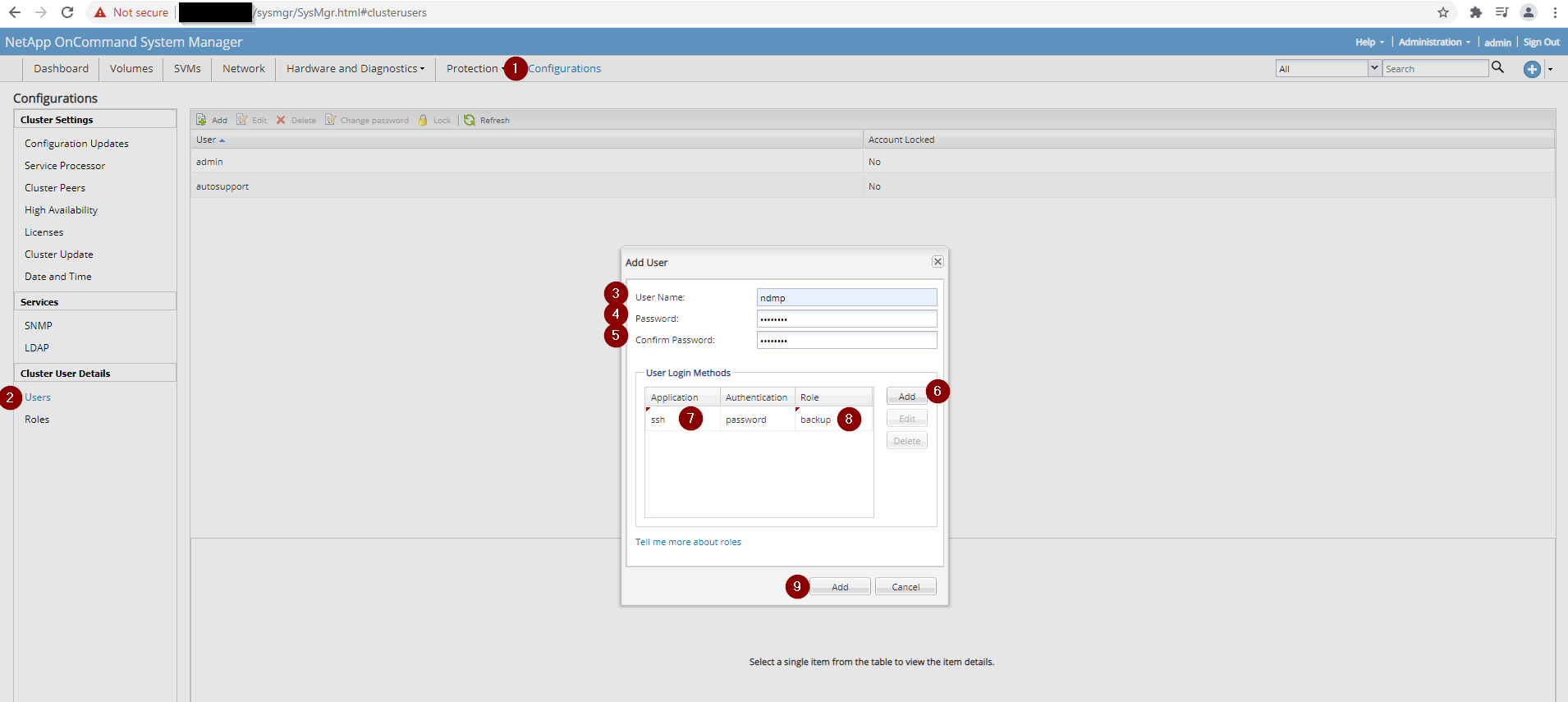
Attenzione: L'interfaccia utente di NetApp potrebbe non impostare correttamente la password NDMP. Se la password non viene riconosciuta per i backup NDMP, generarla utilizzando la CLI come descritto di seguito.
Metodo CLI: genera la password NDMP.
Eseguire il comando appropriato in base alla posizione in cui è abilitato il servizio NDMP.
# Node‑level NDMP service
ndmpd password ndmp password XXXXXXXXXXXXXX
# Cluster (SVM)‑level NDMP service
vserver services ndmp generate-password -vserver [SVM_NAME] -user ndmp
Verificare lo stato del servizio NDMP.
Verificare se NDMP è abilitato sul nodo o sulla SVM.
# Node level – NDMP disabled
system services ndmp show
Node      Enabled   Clear Text   User ID
--------  --------  -----------  -------
[NETAPP_NODE]  false    true         root
# Node level – NDMP enabled
system services ndmp show
Node      Enabled   Clear Text   User ID
--------  --------  -----------  -------
[NETAPP_NODE]  true     true         root
# Cluster (SVM) level – NDMP disabled
vserver services ndmp show
VServer   Enabled   Authentication type
--------  --------  --------------------
[SV M_NAME]  false    challenge
# Cluster (SVM) level – NDMP enabled
vserver services ndmp show
VServer   Enabled   Authentication type
--------  --------  --------------------
[SV M_NAME]  true     challenge
# Detailed SVM view (example)
vserver services ndmp show -vserver [SV M_NAME]
Vserver: [SV M_NAME]
NDMP Version: 4
Ignore Ctime: false
Enable Offset Map: true
Enable TCP Nodelay: false
TCP Window Size: 32768
Data Port Range: all
Enable Backup Log: true
Enable per Qtree Exclusion: false
Authentication Type: challenge
Enable NDMP on Vserver: false
Preferred Interface Role: intercluster, data
Is Secure Control Connection Enabled: false
Nota: Esiste un problema noto su NetApp in cui la password per l'utente NDMP non è impostata correttamente. Non viene riconosciuto per l'utilizzo per i backup NDMP quando viene creato un utente NDMP dall'interfaccia utente di NetApp System Manager. Se si verifica questa situazione, aprire l'accesso CLI a NetApp e consentire al sistema NetApp di generare la password utente NDMP . A seconda di dove è abilitato il servizio NDMP, utilizzare i comandi appropriati di conseguenza.
Affected Products
Avamar, Avamar Plug-in for NDMPArticle Properties
Article Number: 000189649
Article Type: How To
Last Modified: 11 Nov 2025
Version: 3
Find answers to your questions from other Dell users
Support Services
Check if your device is covered by Support Services.