Avamar:バックアップ操作のためにNetApp NDMPユーザー設定を作成、変更、または確認する方法
Summary:
System Manager UIを使用してNetApp Network Data Management Protocol (NDMP)ユーザー設定を作成、変更、検証する手順。 パスワードが設定されていないUIの問題に注意する。CLIを使用して、NDMPユーザー パスワード(ノード レベル: 'ndmpdパスワード ndmpパスワード `;
SVMレベル: 「 vserver services ndmp generate-password -vserver 」 -user ndmp')
「system services ndmp show」(ノード)または「vserver services ndmp show」(SVM)を使用して、NDMPサービスのステータスを確認します。
...
This article applies to
This article does not apply to
This article is not tied to any specific product.
Not all product versions are identified in this article.
Instructions
NetApp NDMPユーザー設定を作成、変更、または検証します。
Web UI メソッド
NetApp System Managerを使用して、新しいNDMPユーザーを追加します。
- Webブラウザーを開き、次の場所に移動します。
https://<NETAPP_MANAGEMENT_IP>/ - [Configurations > Users]に移動します。
- 追加アイコンをクリックして、新しいユーザーを作成します。
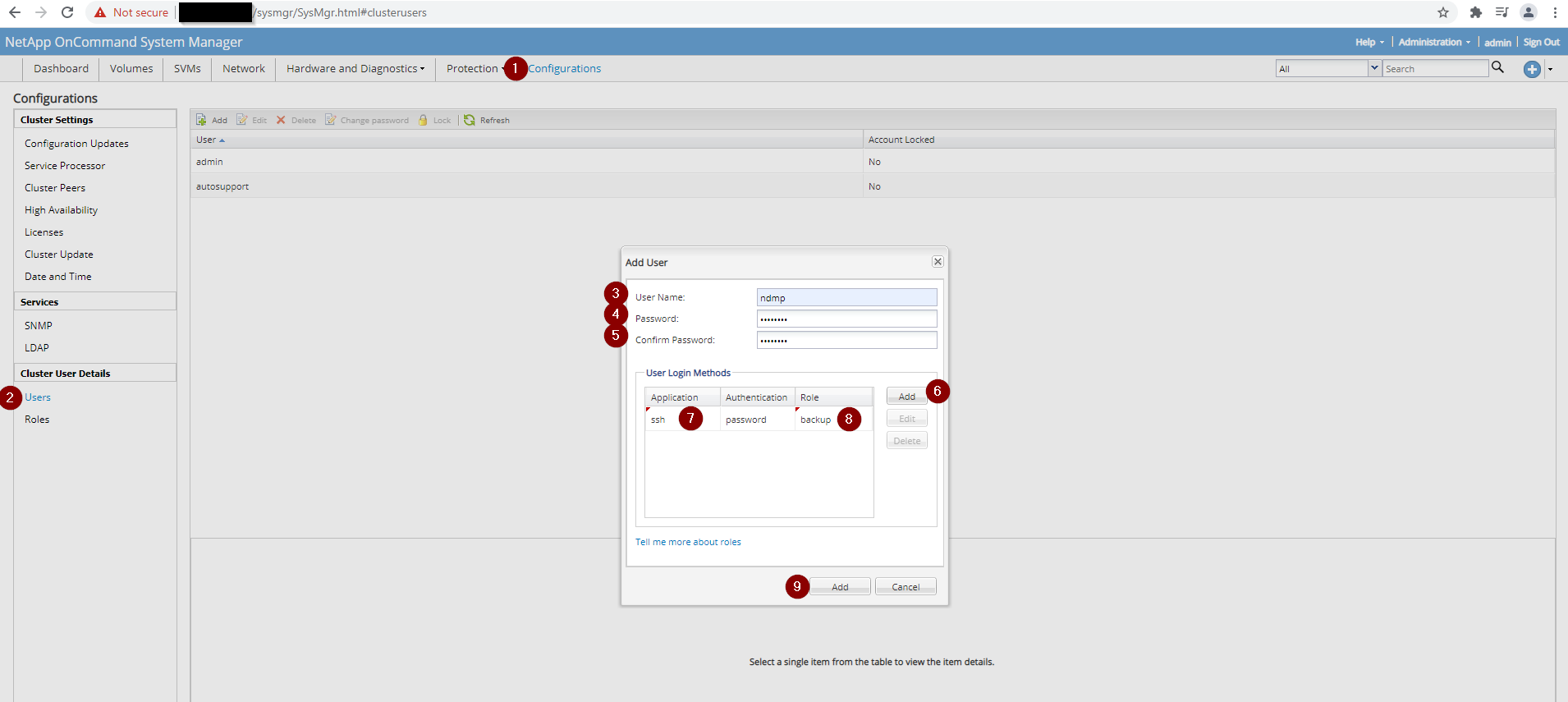
注意:NetApp UIでNDMPパスワードが正しく設定されない場合があります。NDMPバックアップでパスワードが認識されない場合は、次の説明に従ってCLIを使用してパスワードを生成します。
CLIによる方法:NDMPパスワードを生成します。
NDMPサービスが有効になっている場所に基づいて、適切なコマンドを実行します。
# Node‑level NDMP service
ndmpd password ndmp password XXXXXXXXXXXXXX
# Cluster (SVM)‑level NDMP service
vserver services ndmp generate-password -vserver [SVM_NAME] -user ndmp
NDMPサービス ステータスを確認します。
ノードまたはSVMでNDMPが有効になっているかどうかを確認します。
# Node level – NDMP disabled
system services ndmp show
Node      Enabled   Clear Text   User ID
--------  --------  -----------  -------
[NETAPP_NODE]  false    true         root
# Node level – NDMP enabled
system services ndmp show
Node      Enabled   Clear Text   User ID
--------  --------  -----------  -------
[NETAPP_NODE]  true     true         root
# Cluster (SVM) level – NDMP disabled
vserver services ndmp show
VServer   Enabled   Authentication type
--------  --------  --------------------
[SV M_NAME]  false    challenge
# Cluster (SVM) level – NDMP enabled
vserver services ndmp show
VServer   Enabled   Authentication type
--------  --------  --------------------
[SV M_NAME]  true     challenge
# Detailed SVM view (example)
vserver services ndmp show -vserver [SV M_NAME]
Vserver: [SV M_NAME]
NDMP Version: 4
Ignore Ctime: false
Enable Offset Map: true
Enable TCP Nodelay: false
TCP Window Size: 32768
Data Port Range: all
Enable Backup Log: true
Enable per Qtree Exclusion: false
Authentication Type: challenge
Enable NDMP on Vserver: false
Preferred Interface Role: intercluster, data
Is Secure Control Connection Enabled: false
注:NetAppには、NDMPユーザーのパスワードが適切に設定されていないという既知の問題があります。NetApp System Manager UIから NDMP ユーザーを作成した場合、NDMPバックアップでの使用は認識されません。このような状況が発生した場合は、NetAppへのCLIアクセスを開き、NetAppシステムに NDMP ユーザー パスワードを生成させます。NDMPサービスが有効になっている場所に応じて、適切なコマンドを使用します。
Affected Products
Avamar, Avamar Plug-in for NDMPArticle Properties
Article Number: 000189649
Article Type: How To
Last Modified: 11 Nov 2025
Version: 3
Find answers to your questions from other Dell users
Support Services
Check if your device is covered by Support Services.