Avamar:如何创建,修改或验证备份作的 NetApp NDMP 用户设置
Summary:
有关使用 System Manager UI 创建,修改或验证 NetApp 网络数据管理协议( NDMP )用户设置的说明。 注意到未设置密码的 UI 问题;使用 CLI 生成 NDMP 用户密码(节点级别:'ndmpd password ndmp password `; SVM 级别:'vserver services ndmp
generate-password -vserver -user ndmp')
使用“system services ndmp show”(节点)或“vserver services ndmp show”(SVM) 验证 NDMP 服务状态。
...
This article applies to
This article does not apply to
This article is not tied to any specific product.
Not all product versions are identified in this article.
Instructions
创建,修改或验证 NetApp NDMP 用户设置。
Web UI 方法
使用 NetApp System Manager 添加新的 NDMP 用户。
- 打开网页浏览器并导航至
https://<NETAPP_MANAGEMENT_IP>/ - 转至配置用户>
- 单击添加图标以创建新用户。
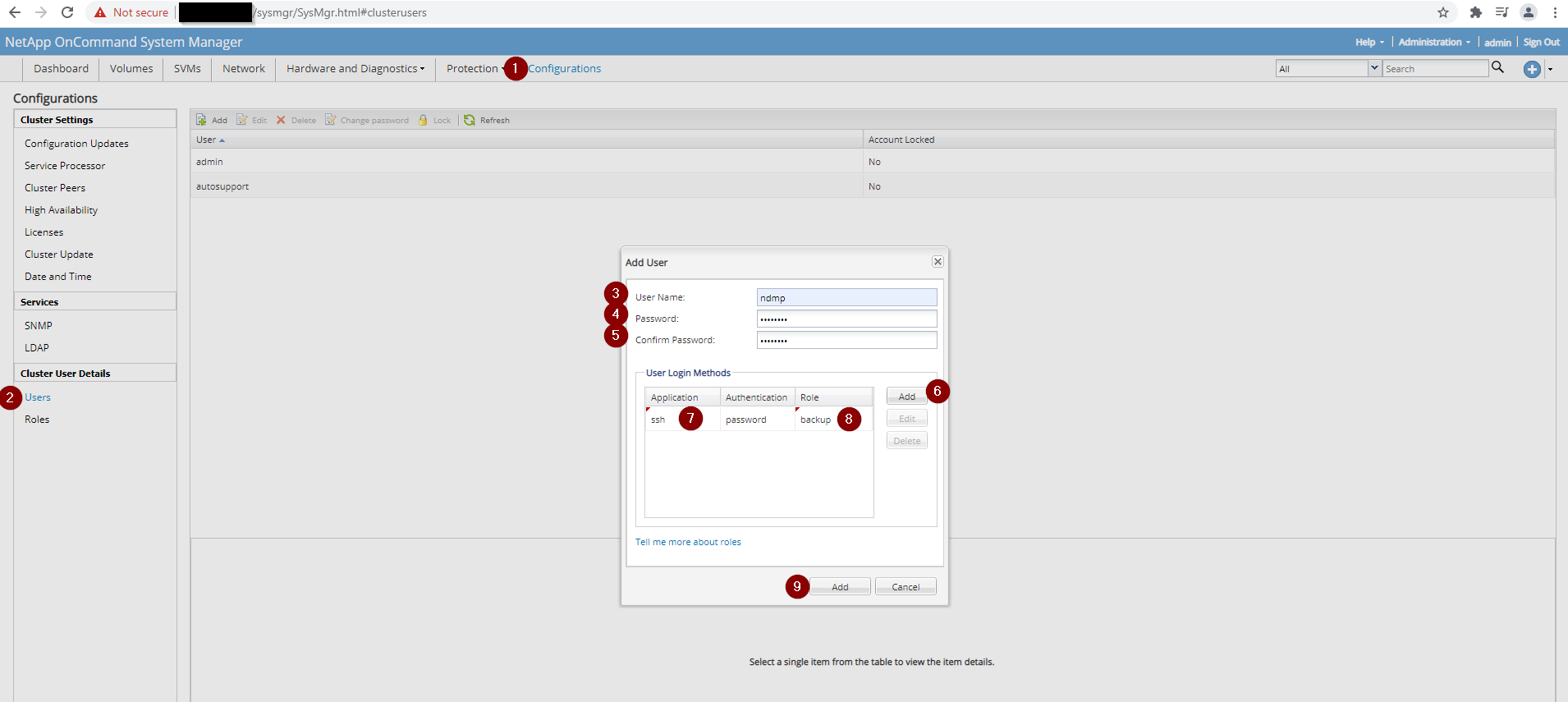
注意:NetApp UI 可能无法正确设置 NDMP 密码。如果 NDMP 备份无法识别该密码,请使用 CLI 生成密码,如下所述。
CLI 方法 — 生成 NDMP 密码。
根据启用 NDMP 服务的位置运行相应的命令。
# Node‑level NDMP service
ndmpd password ndmp password XXXXXXXXXXXXXX
# Cluster (SVM)‑level NDMP service
vserver services ndmp generate-password -vserver [SVM_NAME] -user ndmp
验证 NDMP 服务状态。
检查是否在节点或 SVM 上启用了 NDMP。
# Node level – NDMP disabled
system services ndmp show
Node      Enabled   Clear Text   User ID
--------  --------  -----------  -------
[NETAPP_NODE]  false    true         root
# Node level – NDMP enabled
system services ndmp show
Node      Enabled   Clear Text   User ID
--------  --------  -----------  -------
[NETAPP_NODE]  true     true         root
# Cluster (SVM) level – NDMP disabled
vserver services ndmp show
VServer   Enabled   Authentication type
--------  --------  --------------------
[SV M_NAME]  false    challenge
# Cluster (SVM) level – NDMP enabled
vserver services ndmp show
VServer   Enabled   Authentication type
--------  --------  --------------------
[SV M_NAME]  true     challenge
# Detailed SVM view (example)
vserver services ndmp show -vserver [SV M_NAME]
Vserver: [SV M_NAME]
NDMP Version: 4
Ignore Ctime: false
Enable Offset Map: true
Enable TCP Nodelay: false
TCP Window Size: 32768
Data Port Range: all
Enable Backup Log: true
Enable per Qtree Exclusion: false
Authentication Type: challenge
Enable NDMP on Vserver: false
Preferred Interface Role: intercluster, data
Is Secure Control Connection Enabled: false
提醒:NetApp 上存在一个已知问题,即 NDMP 用户的密码未正确设置。从 NetApp System Manager UI 创建 NDMP 用户时,无法将其识别为 NDMP 备份。如果您遇到这种情况,请打开 CLI 访问 NetApp,并让 NetApp 系统生成 NDMP 用户密码。根据启用 NDMP 服务的位置,使用相应的命令。
Affected Products
Avamar, Avamar Plug-in for NDMPArticle Properties
Article Number: 000189649
Article Type: How To
Last Modified: 11 Nov 2025
Version: 3
Find answers to your questions from other Dell users
Support Services
Check if your device is covered by Support Services.