PowerProtect:Kubernetesバックアップが「controller pod is not running」エラーで失敗する
Summary: PPDM Kubernetesバックアップが「controller pod is not running」エラーで失敗する問題について説明します。
This article applies to
This article does not apply to
This article is not tied to any specific product.
Not all product versions are identified in this article.
Symptoms
この問題が確認されたインスタンスでは、サーバーのディザスター リカバリー バックアップからPPDMをリカバリーした後、すべてのPPDM Kubernetesバックアップが失敗し始めます。ただし、他の状況でも発生することがあります。
Kubernetesバックアップが「controller pod is not running」エラーで失敗します。
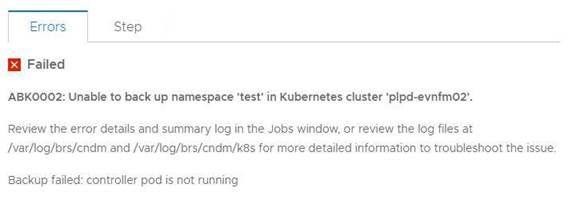
ログに以下のエラーが表示されます。
2021-07-21T03:49:48.340Z ERROR [] [task-5011a057-340f-40fb-8cd8-12414685d058] [][][][TRACE_ID:a66ce529604914ad;JOB_ID:a9b8915af1637407][] [K8sHelperApi.isDone(90)] - Failed to wait on job com.emc.dpsg.ecdm.baseresourceservice.exception.ValidationServiceException: controller pod is not running
2021-07-21T03:50:14.065Z WARN [] [dsSource-plpd-testcluster] [][][][][] [c.e.b.c.s.p.K8sHealthMonitor.checkPodHealth(200)] - Controller Pod is down, cluster: , age=PT153H49M43.065S
そのk8sクラスターに対するkubectl describe pod -n powerprotectコマンドの出力:
powerprotect powerprotect-controller-666ffccbbf-p5rwh 0/1 ImagePullBackOff 0 6d12h
velero-ppdm backup-driver-587cfcdf59-2mc8p 1/1 Running 0 49d
velero-ppdm velero-5df5fcd896-p68rw 1/1 Running 0 49d
Kubernetesバックアップが「controller pod is not running」エラーで失敗します。
ログに以下のエラーが表示されます。
2021-07-21T03:49:48.340Z ERROR [] [task-5011a057-340f-40fb-8cd8-12414685d058] [][][][TRACE_ID:a66ce529604914ad;JOB_ID:a9b8915af1637407][] [K8sHelperApi.isDone(90)] - Failed to wait on job com.emc.dpsg.ecdm.baseresourceservice.exception.ValidationServiceException: controller pod is not running
2021-07-21T03:50:14.065Z WARN [] [dsSource-plpd-testcluster] [][][][][] [c.e.b.c.s.p.K8sHealthMonitor.checkPodHealth(200)] - Controller Pod is down, cluster: , age=PT153H49M43.065S
そのk8sクラスターに対するkubectl describe pod -n powerprotectコマンドの出力:
powerprotect powerprotect-controller-666ffccbbf-p5rwh 0/1 ImagePullBackOff 0 6d12h
velero-ppdm backup-driver-587cfcdf59-2mc8p 1/1 Running 0 49d
velero-ppdm velero-5df5fcd896-p68rw 1/1 Running 0 49d
Cause
PowerProtectコントローラー ポッドがインターネットから必要なイメージを取得できません。
Resolution
1.Kubernetesクラスターがhttps://hub.docker.com/からDocker Hubに、またhttps://quay.io/からQuayにアクセスして、必要なイメージを取得できるかどうかを確認します。
2.ファイアウォールやその他の制限によりKubernetesクラスターがこれらのサイトにアクセスできない場合は、クラスターがアクセスできるローカル レジストリーにこれらのイメージをプルできます。以下の手順に従ってください。
1)Protect Data Managerアプライアンスで、/usr/local/brs/cndm/config/application.propertiesに
application.propertiesファイルを次の内容で作成します。k8s.docker.registry=fqdn:port(例:k8s.docker.registry=artifacts.example.com:8446
k8s.image.pullsecrets=secret resource name)イメージ プル シークレットが必要な場合にのみ、このエントリーを指定します。
2)cndm restartを実行してプロパティを適用します。
メモ:詳細については、『PPDM Administration and User Guide』を参照してください。
3.KubernetesクラスターはすでにPPDM GUIで資産ソースとして追加されているため、手順1または2をチェック/実行した後にKubernetesクラスターを手動で検出する必要があります。
2.ファイアウォールやその他の制限によりKubernetesクラスターがこれらのサイトにアクセスできない場合は、クラスターがアクセスできるローカル レジストリーにこれらのイメージをプルできます。以下の手順に従ってください。
1)Protect Data Managerアプライアンスで、/usr/local/brs/cndm/config/application.propertiesに
application.propertiesファイルを次の内容で作成します。k8s.docker.registry=fqdn:port(例:k8s.docker.registry=artifacts.example.com:8446
k8s.image.pullsecrets=secret resource name)イメージ プル シークレットが必要な場合にのみ、このエントリーを指定します。
2)cndm restartを実行してプロパティを適用します。
メモ:詳細については、『PPDM Administration and User Guide』を参照してください。
3.KubernetesクラスターはすでにPPDM GUIで資産ソースとして追加されているため、手順1または2をチェック/実行した後にKubernetesクラスターを手動で検出する必要があります。
Affected Products
PowerProtect Data ManagerArticle Properties
Article Number: 000190024
Article Type: Solution
Last Modified: 27 Aug 2022
Version: 6
Find answers to your questions from other Dell users
Support Services
Check if your device is covered by Support Services.