PowerProtect:Kubernetes 备份失败,并显示错误“controller pod is not running”(控制器 Pod 未运行)
Summary: PPDM Kubernetes 备份失败,并显示错误“controller pod is not running”(控制器 Pod 未运行)
This article applies to
This article does not apply to
This article is not tied to any specific product.
Not all product versions are identified in this article.
Symptoms
在已观察到这种情况的实例中,所有 PPDM Kubernetes 备份在从其服务器灾难恢复备份恢复 PPDM 后就开始失败。不过,它可能适用于其他情况。
Kubernetes 备份失败,并显示错误“controller pod is not running”(控制器 Pod 未运行)。
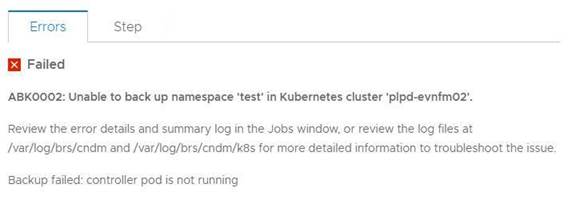
您可以在日志中观察到以下错误:
2021-07-21T03:49:48.340Z ERROR [] [task-5011a057-340f-40fb-8cd8-12414685d058] [][][][TRACE_ID:a66ce529604914ad;JOB_ID:a9b8915af1637407][] [K8sHelperApi.isDone(90)] - Failed to wait on job com.emc.dpsg.ecdm.baseresourceservice.exception.ValidationServiceException: controller pod is not running
2021-07-21T03:50:14.065Z WARN [] [dsSource-plpd-testcluster] [][][][][] [c.e.b.c.s.p.K8sHealthMonitor.checkPodHealth(200)] - Controller Pod is down, cluster: , age=PT153H49M43.065S
对于该 k8s 群集,命令 kubectl describe pod -n powerprotect 的输出:
powerprotect powerprotect-controller-666ffccbbf-p5rwh 0/1 ImagePullBackOff 0 6d12h
velero-ppdm backup-driver-587cfcdf59-2mc8p 1/1 Running 0 49d
velero-ppdm velero-5df5fcd896-p68rw 1/1 Running 0 49d
Kubernetes 备份失败,并显示错误“controller pod is not running”(控制器 Pod 未运行)。
您可以在日志中观察到以下错误:
2021-07-21T03:49:48.340Z ERROR [] [task-5011a057-340f-40fb-8cd8-12414685d058] [][][][TRACE_ID:a66ce529604914ad;JOB_ID:a9b8915af1637407][] [K8sHelperApi.isDone(90)] - Failed to wait on job com.emc.dpsg.ecdm.baseresourceservice.exception.ValidationServiceException: controller pod is not running
2021-07-21T03:50:14.065Z WARN [] [dsSource-plpd-testcluster] [][][][][] [c.e.b.c.s.p.K8sHealthMonitor.checkPodHealth(200)] - Controller Pod is down, cluster: , age=PT153H49M43.065S
对于该 k8s 群集,命令 kubectl describe pod -n powerprotect 的输出:
powerprotect powerprotect-controller-666ffccbbf-p5rwh 0/1 ImagePullBackOff 0 6d12h
velero-ppdm backup-driver-587cfcdf59-2mc8p 1/1 Running 0 49d
velero-ppdm velero-5df5fcd896-p68rw 1/1 Running 0 49d
Cause
Powerprotect 控制器 Pod 无法从互联网提取所需的映像。
Resolution
1.检查 Kubernetes 群集是否可以访问 Docker Hub(位于 https://hub.docker.com/)和 Quay(位于 https://quay.io/)以提取所需的映像。
2.如果 Kubernetes 群集由于防火墙或其他限制而无法访问这些站点,那么您可以将这些映像提取到该群集可访问的本地注册中心。请按照以下步骤操作。
1).在
PowerProtect Data Manager 设备上创建具有以下内容的 application.properties 文件 /usr/local/brs/lib/cndm/config/application.properties:
k8s.docker.registry=fqdn:端口 例如 k8s.docker.registry=artifacts.example.com:8446
k8s.image.pullsecrets=密码资源名称 仅在需要映像提取密码时才指定此条目。
2).重新启动 cndm 以应用属性。
提醒:要获得更多详细信息,请参阅《PPDM 管理和用户指南》(英文版)。
3.由于已在 PPDM GUI 中将 Kubernetes 群集添加为资产源,因此需要在检查/执行步骤 1 或步骤 2 后手动查找 Kubernetes 群集。
2.如果 Kubernetes 群集由于防火墙或其他限制而无法访问这些站点,那么您可以将这些映像提取到该群集可访问的本地注册中心。请按照以下步骤操作。
1).在
PowerProtect Data Manager 设备上创建具有以下内容的 application.properties 文件 /usr/local/brs/lib/cndm/config/application.properties:
k8s.docker.registry=fqdn:端口 例如 k8s.docker.registry=artifacts.example.com:8446
k8s.image.pullsecrets=密码资源名称 仅在需要映像提取密码时才指定此条目。
2).重新启动 cndm 以应用属性。
提醒:要获得更多详细信息,请参阅《PPDM 管理和用户指南》(英文版)。
3.由于已在 PPDM GUI 中将 Kubernetes 群集添加为资产源,因此需要在检查/执行步骤 1 或步骤 2 后手动查找 Kubernetes 群集。
Affected Products
PowerProtect Data ManagerArticle Properties
Article Number: 000190024
Article Type: Solution
Last Modified: 27 Aug 2022
Version: 6
Find answers to your questions from other Dell users
Support Services
Check if your device is covered by Support Services.