SRDF SRA error while adding array pair: SRA command 'discoverArrays' failed. Failed to connect to the array management host
Summary: SRDF Replication Adapter (SRA) discoverArrays command failed. Failed to connect to the array management host. Please check EmcSrdfSra logs for more information about the error.
This article applies to
This article does not apply to
This article is not tied to any specific product.
Not all product versions are identified in this article.
Symptoms
The following error displays while adding an array pair using Symmetrix Remote Data Facility (SRDF) Replication Adapter (SRA):
SRA command ‘discoverArrays’ failed. Failed to connect to the array management host. Please check EmcSrdfSra logs for more information on the error.

Additional Information about the configuration where this issue was seen:
- vCenter version: 6.7
- SRM version: 8.1
- SRA version: 9.2.0
- SE version: 9.2.1 client installed on SRM
- SYMAPI Server: Embedded Managed Array with SE 9.2.1
Cause
The SYMAPI session could not be initialized from the SRM Client to the SYMAPI server due to the error:The maximum number of network connections has been reached on the server.
This means that the SRM client could be making more than 100 connections (by default and maximum) to the SYMAPI Server (storsrvd).
Error found in the EmcSrdfSra.log:
[07/21 06:13:53.779  5264   155 SymapiSession::Init             ] [ERROR]: Failed to perform SymInit().

[ERROR]: [SYMAPI_C_SRVR_CONNECTS_EXCEEDED : The maximum number of network connections has been reached on the server]
.
.
[07/21 06:13:53.779  5264   366 MessageFormatter::setMarker     ] _______Backtrace end_______
[07/21 06:13:53.779  5264    33 SymapiSession::SymapiSession    ] [ERROR]: Failed to initialize Symapi session
[07/21 06:13:53.779  5264   366 MessageFormatter::setMarker     ] _______Backtrace begin_______
[07/21 06:13:53.779  5264   264 SymapiSession::Init             ] Exit
[07/21 06:13:53.779  5264   366 MessageFormatter::setMarker     ] _______Backtrace end_______
[07/21 06:13:53.779  5264   590 SymmUtil::DisplaySEVersion      ] [ERROR]: Failed to fetch SE version information
[07/21 06:13:53.779  5264   366 MessageFormatter::setMarker     ] _______Backtrace begin_______
[07/21 06:13:53.779  5264   664 SymmUtil::GetSEVersion          ] Exit
Error found in the SYMAPI server storsrvd.log:
<Error> [26815 SESS 0001] Jul-27 15:46:17.992 : ANR0018E Rejecting session 1 for dell_user@dellemc123.abc.def.com (::ffff:111.222.333.444): The maximum number of network connections has been reached on the server
Seeing the error entry in the storsrvd.log into the SYMAPI server, it was found that the first session (session 1) from SRM client dellemc123.abc.def.com using user dell_user was rejected by the storsrvd daemon on the SYMAPI server.
When the daemon_options file was checked on the SYMAPI server, it was found that the storsrvd:max_sessions parameter was set to 0.
This is why the first client was rejected.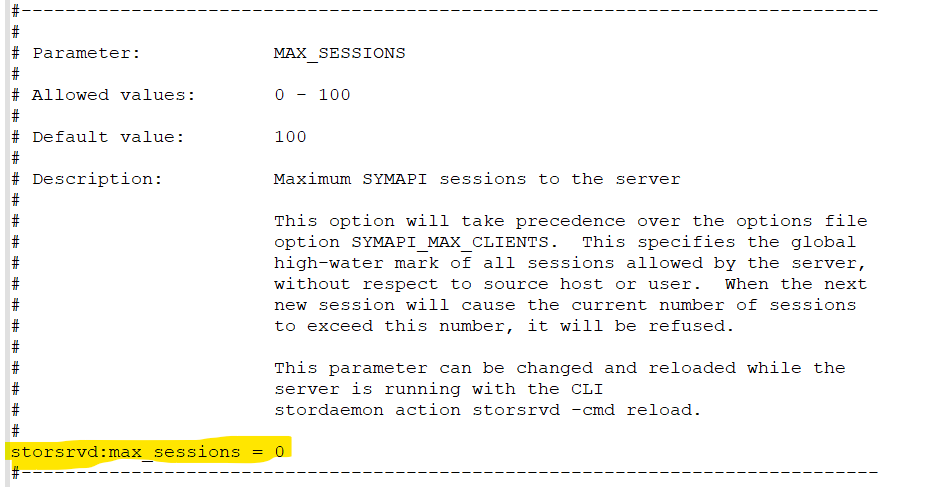
Resolution
- Modify the
daemon_optionsparameterstorsrvd:max_sessionsto default (100) either by putting a # in front of the parameter or changing the parameter tostorsrvd:max_sessions = 100.

or
2. Once the changes are made, restart the storsrvd daemon.
stordaemon shutdown storsrvd -immediate
stordaemon start storsrvd
3. Perform the Add Array Pair operation in the SRM user interface (UI).
Affected Products
SRDF Adapter for VMware Site Recovery Manager, VMware vCenter Site Recovery ManagerArticle Properties
Article Number: 000190097
Article Type: Solution
Last Modified: 26 Aug 2025
Version: 3
Find answers to your questions from other Dell users
Support Services
Check if your device is covered by Support Services.